
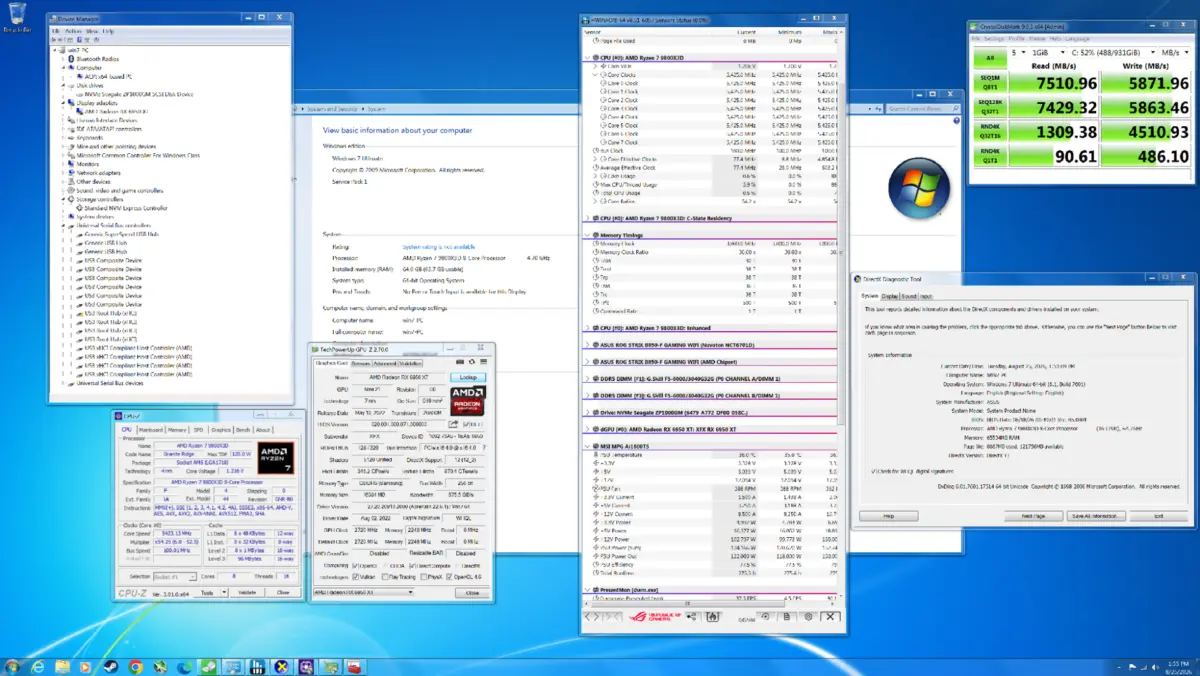
After the notoriously rough reception that greeted Windows Vista upon its release, Microsoft managed to completely turn the tide when Windows 7 launched in 2009 to largely positive reviews from critics and consumers alike. Even nearly two decades later, it remains widely regarded as one of the most beloved and stable versions of the Windows operating system ever released, remembered fondly for its streamlined interface, reliable performance, and departure from the heavy resource consumption of its predecessor. But how exactly does this nearly two-decade-old operating system hold up when it is forced to grapple with bleeding-edge modern hardware? In an effort to find out, tech enthusiasts recently managed to successfully install Windows 7 on a modern high-end personal computer and put it through a rigorous battery of tests across eight modern DirectX 11 games and two classic DirectX 9 titles to see how its raw gaming performance stacks up against the current reigning standard, Windows 11.
To truly understand where Windows 7 came from and why it remains a fascinating subject of technological experimentation, it is worth looking back at its foundational relationship with the operating system that preceded it. At the time of its commercial launch, Windows 7 was architecturally very similar to Windows Vista in many fundamental respects, sharing much of the same underlying DNA. Vista, despite its public relations nightmare and compatibility hurdles during its early days, had actually introduced a massive wave of significant, forward-thinking changes under the hood compared to the aging Windows XP architecture. These deep structural updates laid the groundwork for modern computing standards and included innovative background technologies such as SuperFetch, ReadyBoost, and ReadyDrive, which were designed to intelligently cache frequently used applications and data to improve system responsiveness. Furthermore, Vista introduced entirely new asynchronous APIs and various low-level input/output improvements that transformed how the operating system communicated with storage drives and peripheral devices.
Beyond file handling and storage optimization, Vista also brought forth crucial operating system features that modern users take for granted every single day. It introduced the very first iteration of native processor power management within the Windows ecosystem, allowing the operating system to dynamically scale CPU frequencies and power consumption based on current workloads—a critical feature for both laptops and energy-conscious desktop configurations. Alongside this came a suite of advanced memory-management enhancements designed to handle larger pools of RAM more efficiently than XP ever could. On the visual and aesthetic front, Vista was famously the first version of the Microsoft Windows family to feature the groundbreaking Windows Aero design language, which introduced its distinctive translucent, glass-like window borders, fluid animations, and desktop window manager rendering that fundamentally changed how the graphical user interface looked and felt.
When Windows 7 arrived to replace Vista, it took all of these underlying structural improvements and refined them, smoothing out the rough edges, dramatically reducing the memory footprint at idle, and fixing the driver compatibility issues that had plagued Vista’s initial rollout. It provided users with the advanced architecture of Vista wrapped in a much faster, cleaner, and more reliable package. However, the computing landscape of 2009 looks almost unrecognizably primitive when compared to the computing hardware available today. Modern desktop PCs feature multi-core processors with complex heterogeneous architectures, ultra-fast NVMe solid-state drives capable of transferring data at gigabytes per second, and massive graphics cards equipped with dedicated hardware for ray tracing and artificial intelligence processing.
Bringing an operating system designed in the late 2000s into this hyper-modern environment presents an immense engineering challenge. Modern graphics drivers, security protocols, and hardware instruction sets simply do not natively target Windows 7 anymore, as Microsoft officially ended extended support for the operating system years ago. Yet, tech enthusiasts continue to push the boundaries of legacy software compatibility. By painstakingly sourcing modified drivers and utilizing specialized workarounds, it is entirely possible to get Windows 7 running on modern motherboards paired with contemporary CPUs and GPUs.
The core objective of testing Windows 7 on modern hardware is not to suggest that everyday users should abandon contemporary operating systems for legacy software, but rather to explore the limits of software engineering and backward compatibility. By testing the vintage operating system across a carefully selected suite of eight DirectX 11 games and two DirectX 9 titles, testers can directly compare frame rates, stability, and overall execution against Windows 11 running identical hardware configurations. While modern games increasingly rely on DirectX 12 and cutting-edge features like DirectStorage—which Windows 7 cannot natively support—legacy titles and older graphics APIs provide a fascinating window into how operating system overhead has evolved over the past two decades. As modern hardware continues to march forward into uncharted territory, looking back at platforms like Windows 7 offers a unique perspective on the relentless progression of personal computing technology.
Leave a Reply