October 26, 2026
By Bruno S.
As web administrators grapple with the fallout from recently disclosed security flaws, verifying the exact PHP version powering a website has become a critical operational priority. Recent security advisories have highlighted a crucial technical nuance that system administrators and site owners often overlook: the version displayed by a command-line interface does not always match the environment actively serving web traffic. With severe vulnerabilities emerging in late October 2026, understanding how to accurately audit server environments, web hosting control panels, and local development stacks is more important than ever for maintaining a secure web presence.
Security analysts and hosting providers have emphasized that checking a website’s PHP version requires looking beyond simple terminal commands. A live website, a remote virtual private server, and a local machine each operate within distinct configurations. Relying solely on a terminal output can lead to a false sense of security, as the PHP binary executed by a command line often operates independently from the FastCGI Process Manager or web server application interface handling public-facing requests.
Recent testing across various hosting environments—including managed web hosting plans, virtual private servers running Ubuntu, and local development setups—demonstrated significant discrepancies between command-line outputs and actual production environments. For instance, testing on managed infrastructure revealed that while terminal sessions reported an older PHP branch, the active website successfully served requests through an updated configuration, or vice versa. This dichotomy underscores the necessity of utilizing comprehensive verification methods, ranging from hosting control panels and content management system health dashboards to browser-based configuration scripts.
The urgency surrounding accurate version verification gained national attention following the disclosure of critical security flaws tracked as CVE-2026-109618 and CVE-2026-109619, collectively referred to in security circles as PHP2Shell. Publicized by the PHP development project on October 21, 2026, these vulnerabilities affect unpatched installations across multiple active branches. According to official project advisories, versions 8.5.12, 8.4.27, 8.3.36, and 8.2.35 contain the necessary patches to neutralize the threat. Consequently, any web server executing code prior to these specific releases remains vulnerable until administrators confirm that patched builds have been successfully deployed.
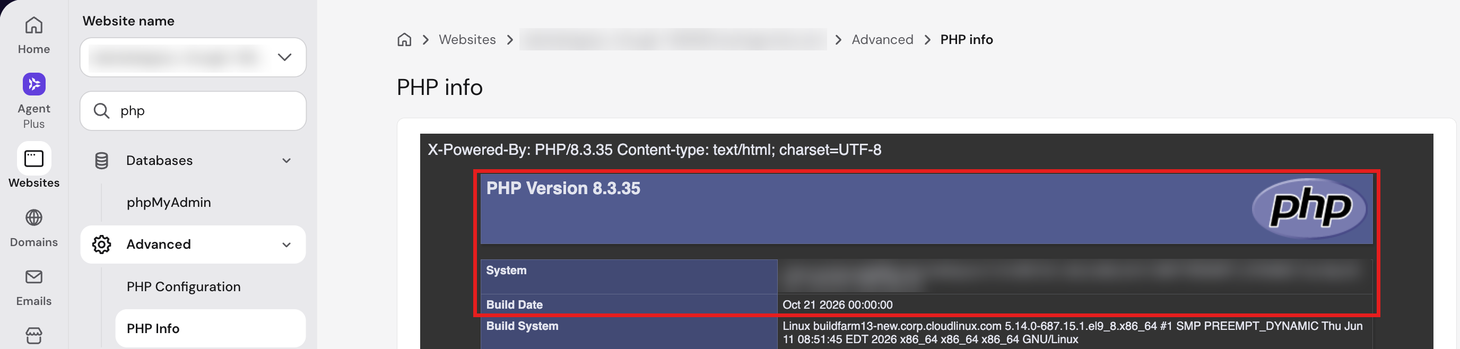
A complicating factor in verifying these security updates is that software patches do not always alter the primary version branch number. On many enterprise hosting platforms and Linux distributions, security fixes are backported directly into existing packages. As a result, the output of a standard version check command may appear unchanged, displaying a familiar release number while actually incorporating critical vendor patches. To confirm compliance, administrators must examine specific build dates or package changelogs provided by their hosting provider or operating system vendor. For instance, managed hosting providers rolling out the PHP2Shell fix ensured that builds dated October 21, 2026, or later contained the requisite security updates, even if the primary version string maintained familiarity. Similarly, enterprise Linux distributions manage package versions through dedicated repository queries, requiring administrators to inspect system logs or package management databases rather than relying on top-line version strings.

Navigating these technical verifications requires familiarity with the specific tools native to each hosting architecture. In traditional hosting control panels, administrative dashboards provide a centralized overview of the server environment. These panels read data directly from the underlying server architecture, making them reliable indicators of the active PHP branch. Advanced sections within these dashboards typically provide granular details, including exact release numbers and compilation build dates, which serve as definitive proof that recent security patches have been successfully applied to the hosting plan.
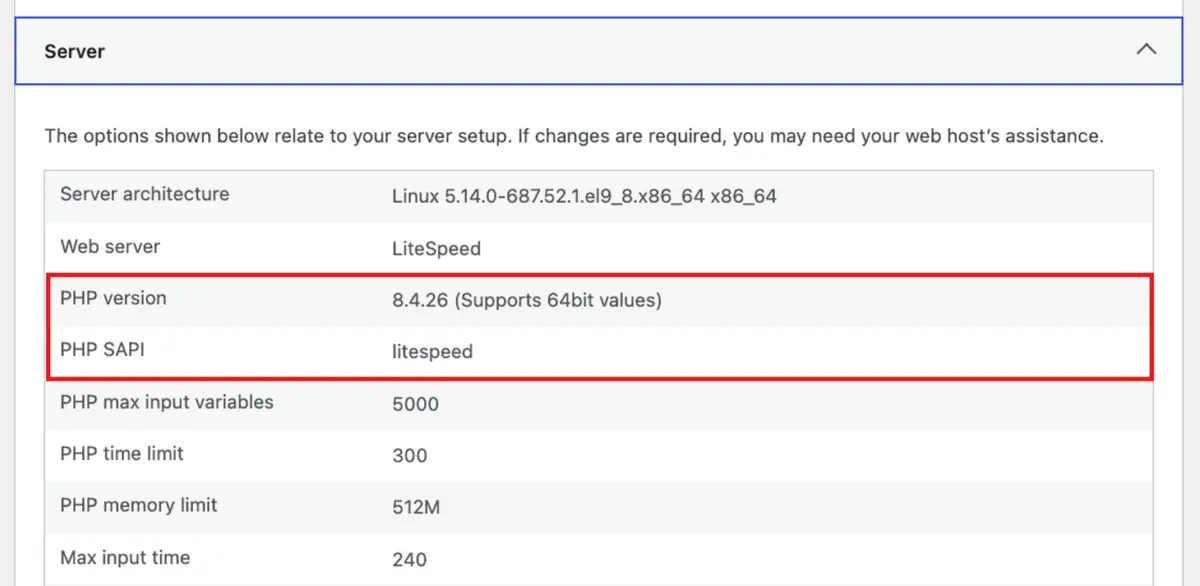
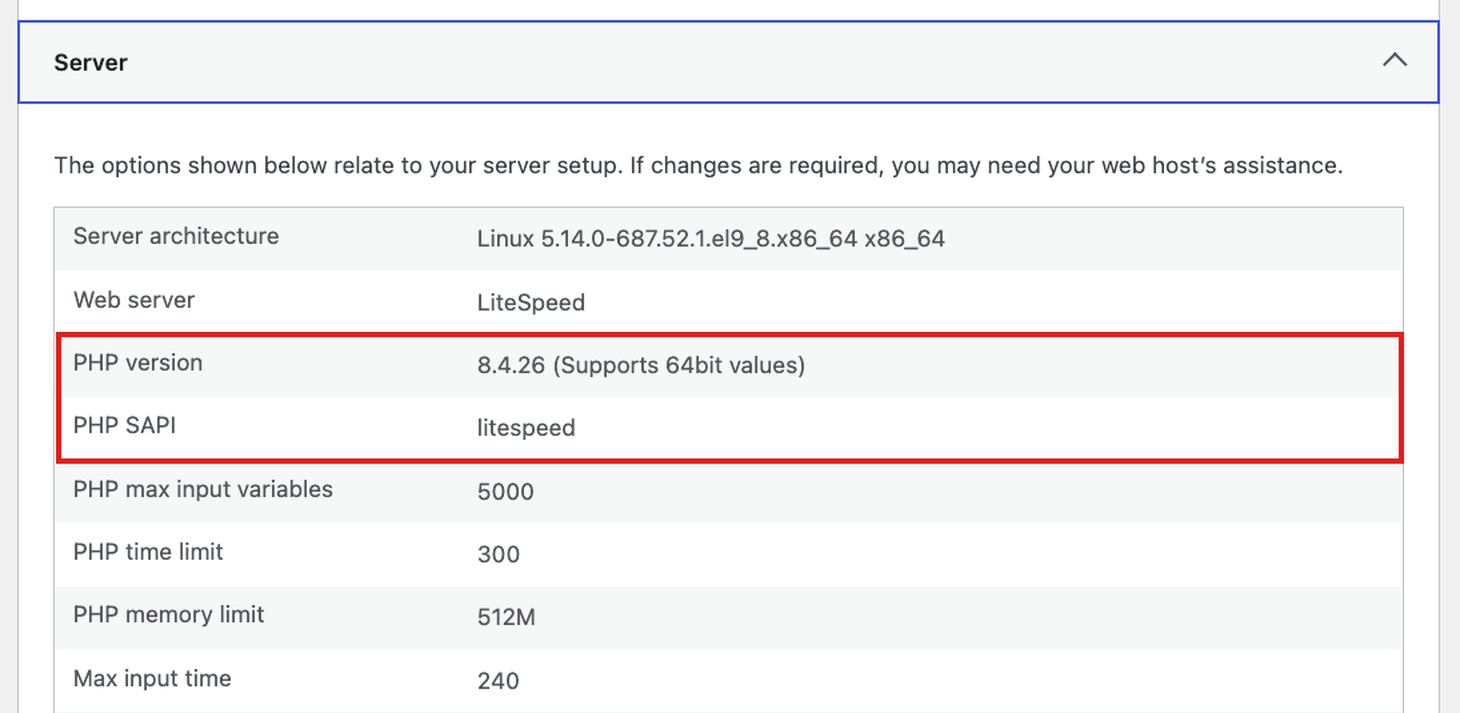
For content management platforms like WordPress, built-in site health utilities offer another layer of verification. By analyzing the server environment parameters, these administrative dashboards report the active PHP release alongside the specific server application programming interface facilitating communication between the application and the web server. Furthermore, these diagnostic tools actively flag deprecated or unsupported versions, categorizing environments that lack ongoing security updates as critical issues that demand immediate remediation.
When control panels or administrative dashboards lack the necessary granularity, administrators frequently turn to browser-based verification using configuration scripts. By uploading a temporary file containing core diagnostic commands, developers can inspect comprehensive environment settings directly within a web browser. This method guarantees that the verification request traverses the exact same server handler and application interface experienced by site visitors. However, because these configuration scripts expose sensitive server paths and internal settings, security best practices dictate that such files must be promptly deleted immediately following the audit to prevent potential exploitation by malicious actors.
Command-line interfaces and secure shell sessions provide advanced administrators with deep system access, though they require careful interpretation. Running standard version queries via terminal access typically reflects the command-line interface binary rather than the web server handler. On multi-tenant servers or virtual private servers running modern web stacks, administrators must inspect configuration files to trace how incoming requests are routed to specific process managers. By locating the active socket files or local ports assigned to process managers, systems engineers can isolate the exact background service powering public web pages and query that specific binary for its precise release data.
Local development environments present yet another isolated ecosystem. Platforms designed to run local web stacks on personal computers maintain independent PHP binaries completely segregated from any global system installations. Whether utilizing cross-platform local development servers or isolated containerization tools, developers must execute version queries directly against the specific binary bundled within their local stack. Confirming a local environment runs an updated version offers no guarantee regarding the security posture of a live production server, reinforcing the need for distinct, environment-specific audits prior to deploying new code.
As the software landscape evolves, managing the lifecycle of supported PHP branches remains a fundamental responsibility for web maintenance. The PHP development project maintains a structured support schedule, offering active bug fixes followed by dedicated security-only patches for a finite duration. Once a branch reaches its end-of-life date, it ceases to receive vulnerability patches, exposing dependent websites to emerging threats. Upgrading to a newer, actively supported branch requires careful pre-migration testing to ensure theme, plugin, and custom script compatibility, safeguarding site stability while fortifying overall cyber defense mechanisms.