

For many developers working within the Drupal ecosystem, the inclusion of automated testing in a workflow is frequently dismissed as an unnecessary complication. The prevailing sentiment often suggests that tests introduce avoidable complexity, consume valuable development budgets, and ultimately provide questionable return on investment for standard web projects. However, industry adoption of modern, open-source testing frameworks is beginning to shift that perspective. Among these tools, Cypress has emerged as a prominent solution for developers seeking to streamline quality assurance without drastically inflating project overhead.
By bridging the gap between front-end user experience and back-end functionality, Cypress offers a robust environment for establishing end-to-end testing protocols. For teams managing local development environments—particularly those utilizing standardized Composer setups like drupal/recommended-project alongside containerized local development tools such as Lando—integrating modern JavaScript-based testing suites has become increasingly feasible.
Setting Up the Testing Environment
The foundational setup for implementing Cypress within a Drupal project begins at the command line. Assuming a standard directory structure featuring core vendor libraries, web document roots, and configuration files, developers typically initialize a Node.js package within the project root. This initial command generates a standard package configuration file, establishing the groundwork required to install Cypress as a development dependency via Node Package Manager.
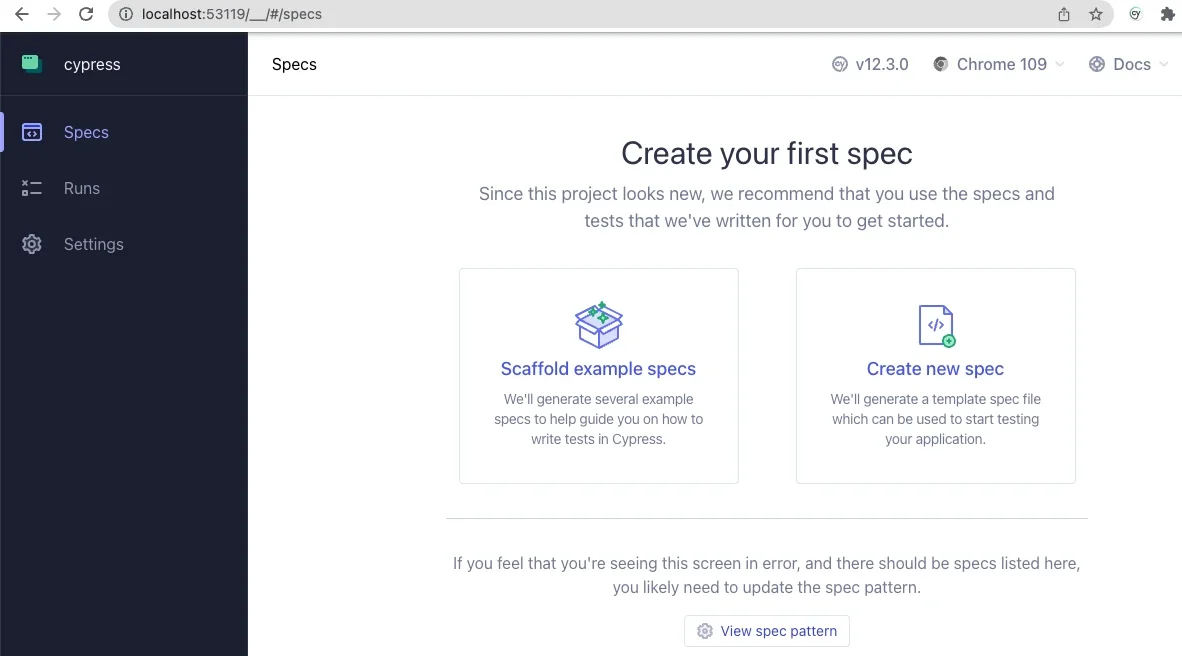
Upon completing the installation, launching the Cypress application for the first time prompts the framework to generate its primary configuration architecture. Developers configure the application for end-to-end testing, allowing the tool to scaffold necessary support directories, configuration files, and example specifications. Choosing a preferred browser—such as a Chromium-based option—opens an interactive test runner interface. This interface splits into two distinct panels: a text-based step tracker on the left and a live, simulated browser window on the right, providing real-time visual feedback as the test suite executes actions against the application.
Configuring the environment requires updating the primary configuration file to point to the local development URL. By defining the base URL and specifying the correct paths for integration scripts, support files, and fixtures, developers ensure that the testing runner can accurately locate and execute specifications against the local Drupal instance.

Writing and Executing Basic Tests
The core value of end-to-end testing becomes apparent when drafting basic validation scripts. Within the integration directory, developers can author test files using intuitive JavaScript syntax to simulate user interactions. A standard test suite might verify that the front page successfully loads and renders the primary page title, or it might simulate authentication workflows by programmatically interacting with form elements.
For instance, writing a test to evaluate login behavior involves commanding the browser to visit the user login path, locating specific form fields by their unique identifiers, populating those fields with designated credentials, and programmatically triggering the submission action. Through this process, developers often uncover subtle interface nuances that traditional manual testing might overlook. In practice, aspects like complex CSS flexbox styling on submit buttons can occasionally obstruct automated click events if the element has not fully rendered or asserted its text content. Implementing explicit assertions ensures the interface is fully interactive before the automation attempts to execute clicks, demonstrating the tangible reliability that automated verification brings to web development.
Customizing Cypress for the Drupal Ecosystem
Beyond standard browser automation, Cypress allows developers to extend its native capabilities by authoring custom commands tailored specifically to content management workflows. By defining reusable functions within support files, teams can streamline repetitive actions such as user authentication and session termination.
A custom logout command, for example, can be engineered to navigate directly to the user termination path, ensuring that any subsequent test sequence begins from a clean, logged-out state. Building upon this, a generalized login command can programmatically clear existing sessions, access the authentication interface, input designated credentials with secure logging parameters disabled, and submit the form.
The versatility of the framework extends even further when integrating command-line utilities. Through the strategic use of environment variables, developers can bridge frontend testing tools with backend management utilities like Drush. By defining custom commands that leverage command-line execution under the hood, testing suites can bypass traditional user interfaces entirely when necessary. A prominent example involves authenticating a user directly by their user ID via login command utilities, capturing the generated one-time login URL from the standard output, and directing the browser straight to the authenticated session.
This capability offers significant security advantages, as it eliminates the need to expose, read, or store plaintext user passwords within testing fixtures. The ability of a frontend JavaScript framework to orchestrate backend command-line operations highlights the flexibility modern tooling provides to Drupal developers.
Expanding the Testing Workflow
As development teams grow more comfortable with automated quality assurance, the scope of testing naturally expands. Advanced implementations frequently incorporate fixtures—external data files designed to feed dynamic test data into scenarios—alongside specialized strategies for navigating complex Asynchronous JavaScript and XML interfaces and dynamic user interfaces.
Industry resources, including specialized webinars and community-maintained public code repositories provided by digital agencies and open-source contributors, continue to document advanced use cases for automated verification within content management systems. As these practices mature within the community, automated testing is increasingly recognized not as an administrative burden, but as a foundational component of sustainable, enterprise-grade Drupal development.



Leave a Reply