
For millions of iPhone owners, Apple’s Spotlight search is a daily utility—a simple pull-down gesture on the home screen used to locate a misplaced app icon or quickly call a contact. However, behind its unassuming search bar lies one of iOS’s most versatile yet underutilized power tools. Far from being a mere index for installed applications and web queries, Spotlight operates as a system-wide command bar, computational engine, media indexer, and launcher for complex software automations.
In an analysis of iOS productivity capabilities, tech writer Pranay Parab highlights how deeply Spotlight integrates across Apple’s operating system. By consolidating system settings, hardware features like the Dynamic Island, optical character recognition engines, and the iOS Shortcuts framework into a single unified search bar, Spotlight allows users to execute complex multi-step workflows in seconds without navigating through multiple applications.
Understanding and leveraging these integrated capabilities transforms Spotlight from a basic navigation tool into an efficient productivity launcher designed to streamline daily device interaction.
Direct Clock Controls and Dynamic Island Integration
Navigating through home screens or searching through app folders to launch the native Clock app is standard practice for setting alarms or starting timers. Spotlight entirely eliminates this multi-step navigation by providing direct hardware-level action shortcuts right from the query line.
By simply invoking Spotlight and typing the word "Clock," the top of the search interface populates with primary app functions: Clock, Set Timer, Add Alarm, and Stopwatch. Selecting "Set Timer" brings up an interactive inline slider to determine the precise countdown duration. Choosing "Add Alarm" exposes direct time inputs, allowing an alarm to be configured without ever opening the Clock app interface.
Furthermore, engaging the "Stopwatch" option initiates an immediate live count. On supported iPhone models, these tools integrate directly into Apple’s Dynamic Island, displaying active timer statuses and allowing users to record lap times or pause active counters seamlessly while continuing other tasks on their device.
Optical Character Recognition for Searching Text in Photos
Modern iOS versions include built-in Optical Character Recognition (OCR), enabling the system to automatically analyze, index, and render text editable within digital images. While many users access this technology directly inside the Photos app or Camera interface, Spotlight harnesses OCR across the device’s entire image repository.

When a user types a specific word, phrase, or number sequence into the Spotlight search bar, the system scans not only file metadata but also the actual visual content of saved photographs, scanned documents, and captured screenshots. Any image containing matching text appears within a dedicated "Photos" category in the search results. Tapping a result provides instant access to the precise image containing the targeted information, eliminating the need to manually scroll through thousands of photos to find written records, receipts, or snapshot notes.
Instant Unit and Currency Conversions
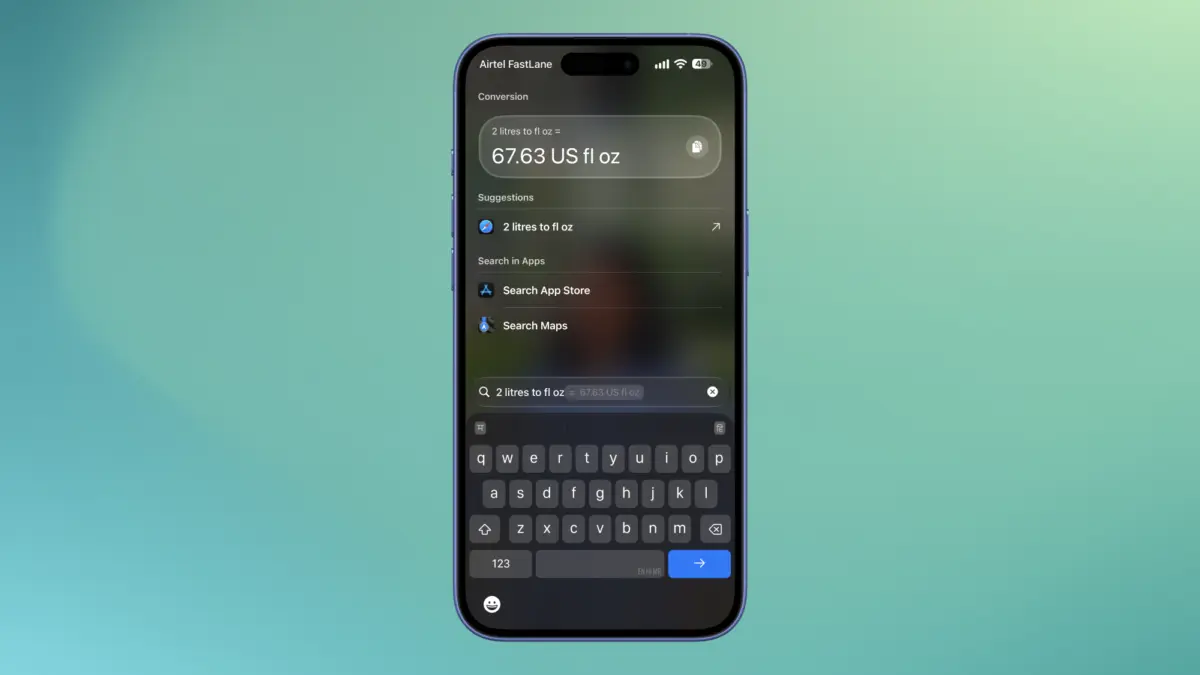
Converting measurement units or calculating currency exchange rates typically involves opening a browser tab or launching a specialized conversion app. Spotlight handles these operations directly within its input field, serving as an instant conversion utility.
For users navigating between metric and Imperial measurement standards—such as translating miles, gallons, fluid ounces, or stones into kilometers, liters, or grams—typing a straightforward phrase like "1 inch to cm" yields an immediate, accurate conversion at the very top of the results list.
The tool functions with equal speed for financial calculations. Entering a monetary symbol followed by a numerical value—such as "£120" or "$240"—prompts Spotlight to automatically convert the figure into the user’s local default currency based on active exchange data. For specific international conversions, users can input clear target requests, such as "£360 to USD," returning accurate cross-currency values instantaneously.
Performing Mathematical Calculations Directly in Search
Spotlight also functions as an immediate replacement for the standard Calculator app when performing quick everyday arithmetic. Users can type mathematical expressions directly into the search bar to receive real-time answers.
The search engine supports fundamental operations including addition, subtraction, division, and multiplication, alongside percentage calculations. Entering structured queries like "20% x 180" calculates precise percentage breakdowns instantly, offering an efficient solution for computing restaurant tips, determining sales discounts, or splitting group expenses without leaving the current screen context.
Rapid Calendar Event Creation and Date-Based Searching
Managing schedules and retrieving historical context often requires opening separate management tools like Calendar, Messages, or Mail. Spotlight unifies these capabilities through date-sensitive command processing.

When a user types a future date into the Spotlight search bar, the interface displays an integrated Event widget complete with a prominent "Add" button. Selecting this button immediately opens a pre-populated event creation interface, allowing the user to configure details and confirm the appointment without opening the Calendar app manually.
Conversely, typing historical date parameters—such as "October 2024"—prompts Spotlight to perform a retrospective search across the device. The system aggregates and organizes media, text messages, and email threads from that specific timeframe into structured sections organized by app name. Tapping any item routes the user directly to the corresponding historic communication or file.
Instant Voice Note Recording from Search
Capturing quick audio notes often requires immediate execution before an idea or conversation passes. Spotlight simplifies this process by connecting search queries directly to system recording functions.
Typing "Record" into the search field immediately surfaces direct actions tied to the native Voice Memos app. Selecting the primary "Record" action begins live audio capture instantly. System feedback transitions smoothly into the iPhone’s Dynamic Island, presenting an active timer alongside live pause and stop controls, ensuring that ambient voice recording can be initiated and monitored cleanly from anywhere in the operating system.
Running Custom Automations and Video Downloads
One of Spotlight’s most powerful capabilities is its native integration with Apple’s Shortcuts app, allowing user-created and imported automations to run directly from search results.
For instance, users who employ custom shortcut scripts to archive online content—such as automations labeled "Download Instagram," "Download Threads," or "YouTube Download"—can run these commands directly through Spotlight. When a media URL is copied to the device clipboard, typing "Download" into Spotlight surfaces all relevant download shortcuts. Executing the appropriate shortcut directly from search prompts the system to process the copied link and store the video file, bypassing the multi-step process of opening social media tools or launching the Shortcuts application directly.
Toggling Color Filters and Greyscale for Focused Work
As digital wellbeing strategies evolve, many users adopt greyscale display modes to minimize screen distractions and reduce app engagement during high-focus work sessions. However, toggling display parameters through standard system settings requires navigating through several menus.

Spotlight serves as an efficient system toggle for deeply embedded accessibility configurations. Searching for "Color Filters" brings up a direct toggle switch within the search results, enabling users to instantly switch their display between full color and greyscale mode. This instant toggle provides a frictionless way to eliminate visual clutter when focus is required and restore normal visual display when work is concluded.
Switching Focus and Do Not Disturb Profiles
Managing notification profiles and custom device states throughout the day is critical for maintaining productivity. While Focus modes are commonly managed via the iOS Control Center, Spotlight provides an alternative, text-driven interface for system state adjustments.
By typing "Focus" into the search bar, Spotlight indexes all configured Do Not Disturb and specialized Focus profiles under its "Settings" header. Users can view their full menu of operational profiles and toggle specific modes on or off with a single tap, offering a clear textual alternative to icon-based Control Center menus.
Customizing Spotlight Privacy and Hiding Sensitive Data
As Spotlight’s indexing engine grows more comprehensive, controlling what information surfaces in search results becomes essential for personal device privacy. Apple provides granular configuration controls within iOS to ensure sensitive applications, personal communications, or private tools remain completely hidden from search queries.
Users can manage these settings by navigating to Settings > Search on their device. Under the "Before Searching" section, modifying the "Suggest Apps" setting to "Don’t suggest" prevents Spotlight from displaying automated app suggestions when the search bar is opened. Users who prefer a completely clean interface can opt to rely entirely on the native App Library for software launching.
For more selective privacy management, scrolling further down the Search settings menu reveals an itemized list of all installed applications. Selecting an individual app exposes toggles for "Show App in Search" and "Show Content in Search." Disabling these options ensures that targeted applications—such as dating services, sensitive financial tools, or private messaging utilities—along with their internal content, media, and text indices, are fully excluded from Spotlight search results.
Leave a Reply