
As iPhone users around the world continue to adapt to the sweeping changes introduced in iOS 27, Apple is already laying the groundwork for the next significant phase of its mobile operating system. While many device owners are still getting accustomed to the baseline software—or navigating the recent iOS 27.0.1 maintenance release designed to address early glitchiness on the new iPhone 18 Pro lineup—the technology giant has officially shifted focus toward its next feature-laden update: iOS 27.2.
Currently making its way through developer and public testing channels, iOS 27.2 does not seek to entirely overhaul the core user experience in the way its major parent release did. Instead, it serves as a robust refinement update that introduces meaningful functionality across several key native applications and system services. At the forefront of this mid-cycle update is a comprehensive redesign of the native Health application, alongside notable upgrades to Apple Intelligence call features, expanded language support for Siri AI, long-awaited accessibility tools for FaceTime, and multi-user profile management for the Apple TV app on mobile devices.
For users eager to experience these upcoming capabilities ahead of the general public deployment, Apple has made the update accessible through its ongoing Beta Software Program. However, as with any pre-release software, early adopters are advised to proceed with caution and secure full data backups prior to installation.
iOS 27.2’s Major Health App Overhaul
The primary highlight of the iOS 27.2 software build is an ambitious redesign of the Apple Health ecosystem. Described as the application’s most substantial transformation in years, the overhaul aims to unify fitness tracking, preventive health assessments, and long-term wellness analytics under a single, streamlined interface.
One of the most immediate structural shifts involves the integration of Fitness ring data directly into the main Health application interface. Previously, users were required to jump between the standalone Fitness app and the Health app to view their complete daily activity profile. Under iOS 27.2, key activity metrics—including movement, exercise, and stand goals—are brought directly into the central Health dashboard, offering a more consolidated view of physical activity alongside medical and biometric data.
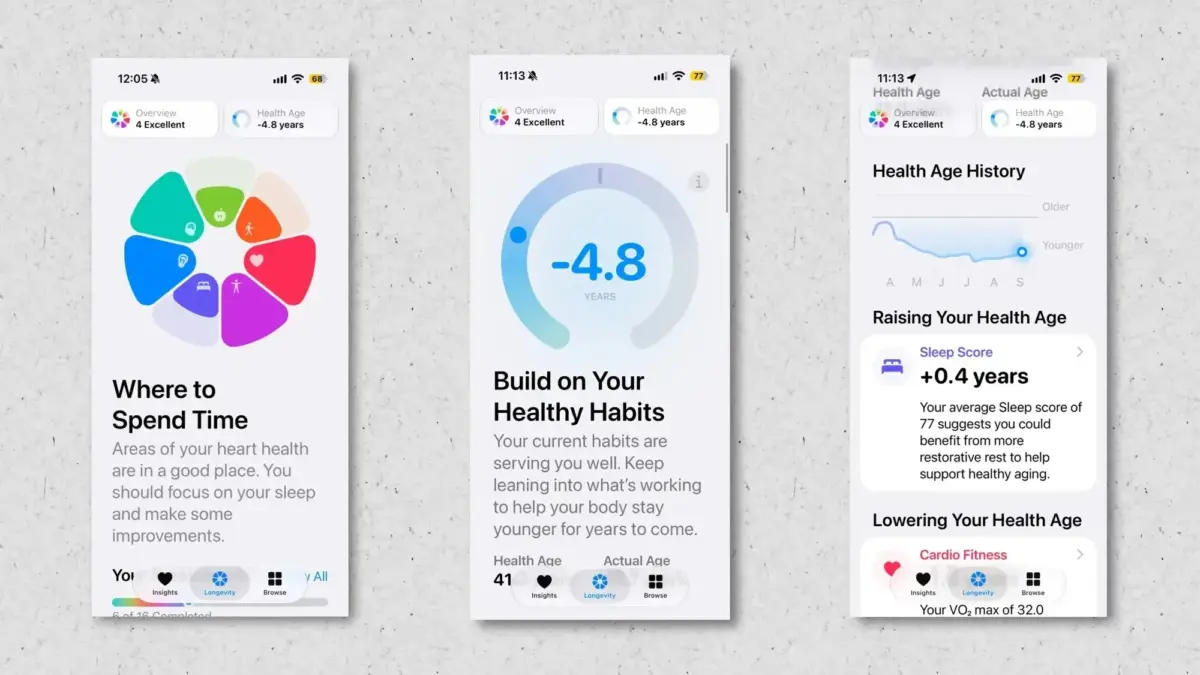
Central to the updated app is the introduction of a dedicated "Longevity" tab, created to give users actionable insights into the core drivers of long-term vitality and healthspan. This section categorizes daily health metrics across seven distinct domains: mental wellbeing, nutrition, daily movement, heart health, metabolic health, sleep quality, and hearing health. By analyzing data collected across Apple Watch sensors, paired peripheral devices, and manual user inputs, the Longevity tab synthesizes complex biometric trends into readable evaluations regarding overall biological maintenance.
Complementing the Longevity view are interactive health assessments, anchored by a new "Health Age" metric. Similar to traditional biological age assessments, this feature analyzes aggregated physiological markers to determine whether a user’s physical parameters match, exceed, or lag behind their actual chronological age.
Furthermore, Apple is leaning into computer vision capabilities by introducing camera-assisted physical evaluations within the Health app. Utilizing the iPhone’s built-in camera system, the application can observe and analyze users while they perform guided physical movements. The system then calculates standardized performance ratings across key physiological categories, including balance, flexibility, cardiovascular capacity (estimated VO2max), and general muscular strength.
In addition to these heavy-hitting analytical tools, the updated Health app introduces smaller, practical layout refinements. Notably, the user interface now features a prominent step counter located at the top of both the Health and Fitness application dashboards—a functional placement designed to give users immediate access to basic daily movement counts without requiring navigation through sub-menus.

Expanding Call Context and Apple Intelligence Capabilities
Beyond fitness and medical tracking, iOS 27.2 continues Apple’s gradual rollout and enhancement of its proprietary artificial intelligence platform, Apple Intelligence. Specifically, the update builds upon the "Call Context" feature previously introduced to streamline communication management on the iPhone.
In its initial iteration, Call Context relies on native Apple Intelligence processing to scan local device data—such as recent emails, text conversations, and calendar entries—whenever a user places a call to a recognized business or service provider. If relevant information is detected, the system proactively generates on-screen cards displaying contextual details during the active call. For instance, dialing an airline customer service line prompts Call Context to surface active flight itineraries, booking reference numbers, or gate details found within the user’s Inbox directly onto the phone call screen.
With the release of iOS 27.2, Apple is extending the scope of Call Context to personal relationships through the addition of anniversary and milestone alerts. If an outgoing or incoming call involves a contact with whom a saved anniversary or notable date is associated, an on-screen contextual notification will appear during the call. This automated reminder system aims to prevent missed personal milestones by giving users a real-time heads-up during routine voice conversations, serving as a subtle technological safety net for users prone to forgetting birthdays or special occasions.
Accessibility Upgrades Bring ASL Support to FaceTime
In terms of communication accessibility, iOS 27.2 fulfills key functionality initially previewed during Apple’s broader accessibility announcements in May 2026. The update introduces specialized application programming interfaces (APIs) designed to integrate professional sign language interpretation into FaceTime video calls.
Specifically built to accommodate American Sign Language (ASL) users and other deaf or hard-of-hearing individuals, the new frame-handling and video routing APIs enable a human sign language interpreter to join video calls smoothly alongside primary participants. Although this feature missed the initial gold-master release of iOS 27, its inclusion in the 27.2 testing phase marks a significant step forward in making real-time video communication fully accessible to non-verbal and signing communities.
Apple TV App Profiles Arrive on iPhone and iPad
Multi-user management is also receiving an attention boost in iOS 27.2, specifically within media consumption apps. While full, system-level multi-user accounts remain exclusive to other Apple product lines, the software update introduces individualized user profile switching to the native Apple TV application on both iOS and iPadOS.
For years, Apple TV streaming hardware has offered multi-profile functionality, permitting distinct family members to maintain separate watchlists, tailored recommendations, and episode-tracking histories on a shared television device. With iOS 27.2, this capability transitions directly to handheld screens. Shared devices—such as a household iPad or family-accessible iPhone—can now toggle between customized profiles inside the Apple TV app without disturbing the primary device owner’s watch history or continuous viewing queues.
Siri AI Gains International Language Support
Language accessibility for Apple’s next-generation artificial intelligence assistant is taking a notable leap forward in iOS 27.2. When Apple Intelligence and its updated Siri AI engine debuted, advanced natural language processing features were strictly limited to English-language regional settings.
The release of iOS 27.2 expands the assistant’s deep context understanding and conversational capabilities to five additional global languages: French, Japanese, Korean, Portuguese, and Spanish. International users operating their devices in these languages will gain access to the full suite of localized Siri AI tools, broadening the geographical reach of Apple’s intelligent platform ahead of upcoming software cycles.

Aesthetic Polish and User Interface Tweaks
Alongside headline features, iOS 27.2 incorporates a series of subtle user interface (UI) adjustments across several built-in system applications, refining visual contrast and functional terminology.
In Apple Music, design tweaks reduce the reliance on bright red background accents that characterized earlier iOS 27 iterations. Key action controls—such as the primary Play and Shuffle buttons—have been swapped from bold red accents to neutral black elements. Similar monochrome treatments have been applied to navigational icons located throughout the app’s Library section, offering a cleaner, more understated visual look.
The system Clock application receives typographical adjustments within its alarm configuration screens. To create better visual hierarchy when scheduling alarms, the "AM" and "PM" period indicators have been reduced in font size relative to the primary numeric clock face.
In the Podcasts application, Apple has updated legacy labeling for clarity. The longstanding "Up Next" queue designation has been rebranded as "New Episodes," a semantic change designed to help users more easily distinguish between manually queued content and freshly published show releases.
Finally, privacy management surrounding Siri functionality has been simplified. Within System Settings, the menu previously titled "App Access" has been renamed "Excluded Apps." Along with the name change, the configuration page now supports multi-selection, enabling users to exclude multiple installed applications from Siri’s data scanning and interaction features simultaneously rather than configuring each application individually.
Testing Progress and Public Availability
As Apple continues to iterate through the developer and public beta cycles for iOS 27.2, the update remains restricted to registered beta testers. Users interested in testing the expanded Health features, extended Call Context tools, or multi-language Siri capabilities can register their compatible devices through the official Apple Beta Software Program portal.
However, tech analysts and device managers continue to urge standard consumers to exercise caution. Beta builds carry inherent risks of software instabilities, unexpected battery drain, and app incompatibilities. Consequently, installing pre-release software on primary personal devices is generally discouraged without performing a full encrypted backup of local system data prior to updating.
Leave a Reply