
As iPhone users across the globe continue adapting to the sweeping updates introduced in iOS 27, Apple is already preparing its next significant functional release. Following the deployment of early patch updates—such as iOS 27.0.1, which arrived shortly after launch to address performance glitches and bug fixes specific to the iPhone 18 Pro—the technology company has officially moved into the beta testing phase for iOS 27.2.
While secondary software point-releases frequently focus on maintenance, performance optimization, and background stability fixes, iOS 27.2 presents a comprehensive mix of user-facing changes, functional improvements, and overdue ecosystem additions. The update delivers a total structural overhaul of the native Health app, expands the reach of generative Siri features to broader international audiences, enhances Apple Intelligence integration on call screens, and introduces targeted usability tweaks across core built-in applications.
The software is currently available to registered members of Apple’s developer and public beta programs, giving early adopters and power users an advance look at the features set to arrive on standard consumer devices in the coming months.
Comprehensive Revamp of the Apple Health Application
The most significant centerpiece of the iOS 27.2 update lies within the native Health application, which receives its most substantial redesign in several software generations. The overhaul consolidates health tracking, activity metrics, and long-term wellness monitoring into a unified hub, bridging the gap between passive daily data collection and actionable health insights.
A primary structural change in this release is the direct integration of Apple’s iconic Activity rings. Previously managed predominantly through the dedicated Fitness application, daily movement, exercise, and stand goals can now be viewed directly within the Health app interface. This consolidation gives users immediate visibility over their active biometric performance without requiring them to switch between separate pre-installed applications.
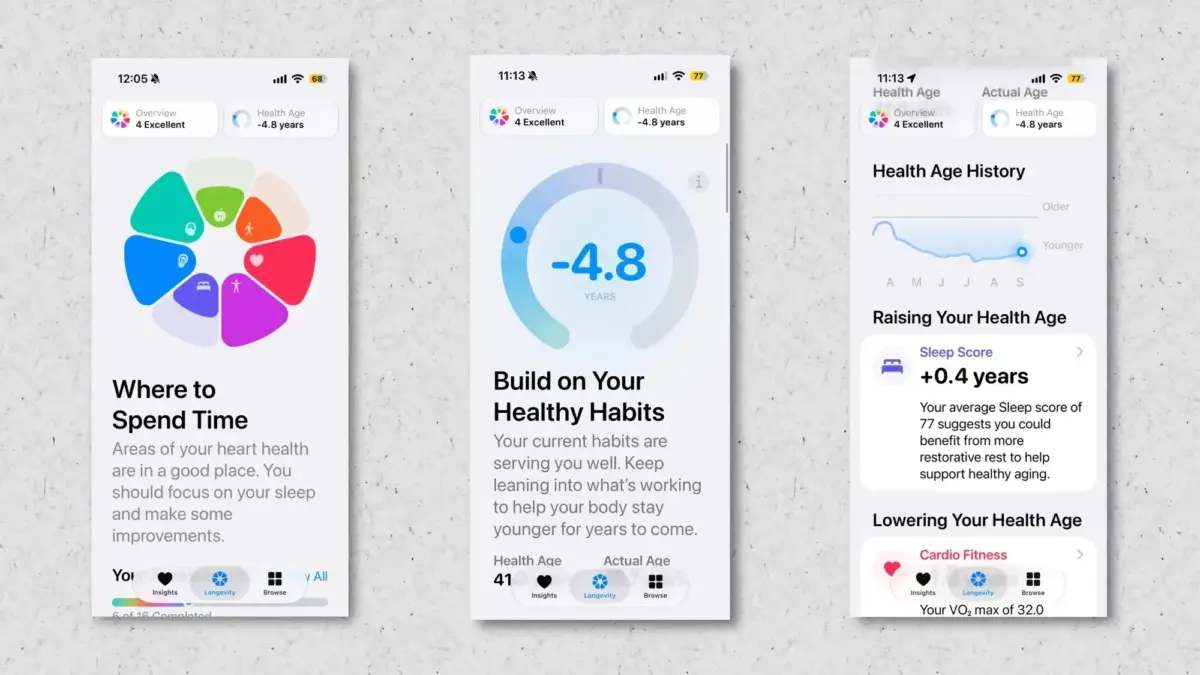
In addition to physical activity tracking, iOS 27.2 introduces a dedicated "Longevity" tab, designed to contextualize key metrics that impact overall long-term wellbeing. The panel organizes diagnostic data across key physiological and lifestyle dimensions, including mental wellbeing, nutritional inputs, daily physical movement, cardiovascular performance, metabolic health indicators, sleep metrics, and hearing health. By grouping these parameters together, the interface provides a broader operational overview of individual physical trajectory over time.
To assist users in understanding this data, Apple has introduced interactive health assessments. Among these tools is a new "Health Age" diagnostic metric, which synthesizes historical bodily metrics to estimate biological health against chronological age. Furthermore, the updated application incorporates camera-assisted exercise evaluation capabilities. Utilizing the iPhone camera, the software can optically observe users while they execute specific physical routines, analyzing movement patterns to rate performance across key fitness vectors such as balance, structural flexibility, VO2 max estimations, and muscle strength.
Visual and navigational refinements are also present throughout the interface. Observers and health editors evaluating early developer builds noted practical user-interface touches, such as elevated step-count visibility positioned prominently at the header of both the Health and Fitness apps, streamlining daily tracking for users who prioritize movement metrics.

Enhancing Call Context with Apple Intelligence
Beyond health and fitness tracking, iOS 27.2 expands upon the deep system integration of Apple Intelligence, specifically extending the capabilities of the "Call Context" feature introduced in earlier iterations of iOS 27.
Call Context was engineered to parse on-device data safely and display pertinent visual information on the incoming or outgoing call interface when interacting with businesses or contacts. For instance, when a user dials a commercial air carrier’s customer support line, Apple Intelligence scans saved emails, text messages, and wallet passes on the device to locate matching flight itineraries, rendering flight numbers, booking codes, and departure times prominently on the active phone screen during the call.
In iOS 27.2, Apple expands Call Context to support personal relationship milestones by integrating automated anniversary and event alerts. If a user places a phone call to a saved contact on a significant personal date—such as a registered wedding anniversary or milestone event embedded within contact card details or calendar entries—the call screen displays an dynamic prompt reminding the caller of the occasion. The addition aims to provide real-time situational awareness during calls, bringing practical everyday value to Apple’s ongoing artificial intelligence deployment.
Expanding Accessibility with Native Sign Language Integration
Accessibility capabilities also receive notable upgrades in iOS 27.2, fulfilling feature commitments outlined during Apple’s earlier accessibility announcements. The release introduces a dedicated system API for FaceTime that enables native support for third-party human American Sign Language (ASL) interpreters during live video calls.
Although initially slated to launch alongside the inaugural release of iOS 27, the developer integration was held back for further refinement and testing. With its arrival in the iOS 27.2 beta, video communication on the iPhone becomes markedly more accessible for Deaf and hard-of-hearing users. By allowing professional human interpreters to seamless join FaceTime video feeds via structured native application interfaces, the platform provides a more integrated tool for real-time sign language translation during digital conversations.
Apple TV Profiles Arrive on iPhone and iPad
On the media and entertainment front, iOS and iPadOS 27.2 extend functionality that was previously restricted to hardware platforms like the Apple TV set-top box. With the updated software, the mobile Apple TV app officially gains support for multi-user profile switching on portable touch devices.
Until now, the Apple TV application on iOS and iPadOS was tied exclusively to the primary Apple Account configured at the device system level. Under the updated architecture in iOS 27.2, multiple family members or household users can create, manage, and switch between personalized profiles directly inside the Apple TV app on a single shared iPhone or iPad.
Each profile retains its own viewing recommendations, watch history, saved queues, and personalized content suggestions. This development is particularly useful for families sharing a single home tablet, ensuring that individual viewing habits and progress markers remain distinct across multiple users without cluttering a single, shared library interface.

Global Expansion of Siri AI Multilingual Capabilities
When Apple first rolled out its next-generation, AI-enhanced Siri architecture, the advanced natural language understanding and contextual processing capabilities were limited exclusively to English. With the testing of iOS 27.2 underway, Apple is expanding the global footprint of its updated voice assistant.
The beta update introduces native support for five additional languages within Siri AI: French, Japanese, Korean, Portuguese, and Spanish. The expansion enables users in these linguistic markets to access context-aware voice requests, complex conversational chaining, on-device contextual processing, and expanded application controls in their native languages. The move represents an important step in Apple’s broader international strategy to deliver parity across global device markets.
User Interface Refinements and System Tweaks
Alongside headline feature upgrades, Apple has implemented targeted visual adjustments and navigational polish across several native iOS applications to clean up visual clutter and improve overall usability.
In the native Music app, designers have scaled back visual red accents in favor of a more neutral palette. High-profile control elements—such as the prominent Play and Shuffle control buttons, along with primary navigation icons within the Library view—have been updated from bright red accents to solid black tones. The shift yields a cleaner, higher-contrast aesthetic that aligns closely with Apple’s evolving system design guidelines.
The Clock app features subtle typographic revisions on the alarm setup screen. The design now renders "AM" and "PM" operational indicators in a significantly smaller font size relative to numerical time values, bringing greater visual hierarchy to the primary alarm digits when configuring wake-up schedules.
In the Podcasts app, the media queue navigation header previously designated as "Up Next" has been renamed to "New Episodes." The terminology tweak is intended to reduce confusion between manual play queues and automated episode drop lists, offering greater clarity for long-time listeners.
System privacy and artificial intelligence settings have also been adjusted. Within the Siri preference menus, the entry formerly titled "App Access" has been updated to "Excluded Apps." Alongside the semantic change, the interface now allows users to bulk-select and exclude multiple third-party applications simultaneously, offering greater control over which software programs are permitted to share data processing routines with Siri.
Looking Ahead
As Apple continues to test iOS 27.2 across developer and public beta groups, further refinements and minor changes may be introduced before the update reaches final consumer builds. Device owners interested in testing these features early can enroll eligible iPhones in the Apple Beta Software Program through system settings, provided they perform full system data backups prior to installation to mitigate potential risks associated with pre-release software.
Leave a Reply