
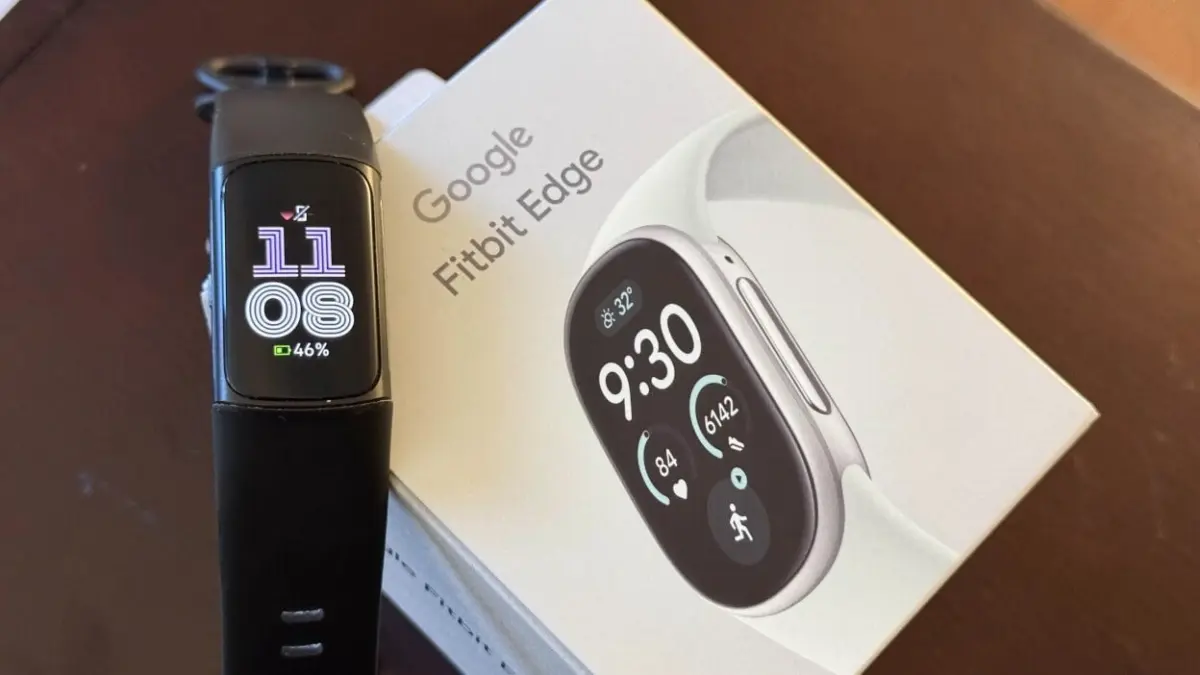
The Fitbit brand has long been defined by its minimalist fitness trackers equipped with compact display screens, offering health metrics and activity tracking without the bulk or power demands of a full-fledged smartwatch. However, it has been three full years since Google last released a traditional screen-equipped Fitbit tracker. With the official announcement and immediate opening of pre-orders for the new Fitbit Edge, longtime brand loyalists are now examining how this long-awaited device compares to its direct predecessor, the Fitbit Charge 6.
From an architectural standpoint, the Fitbit Edge occupies a precise middle ground in Google’s modern wearable lineup. It fits strategically between the minimalist, screenless Fitbit Air and the high-end, curved-display Pixel Watch series. Rather than running the full Wear OS platform found on Google’s Pixel Watch hardware, the Edge operates on the lightweight, battery-efficient operating system utilized by the screenless Fitbit Air. This distinct software framework enables the Edge to retain broad ecosystem accessibility, offering seamless pairing capabilities with both iOS and Android smartphones.
However, a closer look at the hardware modifications and functional changes reveals that Google has re-architected its core tracking concept. The transition from the Charge 6 to the Fitbit Edge includes key hardware restorations, long-overdue software updates, and a few notable omissions.
The Fitbit Edge Restores a Physical Side Button
One of the most noticeable physical differences between the new Fitbit Edge and the older Charge 6 is the return of a mechanical side button. In recent iterations, including the Charge 6, Fitbit replaced traditional moving buttons with a solid-state, capacitive haptic sensor—a small indent or "nub" on the side of the casing designed to simulate a button press via vibration feedback when squeezed.
In real-world usage, that capacitive sensor proved to be a frequent point of friction. Users frequently experienced missed touches, unresponsive inputs, or inconsistent haptic buzzing, particularly during workouts when hands were wet or sweaty.
The Fitbit Edge abandons the haptic sensor in favor of a dedicated, tactile button on the right side of the device casing. Initial hands-on testing confirms that the hardware input offers a definitive, physical press and an audible click upon compression. Crucially, the mechanical button operates mechanically regardless of device power states, providing reliable tactile feedback when attempting to wake the display, pause a workout, or navigate back through interface menus.
Enhanced Spatial Tracking: The Altimeter Returns Alongside Upgraded GPS Hardware
Beyond its external controls, the Fitbit Edge introduces significant changes to its internal sensor array. Foremost among these hardware additions is the integration of an altimeter. To find a display-equipped Fitbit tracker featuring an internal altimeter, users previously had to look back to the Charge 4, as subsequent generations omitted the barometric sensor altogether.
The altimeter measures changes in atmospheric pressure to detect changes in vertical elevation. Its presence on the Fitbit Edge reinstates floor-counting metrics, allowing users to automatically log stair climbs throughout the day. Additionally, the sensor improves elevation tracking during outdoor training sessions, offering more precise data when navigating hilly terrain during outdoor runs, hikes, or bike rides.
Alongside elevation sensing, Google has addressed the device’s location-tracking capabilities. Both the Charge 6 and the Fitbit Edge feature built-in GPS units, allowing users to map outdoor routes independently without tethering to a companion smartphone. This distinguishes both devices from the screenless Fitbit Air, which lacks onboard GPS entirely and must rely on a paired phone’s location connection to collect distance and pacing metrics.
However, built-in GPS functionality on the older Charge 6 was plagued by architectural design issues. The primary defect involved structural sensitivity: tightening the silicone wristband too firmly placed mechanical tension on the internal GPS antenna, frequently degrading satellite signals. This flaw often resulted in wildly inaccurate location mapping and distorted route overlays during outdoor workouts.

Google states that the Fitbit Edge incorporates an updated GPS chipset and antenna layout designed to eliminate structural signal interference. Given the signal degradation problems observed on the Charge 6, the upgraded positioning hardware represents a necessary correction for outdoor fitness tracking reliability.
The Major Downgrade: Omission of NFC and Google Pay
While the Fitbit Edge brings improvements to input mechanics and spatial sensors, it also drops a flagship convenience feature present on the Charge 6: Near Field Communication (NFC) support.
On the Charge 6, integrated NFC allowed users to configure Google Wallet directly on the device. This meant users could make contactless payments at retail store registers by tapping their wrist against payment terminals. The feature was particularly valued by outdoor runners and walkers who preferred to exercise without carrying a smartphone, house keys, or physical payment cards, while still retaining the ability to purchase refreshments or handle unexpected expenses on the go.
The Fitbit Edge completely strips out NFC hardware, meaning Google Wallet and tap-to-pay capabilities are unsupported on the new device. This hardware removal was likely forced by internal space constraints within the device’s slender chassis, as engineers accommodated the physical altimeter mechanism and restructured the GPS antenna array. Nevertheless, for users who relied heavily on contactless payment options during workouts, the loss of Google Pay functionality represents a clear downgrade from the Charge 6.
Universal Audio Controls Replace Restrictive Media Options
Software integration for playback control has also undergone a major change. On the Charge 6, media controls were strictly limited to YouTube Music. Using the tracker to play, pause, or skip audio tracks required a tethered phone, an active YouTube Music application, and a paid premium subscription to the service. Users listening to music or podcasts via Spotify, Apple Music, Audible, or other third-party streaming platforms were completely unable to control audio playback from their wrist.
The Fitbit Edge corrects this restrictive ecosystem barrier by adopting system-level media playback controls. According to Google, the media interface on the Edge interacts directly with whatever active audio source is playing on the paired smartphone. Whether the host device is streaming content from Spotify, Apple Music, third-party podcast apps, or YouTube Music, the Fitbit Edge can manage playback, track advancement, and volume control, matching standard media control features found on modern smart wearables.
Navigation Features and the Roadmap for Google Maps
In terms of wrist-based navigation, the launch of the Fitbit Edge comes with temporary functional limitations regarding mapping services. At release, the Fitbit Edge does not support Google Maps directions out of the box. Official product documentation indicates that Google Maps navigation support is designated as "coming soon" via a future software update.
This temporary delay is unlikely to impact real-world usage significantly, given the historically basic implementation of navigation services on screen-based Fitbit trackers. On the Charge 6, Google Maps integration was limited to a dedicated, text-based applet that provided turn-by-turn directional prompts rather than rendering a full, interactive map display. As a result, the feature served primarily as a secondary visual cue rather than a true mapping solution. While Charge 6 owners who actively used turn-by-turn prompts will need to wait for Google to roll out the planned software update for the Edge, the core experience is expected to align once the feature is deployed.
Balancing Upgrades and Compromises
The comparison between the Fitbit Edge and the Fitbit Charge 6 illustrates a targeted realignment of Google’s fitness tracker strategy. In designing the Edge, Google focused on correcting long-standing hardware and software complaints that affected daily usability on the Charge 6, restoring a physical side button, reinstalling a barometric altimeter, upgrading the built-in GPS array, and expanding media controls beyond single-app exclusivity.
At the same time, achieving these functional adjustments required structural trade-offs—most notably the complete removal of NFC hardware and contactless payment functionality. For prospective buyers and upgrading Charge 6 owners, deciding on the Fitbit Edge ultimately comes down to individual feature priorities: weighing the physical click of a button, elevation tracking, and universal audio controls against the loss of tap-to-pay convenience on the wrist.
Leave a Reply