For handheld gaming PCs and users who frequently utilize Xbox mode on Windows, the latest experimental build brings a long-awaited layer of convenience. Historically, tweaking fundamental system parameters while immersed in a full-screen gaming environment often required navigating away from the game or cumbersome system overlay menus just to adjust basic hardware states. The new build addresses this workflow bottleneck by introducing streamlined quick settings directly accessible while in Xbox mode. Gamers can now seamlessly manage critical hardware and software configurations—such as toggling Bluetooth connectivity, adjusting Wi-Fi networks, and modifying power management settings—all without ever having to exit their gaming session. This reduction in context-switching aims to keep players immersed in their entertainment while maintaining precise control over their device’s underlying performance and connectivity profiles.
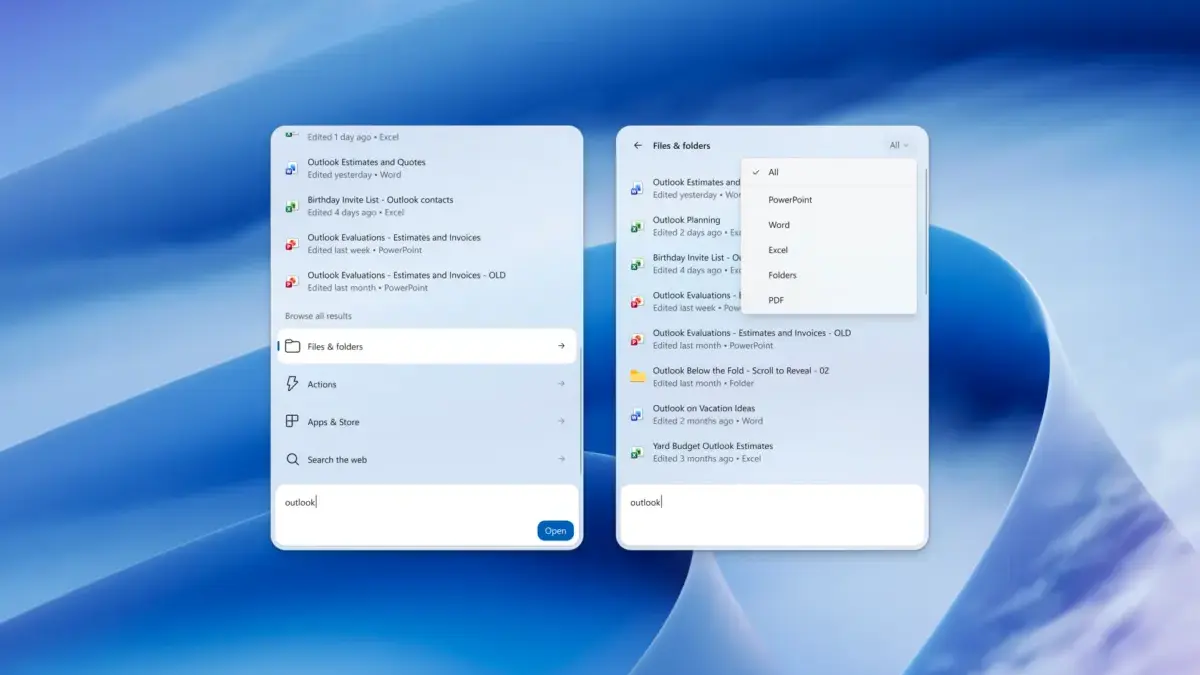
Beyond the gaming-centric enhancements, the most sweeping changes in these Insider builds are found in the newly upgraded Windows 11 search engine. Microsoft has completely overhauled the search experience to make it far more comprehensive, granular, and actionable than previous iterations. Users are no longer restricted to a rudimentary list of file paths and web queries; instead, the search interface now incorporates advanced filtering mechanisms that allow individuals to isolate results based on specific categories such as files, direct actions, or traditional web searches. This categorization helps clear away digital clutter, ensuring that users can immediately locate precisely what they are looking for, whether it is a locally stored document or a real-time snippet of information from the internet.
Furthermore, the updated search box has evolved from a passive directory lookup into an active command line. Users can now perform various system actions directly within the search bar itself, eliminating the need to dig through multiple layers of the Settings application. For instance, typing a brief command allows individuals to instantly adjust their display’s screen brightness or modify system audio volume without breaking their workflow. The integration extends even further into cross-device functionality, allowing users to execute specific tasks on a connected smartphone directly from their desktop. Among these cross-device capabilities is the ability to initiate phone calls right through the PC interface, bridging the gap between desktop computing and mobile communication more fluidly than before.

The depth of information provided within the search results has also seen a substantial upgrade. When querying files, the search flyout now surfaces rich contextual metadata, such as the exact timestamp of when a document was last modified and the author associated with the file. This contextual richness is not limited to local documents; the search engine can now dynamically pull in live data charts and summaries, including real-time stock prices and detailed weather forecasts, directly into the search pane. By surfacing this information instantaneously, Microsoft is positioning the Windows search bar as a central hub for quick information retrieval, minimizing the necessity of opening a separate web browser or dedicated application just to check the weather or financial markets.
To ensure that the search engine continuously adapts to individual user preferences and usage patterns, Microsoft has introduced a new feedback mechanism directly into the interface. Users can now train Windows 11 search over time by simply clicking inline thumbs-up or thumbs-down icons attached to specific results. This direct telemetry collection allows the underlying algorithm to learn which types of files, actions, or sources are most relevant to a given user, tailoring future queries to match personal habits and organizational structures. By incorporating user feedback directly into the result pane, Microsoft hopes to foster a more personalized and intuitive search experience that improves the longer the operating system is used.
These sweeping updates are currently rolling out to members of the Windows Insider program, giving developers, enthusiasts, and early adopters an opportunity to test the features and provide critical feedback before they see a wider commercial release. Beta Build 26220.9836 and Experimental Build 26340.9843 represent a concerted effort by Microsoft to address long-standing user requests for a faster, smarter, and more unified operating system experience. While these features are still undergoing refinement in the testing channels, they signal a clear direction for the future of Windows 11, where system controls are more accessible, search is genuinely actionable, and cross-device integration feels increasingly seamless.