Linux Mint is preparing to reintroduce one of the operating system’s most requested features by bringing hibernation back through a newly developed Sleep Modes page in its System Administration tool. Scheduled to debut in the upcoming Linux Mint 27 release this December, the new addition aims to eliminate the historical complexity and manual configuration hurdles that previously forced mainstream Linux distributions to abandon the feature.
While major distributions like Ubuntu famously distanced themselves from hibernation years ago due to reliability issues and user confusion, Linux Mint is taking a pragmatic approach. The distribution is not rewriting underlying kernel capabilities or magically solving the technical hurdles that prompted other platforms to drop support. Instead, Linux Mint is giving users clear choices, bundling classic hibernation alongside two hybrid modes designed to bridge the gap between traditional suspending and total power shutdown.
Understanding Sleep Modes: Hibernation vs. Suspend
To appreciate the significance of Linux Mint’s upcoming tool, it helps to understand the fundamental mechanical differences between how operating systems handle power management sessions. Both suspend and hibernation serve the same primary goal of preserving an active user session, which encompasses open applications, active document windows, and running background tasks. However, they achieve this goal through vastly different mechanisms.
When a computer enters suspend mode, commonly referred to as sleep, the system preserves the active session directly inside the system’s volatile random-access memory while cutting power to almost every other hardware component. This allows the computer to wake up almost instantaneously, often within a couple of seconds. The primary drawback of this approach is that RAM requires a continuous, albeit low, trickle of electrical current to maintain its data integrity. Because a suspended laptop continues to draw power from its battery over time, a prolonged sleep state will eventually drain the battery completely. If the battery dies before the user plugs the machine into a power source, the contents of the RAM are lost, resulting in the forfeiture of any unsaved work.
Hibernation approaches the problem from the opposite direction by copying the entire active session from RAM directly onto permanent storage, such as a solid-state drive or hard disk drive, before cutting power to the entire machine. Once the data transfer is complete, the computer shuts down entirely and consumes zero electrical power. When the user powers the machine back on, the operating system reads the saved session image from the disk, restoring all applications and windows to their exact previous states. In short, suspend offers speed at the cost of continuous power consumption, whereas hibernation offers absolute power safety at the cost of resume speed and disk write operations.
Why Ubuntu and Other Distributions Dropped Hibernation
The decision by Linux Mint to reintroduce hibernation stands in stark contrast to broader industry trends. Ubuntu disabled native hibernation by default more than a decade ago, starting with the 12.04 release. At the time, developers cited multiple reasons for the deprecation, including general unreliability, sluggish performance on mechanical drives, and user confusion caused by presenting multiple overlapping power management states.
Because the vast ecosystem of Ubuntu-derived distributions inherited these upstream design choices, hibernation quietly vanished from standard installations across many popular operating systems. In fact, the retreat from hibernation extends well beyond the Ubuntu family, with a significant number of mainstream Linux distributions phasing out the option over the years.
Performance has historically been a major roadblock. Writing several gigabytes of RAM contents to physical storage and reading them back upon boot can take considerably longer than performing a clean system reboot, particularly on older or slower storage hardware. Furthermore, successful hibernation requires substantial swap space allocation. To accommodate an entire memory state, the designated swap partition or swap file must be at least as large as the active RAM installed in the system. Many modern distributions ship with minimal swap configurations by default, while others, such as Fedora, utilize compressed RAM solutions like zram, which cannot store persistent session data when the machine loses power.

Security features have introduced additional complications. Modern personal computers frequently ship with Secure Boot enabled by default, forcing the Linux kernel to run in a restricted lockdown mode. This lockdown mechanism intentionally blocks hibernation because the saved session image residing on the disk lacks a cryptographic signature, presenting a potential vector for offline tampering or unauthorized data extraction. Because the majority of modern hardware ships with Secure Boot active, native hibernation simply fails to function for a substantial portion of the user base. This hardware reality remains the primary reason why distributions like Fedora Workstation do not offer hibernation out of the box.
The Three Sleep Modes Offered in Linux Mint
Rather than forcing a single rigid approach, the upcoming Sleep Modes page in Linux Mint provides users with a centralized dashboard to configure power management according to their specific hardware capabilities and personal preferences. Users will have the flexibility to enable multiple modes simultaneously and select their preferred behavior directly from the desktop environment’s power menu.
The classic hibernation mode saves the current session to persistent storage and completely powers down the machine. While it remains slower than a standard suspend state and can take longer than a normal reboot depending on hardware read and write speeds, it guarantees that the session will survive indefinitely without drawing power.
Hybrid Sleep addresses the middle ground by suspending the computer and writing the session data to disk simultaneously during the initial trigger. Under normal circumstances, users experience the rapid wake times associated with traditional suspend. However, if the battery eventually depletes while the machine is away from a power source, the user simply needs to connect the charger, and the system can recover the session from the disk rather than losing unsaved work.
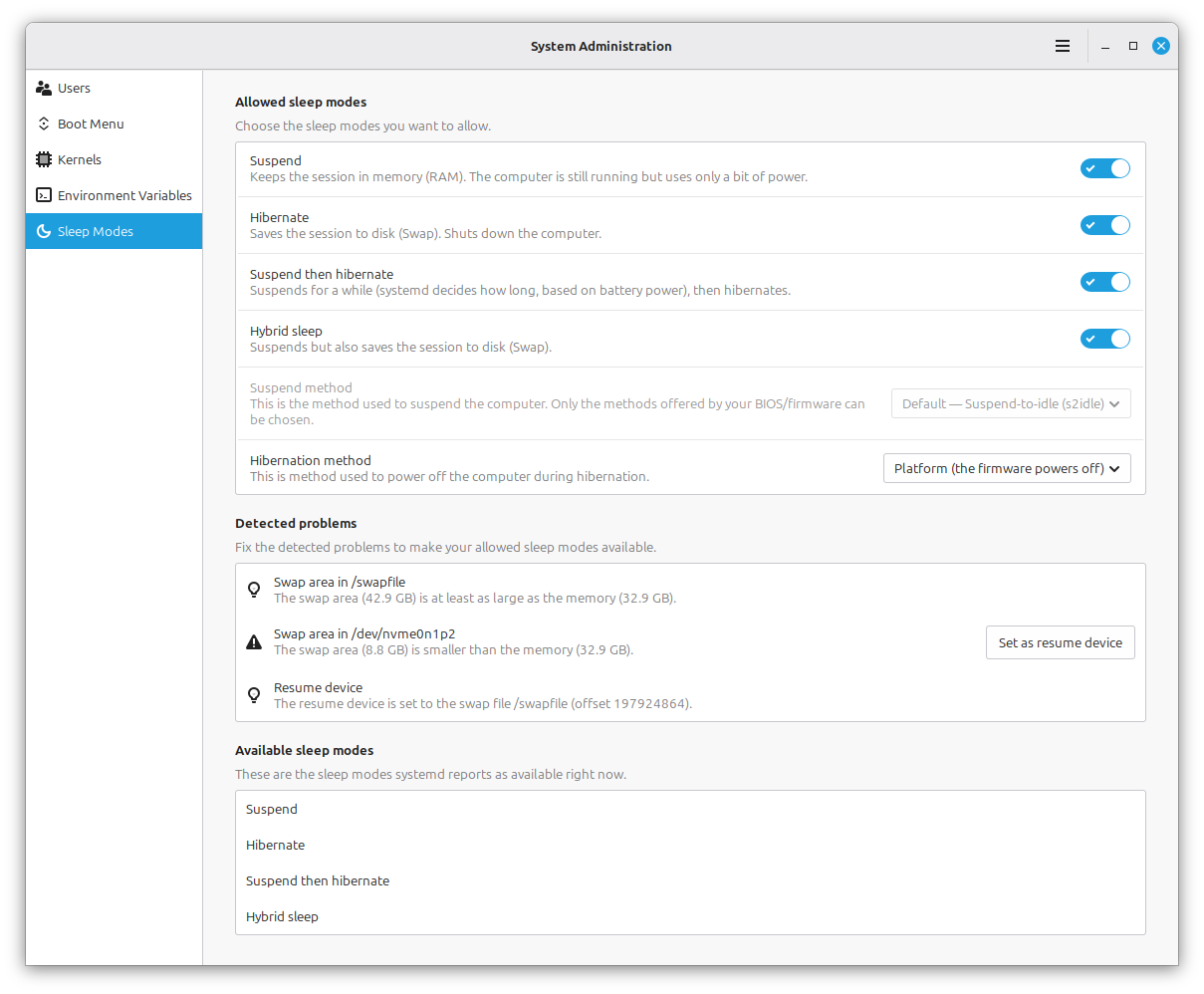
Suspend-then-hibernate offers perhaps the most practical compromise for laptop users. This mode initially places the computer into a standard suspended state for fast everyday wake-ups, but automatically transitions the system into full hibernation if the battery level drops to a critical threshold. This approach delivers the immediate responsiveness of sleep during routine daily use while retaining a reliable safety net against unexpected battery exhaustion.
Addressing Underlying System Limitations
While Linux Mint’s new administration tool simplifies the process of enabling and managing these power states, it cannot bypass the physical and architectural limitations inherent to modern computing hardware. The software interface includes built-in diagnostic indicators to warn users of potential configuration conflicts. If a system lacks adequate swap space to hold the contents of the memory, the tool flags the deficit as a problem. Similarly, if Secure Boot is active on the host machine, the utility clearly identifies it under its detected problems section.
To maintain system stability, the tool handles configuration changes by writing its parameters to its own dedicated systemd files, allowing users to toggle these advanced sleep modes on and off without manually editing configuration files or risking damage to core system services. The development reflects a broader philosophy within the Linux Mint project of implementing subtle, practical improvements aimed directly at daily usability rather than chasing transient software trends.