
As iPhone users across the globe continue adjusting to the expansive features packed into iOS 27, Apple is already laying the groundwork for its next substantial software update. Coming hot on the heels of iOS 27.0.1—a targeted bug-fix release dispatched primarily to address early hardware-specific performance hiccups on the new iPhone 18 Pro line—the technological focus has shifted toward the upcoming iOS 27.2 update. Currently making its way through developer and public testing channels, iOS 27.2 signals a meaningful evolution
for the operating system, delivering key updates to health tracking, artificial intelligence features, accessibility, and ecosystem customization.
While point releases within Apple’s yearly software cycle often emphasize stability patches and under-the-hood optimization, iOS 27.2 introduces a notable array of front-facing features. Users who choose to participate in the Apple Beta Software Program can preview these changes on their primary hardware today, provided they take proper precautions by backing up critical system data prior to installation.
A Major Overhaul for the Apple Health Ecosystem
The headline feature of the iOS 27.2 release is an ambitious redesign of the native Health application. Recognized as one of the most comprehensive updates to Apple’s wellness suite in recent years, the revamp changes how personal health metrics, fitness goals, and preventative diagnostic tools are organized on the iPhone.
A primary change in this updated structure is the direct integration of Activity rings into the main Health application interface. Previously housed within the dedicated Fitness app, the activity rings—which display daily movement, exercise, and stand goals—are now fully embedded in the Health platform, providing a single consolidated dashboard for daily activity alongside vital biometrics.
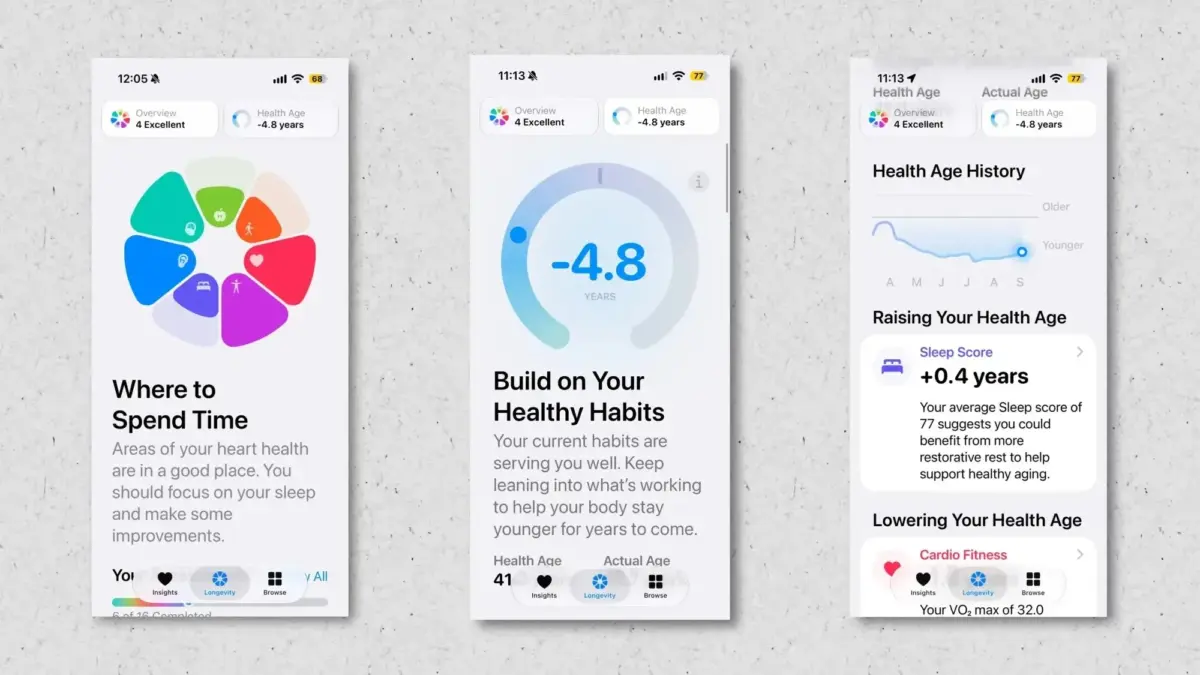
In addition to integrated fitness metrics, iOS 27.2 introduces a dedicated "Longevity" tab within the Health app. This section is engineered to synthesize broad metric streams into long-term wellness intelligence. The Longevity feature aggregates data across seven specific core pillars:
- Mental wellbeing
- Nutrition
- Daily movement
- Heart health
- Metabolic health
- Sleep architecture
- Hearing health
By grouping these categories together, the system aims to offer users a clearer overview of how daily habits influence long-term vitality.
To complement the Longevity metrics, Apple has incorporated new self-guided assessments designed to analyze current overall fitness levels and highlight opportunities for physical improvement. Central to this diagnostic suite is a new feature called "Health Age," which evaluates incoming health data to calculate a user’s estimated physiological age relative to their chronological age.

Furthermore, iOS 27.2 leverages device hardware to introduce interactive movement evaluations. Users can allow their iPhone’s camera system to monitor them while performing specific exercises. The software then analyzes movement patterns, form, and execution to grade users across key physical metrics, including flexibility, structural balance, estimated VO2 max, and functional strength.
Beyond these high-level diagnostic tools, the overhaul also includes smaller, everyday interface tweaks aimed at user convenience. For example, daily step totals have been given increased visual prominence, sitting clearly at the top of the main screen in both the Health and Fitness apps for immediate viewing.
Intelligence Expansion: Call Context Adds Personal Milestones
Apple’s native artificial intelligence framework continues to mature in iOS 27.2, specifically through functional enhancements to "Call Context." Initially introduced to leverage Apple Intelligence during active phone calls, Call Context analyzes incoming numbers and checks whether the caller corresponds to a recognized business or entity with relevant data stored across the user’s device. When a match is made, the system automatically pulls related contextual data—such as retrieving a flight confirmation number from an inbox message when a user calls an airline line—and displays it directly on the active call screen.
With the deployment of iOS 27.2, Apple is extending the reach of Call Context into personal relationships by incorporating automated anniversary and milestone alerts. If a user initiates or receives a call from a contact with a saved anniversary or notable date attached to their address book entry, an alert will display on the screen during the conversation. This addition serves as an immediate visual safeguard against forgotten milestones, extending Apple Intelligence beyond transactional customer support into daily personal communications.
Elevating Accessibility: FaceTime Integrates Native Interpreter Support
In alignment with accessibility commitments detailed in earlier previews, Apple is using the iOS 27.2 update to enhance live communication for Deaf and hard-of-hearing users. Although initial framework updates were announced previously, the necessary application programming interface (API) changes required to support real-time human interpretation during video calls are arriving with this software build.
The new FaceTime framework enables users to bring a human sign language interpreter directly into active video calls. By providing structured system support for American Sign Language (ASL) and third-party interpretation integration, the software aims to streamline video call management for users who rely on sign language translation, removing the technical barriers that previously made multi-party interpreted video chats cumbersome on mobile devices.
Cross-Device Parity: Apple TV Profiles Expand to Mobile Hardware
Apple is also taking steps to align user experience across its hardware ecosystem by introducing individual user profiles to the native Apple TV app on iOS and iPadOS 27.2.
On the home-bound Apple TV platform, profile switching has long allowed household members to maintain separate view histories, watchlists, and algorithmic content recommendations. By bringing this functionality over to the iPhone and iPad versions of the Apple TV app, Apple ensures that shared mobile hardware—particularly family iPads—can support distinct streaming profiles. Members of a household can now pick up a shared tablet, switch to their personal Apple TV profile, and access their individualized watch lists without cluttering another family member’s watch history.
Global AI Deployment: Siri AI Gains Multilingual Capabilities
At launch, the localized Apple Intelligence upgrades powering the revamped Siri assistant were available exclusively in English. The iOS 27.2 update marks the beginning of a broader global push, officially expanding Siri AI support to several new languages.

Once updated to iOS 27.2, users will be able to interact with the enhanced Siri AI features in:
- French
- Japanese
- Korean
- Portuguese
- Spanish
This international expansion broadens access to advanced natural language processing, context-aware command execution, and on-device machine learning capabilities for millions of non-English speaking iPhone users worldwide.
System-Wide Visual Polish and UI Refinements
Alongside headline features, iOS 27.2 includes a selection of aesthetic changes and minor interface tweaks across several native apps.
Within the Apple Music app, designers have scaled back the intense red accent colors that characterized earlier iterations. Important action controls—including the primary Play and Shuffle buttons—have transitioned from bright red to a neutral black finish. Additionally, media control icons throughout the Library navigation tabs have been converted to black for a cleaner look.
Minor visual and structural refinements have been applied across other system applications as well:
- In the native Clock application, the typography used for "AM" and "PM" designations during alarm configuration has been scaled down relative to the numerical time digits, establishing a cleaner hierarchy.
- In the Apple Podcasts app, the long-standing "Up Next" queue section has been renamed to "New Episodes" to clarify content organization for listeners.
- In privacy settings, the control category previously listed under Siri as "App Access" has been renamed to "Excluded Apps." This menu now allows users to exclude multiple third-party applications from Siri access simultaneously, streamlining permission management.
Availability and Beta Testing Guidelines
The features included in iOS 27.2 are currently available to registered developers and members of Apple’s public beta testing program. As testing progresses, Apple is expected to refine performance, resolve system bugs, and polish interface elements ahead of a formal public release for all compatible devices.
Users interested in trying the new Health app redesign, multi-language Siri support, or call intelligence features can enroll their device via the official Apple Beta Software Program. However, because pre-release software inherently carries risks of app instability, battery drain, and unpredicted system crashes, users are strongly advised to create a full system backup before updating.
Leave a Reply