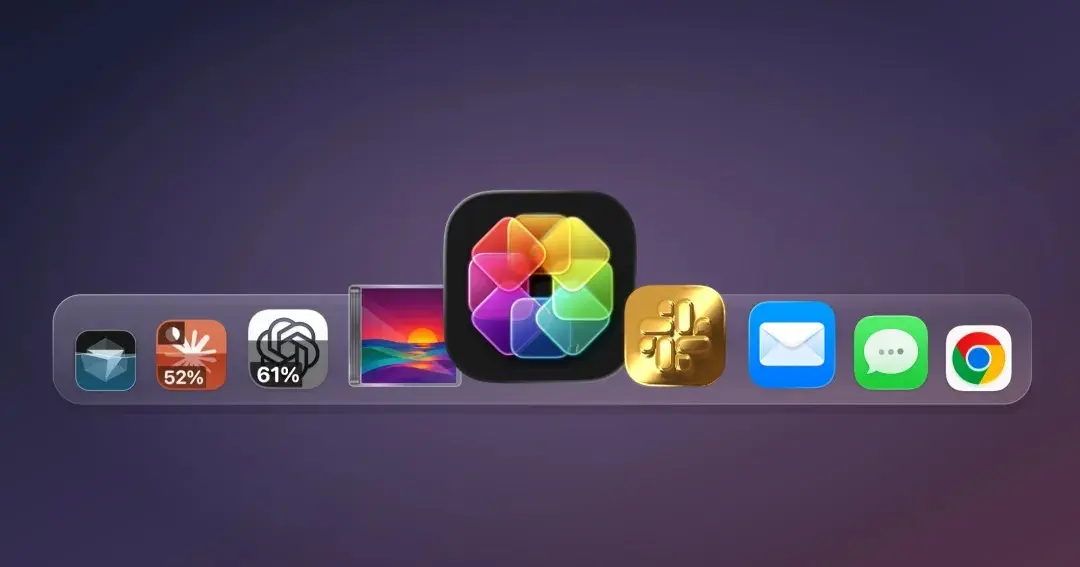
There is a remarkably creative new way to keep an eye on your AI usage and monitor when your limits reset directly from your macOS desktop: by using your Mac’s app icons.
Copenhagen-based designer Michael Flarup has officially launched a new Mac utility called IconSwapper. The software gives users the ability to replace any standard application icon with custom artwork of their own creation. While the tool certainly accommodates traditional aesthetics—allowing users to change appearance, design styles, shading, and more—one of its most compelling and innovative features is the ability to swap the icons for artificial intelligence platforms like ChatGPT or Claude with dynamic versions capable of displaying live usage data in real time.
Operating the utility is straightforward and designed to be accessible to users regardless of their technical background. After installing the application on a Mac computer, the user simply selects which program they want to generate a live icon for. The software then links the visual representation to respond to specific background processes and metrics generated by that designated application.

Alongside tracking AI usage metrics for platforms like ChatGPT, Claude, and Cursor, users can also configure live icons for a wide variety of built-in Mac applications, such as Messages, Mail, Safari, Finder, and Music. Popular third-party applications like Google Chrome and Spotify are also supported. While many of these non-AI configurations lean more toward entertainment than practical utility, they showcase the profound flexibility of the underlying technology. For instance, users can configure Safari’s iconic compass graphic to react dynamically to page loads and active downloads, or program the Finder face graphic so that its eyes actively track the movement of the cursor across the screen.
Naturally, developers and power users have numerous traditional ways to monitor their AI consumption without involving desktop icons. Usage tracking is readily available directly through user account dashboards, API monitoring harnesses, and even dedicated standalone desktop gadgets. However, integrating these critical metrics directly into the application icon itself introduces a distinctive sense of whimsy and personalization to the standard macOS desktop environment. For individuals dealing with crowded desktop docks, the developer notes that these customized, dynamic icon representations remain fully visible within the system tab bar when switching between active tasks.
Beyond live data visualization, IconSwapper provides comprehensive tools for traditional visual modification of static icons. The software features an extensive built-in library of alternative, pre-designed icons ready for immediate deployment across virtually any installed application. Alternatively, users maintain the freedom to upload and implement entirely custom imagery.

The journey toward developing IconSwapper stretches back across Flarup’s long-standing career in digital design. Based in Copenhagen, where he manages a specialized design studio, Flarup has maintained a professional fascination with icon design and interface customization for decades. He has been crafting bespoke Mac icons since the early 2000s and previously authored a comprehensive book dedicated to the history and artistry of app icons, celebrating the creative contributions of interface designers.
For years, creating a fluid solution for customizing Mac system and application icons presented a persistent technical challenge. macOS features no official, native support for comprehensive system theming and tightly protects its core system icons against unauthorized modification. To overcome these robust operating system restrictions, Flarup devised an entirely novel technical approach. Rather than permanently replacing system files or application bundles, the utility draws and renders graphics directly over existing icons in real time. This breakthrough enables the implementation of advanced shaders, fluid motion, and live data rendering without destabilizing the host application.
In an interview with TechCrunch, Flarup explained that his proprietary renderer processes underlying icon artwork through custom Metal shaders executing in real time.

The breakthrough moment in development involved figuring out how to successfully transmit a custom bitmap to the macOS Dock for a running application, allowing the system itself to render the modified frame natively. Significant time and engineering effort were required to ensure that the dynamic artwork tracked smoothly through every subtle animation enforced by macOS, ranging from native Dock magnification effects to the Command-Tab application switcher interface. Once that rendering pipeline was established, the icon gained the capability to react dynamically to nearly any internal or external state.
This capability empowers users to configure icons in unprecedented ways, such as generating sweeping light animations that glide across a gold-shaded icon surface as the cursor passes over it, or triggering subtle desktop animations while an AI assistant processes a complex query in the background.
Flarup notes that these features open up imaginative avenues for individuals looking to make their computing environment feel uniquely personal, observing that everyday software tools can benefit from a greater degree of personality and playfulness.

IconSwapper is currently available as a digital download through its official website, featuring a promotional one-time purchase price of $19 before transitioning to its standard retail price of $29.