
You closed a dialog box and your browser console flashed a distinct, angry shade of amber. Like countless developers before you, you highlighted the error message, dropped it into a search engine, and landed on a thread shared by half the front-end internet. Whether you are working with Angular, Bootstrap, Ionic, or phpMyAdmin, this exact string pops up identically.
Yet the top search results routinely bury the most critical truth: the warning is entirely correct. There is a real person on the other side of that browser tab—someone relying on a screen reader whose focus is about to drop straight into an unhandled hole in your webpage.
The quick fixes ranking at the top of search engine results all employ the same underlying tactics under various names. Developers reach for the blur() one-liner, the setTimeout wrapper around a closing function, or the quick trick of stripping the aria-hidden attribute entirely.
Each of these shortcuts quiets the console while quietly harming the person the browser was trying to protect. If you have already shipped one of these patches in a production environment, you share the stage with enormous company. You were failed by your search engine results, not by personal carelessness.
For developers who can make the architectural leap, the single cleanest shortcut is migrating to the native HTML <dialog> element and calling .showModal(). The browser handles the entire focus dance natively, and this class of bug effectively vanishes, though developers must still handle the case where a targeted focus return element has been removed from the Document Object Model (DOM). Everything else remains targeted at teams wired into component libraries or corporate design systems that cannot be torn out mid-quarter.
The Fix, If You Are in a Hurry
The entire issue boils down to a single principle: focus has to leave a region before that region becomes hidden or inert. Everything else is merely footnotes, edge cases, and the downstream story of learning that rule the expensive way.
In practice, this is an issue of the strict order of operations. Most modal code already contains the correct pieces, but executes them in the wrong sequence. The fix is pure reordering, ensuring the closing overlay itself becomes inert rather than improperly hidden.
The traditional broken version reads top-to-bottom exactly the way a developer would narrate closing a modal out loud. However, the browser applies the hide instruction the moment the statement runs, operating before the focus movement on the next line can execute. It functions as one synchronous task. The damage stems from the ordering and the invalid transitional state existing between those two statements.
Get the order right and the result is completely unremarkable, which is precisely the point. The user hits the escape key, hears focus land back on the button they originally used to open the interface, and carries on with their task. Get it wrong and they land on the body element, hear silence or just the page title, and are forced to tab from the top of a long page all the way back to wherever they had been. That second experience is what the browser warning exists to prevent.
Chrome Is Not Warning You; It Is Overruling You
Developers frequently read the word "warning" and file it away alongside other non-blocking console notices—treating it as yellow noise, someone else’s problem, or something to deal with after the release cycle.
That terminology causes significant damage because it implies the message is purely advisory, which it is not. By the time the message appears in the console, the browser has already analyzed your markup, decided your implementation was wrong, and shipped a completely different accessibility tree to the operating system than the one you wrote.
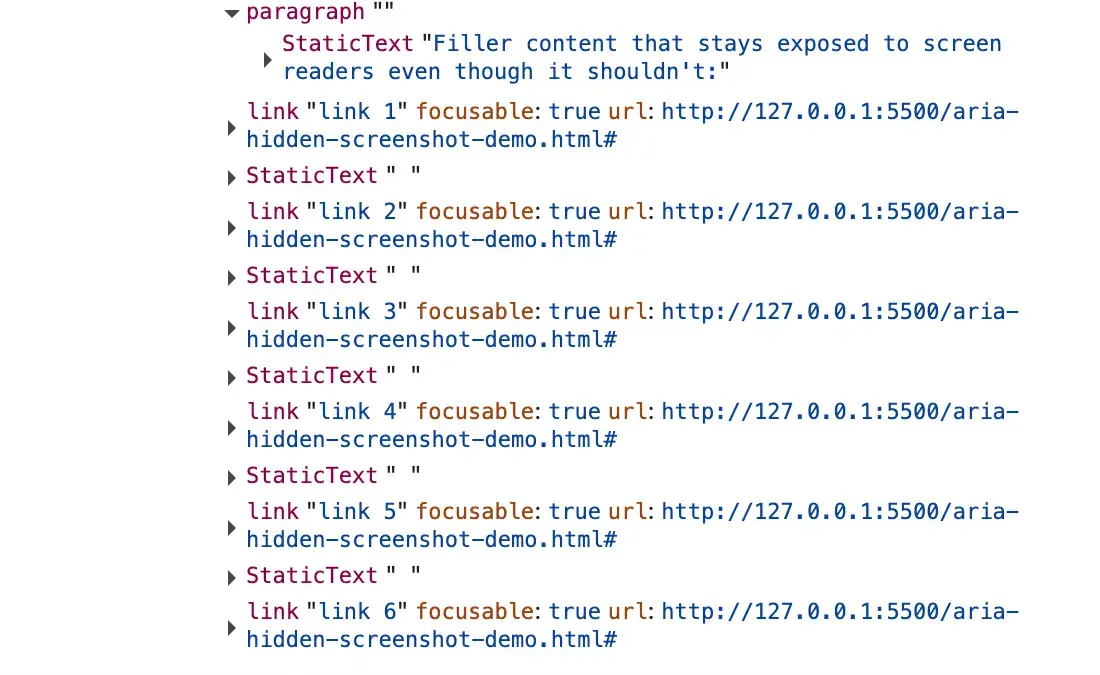
When inspecting the Elements panel while a modal is open, the aria-hidden="true" attribute sits right there on the background wrapper, completely untouched. Nothing in the DOM inspector appears incorrect. However, switching to the Accessibility panel reveals the tree Chrome actually handed to the screen-reader APIs. The subtree explicitly marked for hiding remains fully exposed and fully readable.
The browser engine reads the attribute, notices a focused node living inside that subtree, and walks back up the ancestor chain, ignoring the aria-hidden directive entirely. The moment focus finally leaves, the pruning snaps back and the region hides as requested. Consequently, the state developers think they shipped—where the background region is invisible to assistive technology—does not actually exist anywhere except in the Elements panel and the developer’s head.
This gap stems from a paradox baked into aria-hidden. The attribute pulls content out of the accessibility tree, but it does not pull that content out of the keyboard focus order. Because these two systems operate independently with nothing keeping them in sync, an element can remain fully focusable while being completely imperceptible to assistive technology.
The instant a user tabs into that space, a ghost focus state is created. The screen reader fires a focus event for a node it was explicitly told does not exist, looks it up, finds nothing it is allowed to describe, and outputs absolute silence. The user presses a key, the machine acknowledges nothing, and they are left uncertain whether the application broke, their assistive technology crashed, or they made a mistake.
Chromium-based browsers have been quietly patching this behavior for years, with warnings appearing in structured waves across major UI frameworks like Material-UI, Ant Design, and Flowbite. Firefox and Safari do not currently surface a comparable console warning for this specific scenario, executing their handling of focused content inside hidden subtrees without notifying the developer. Chrome decided to make developers feel the friction, a choice that prevents broken code from shipping indefinitely under the cover of a silent browser repair.

The Four Ways Developers Reach This State
Every variation of this accessibility breakdown ends in the exact same place: focus sitting inside a region that has just been hidden. Yet they arrive from distinct directions, and applying the wrong fix will either fail to silence the warning or silence it by breaking something worse.
The first major vector is the close-time race. A user clicks the close button, initiating a dialog fade-out. Somewhere during those few hundred milliseconds of CSS transition, focus is still parked on the close button, which sits inside the overlay the library just marked hidden to start the fade. The transition has not finished and focus has not moved anywhere, prompting the browser to log a retained focus warning.
The second vector is the open-time inversion, representing the exact reverse scenario. An overlay opens and the library marks the background as aria-hidden="true". However, the button the user just clicked lives in that background, holding focus for a brief beat before anything moves it into the dialog. This triggers an open-time warning about an element that just received focus while hidden.
The third vector involves nested composition conflicts, such as placing a form select element inside a modal dialog. When the user interacts with the select dropdown and closes it, two separate components—each believing they are the one true modal layer—fight over who gets to hide the rest of the page. Under modern rendering updates, this can escalate from a console warning into a complete keyboard navigation freeze where the page becomes entirely untabable.
The final vector occurs when focus leaves the page entirely. If a user has a menu open and switches browser tabs or windows, focus bookkeeping can strand an aria-hidden state on teardown with no live focus remaining to reconcile against.
Why Popular Fixes Made the Problem Worse
When developers search for a remedy to silence the console warning, a common one-liner frequently emerges at the top of search results: calling .blur() on the active element within the modal’s close handler.
While this successfully quiets the console and allows continuous integration pipelines to pass, it creates a severe accessibility failure. When .blur() is invoked without a subsequent focus target, focus does not go somewhere sensible; it goes nowhere. The browser, forced to place focus somewhere, falls back to the body element.
For a mouse user, this fix is completely invisible. For a keyboard or screen reader user, the reader typically goes quiet or reads the page title, and the very next tab press restarts navigation from the absolute top of the entire webpage. This violates core web accessibility guidelines regarding predictable focus order, dressing up a severe user experience failure as a technical fix.
Timing hacks represent another popular approach, attempting to wrap open or close operations in a setTimeout or requestAnimationFrame so focus restoration happens a tick later. While this strategy may succeed on fast machines with warm caches, it breaks down under heavy CPU load, on budget mobile devices, or during concurrent rendering schedules where the scheduler slices work apart. When it fails, the broken hidden-with-focus state ships intermittently, frustrating users in unpredictable ways.
Stripping the aria-hidden attribute entirely or using mutation observers to yank it off every time a library sets it removes the console warning because nothing is hidden. Unfortunately, this means the background page remains fully accessible to screen readers while the modal is open, allowing users to tab out of the active modal and into background controls, violating the fundamental contract of a blocking modal interface.
The Teardown Contract and Correct Implementation
Solving this architectural challenge requires adhering to a strict teardown contract. On close, focus must leave the closing region before that region becomes hidden, and it must land somewhere real, never on an inert node and never stranded on the document body.
Because the inert attribute blocks focus entirely, any trigger residing inside an inerted background must have that inert status lifted before the trigger can be refocused. Otherwise, the focus call becomes a silent no-op, leaving focus trapped inside the closing dialog.
Vanilla JavaScript implementations cleanly demonstrate this contract without framework schedulers interfering. The pattern requires capturing the active element before moving focus into the dialog, setting the background to inert when opening, and reversing the process upon closing. Specifically, the background must be un-inerted, focus must be returned synchronously to the trigger button, and the closing shell must be marked inert with pointer events disabled while CSS handles the visual fade-out.
React applications face additional hurdles due to state batching and asynchronous render cycles. If background inertness is tied directly to React state updates, calling .close() followed immediately by a focus restoration will fail because the DOM has not yet processed the state change when the focus call executes. Developers must ensure that state updates or imperative DOM changes regarding inertness are executed synchronously so that the trigger is fully reachable the instant the focus method runs.
Major component libraries and frameworks approach this sequencing with varying degrees of success. Native dialog elements eliminate the ghost-focus class entirely by leveraging the browser top layer and implicit inertness, though focus return behavior still depends on the continued existence of the previously focused element. Component suites like React Aria handle scope management tightly via layout-effect timing, avoiding these race conditions entirely, while older or more complex portal architectures continue to refine their teardown lifecycles.
Ultimately, the browser warnings are not arbitrary annoyances or style-guide niceties. They serve as an architectural alarm signaling when an application exposes hidden content to assistive technologies. By understanding the underlying sequencing and ensuring focus departs a region before it becomes inert or hidden, development teams can build accessible, warning-free web interfaces that serve all users equitably.


Leave a Reply