
You closed a dialog box, and the browser console instantly turned a distinct shade of angry mustard. Highlighting the error message, you dropped it into a search box, only to find yourself dropped onto a page shared by half the front-end internet. Whether you were working in Angular, Bootstrap, Ionic, or phpMyAdmin, this exact character string seemed to follow you everywhere.
However, top search results consistently bury a vital truth: the browser’s warning is entirely correct. On the other side of that warning sits a real person—specifically, a screen reader user whose focus is about to drop into an invisible hole in your webpage.
The solutions that frequently rank at the top of search engines all tend to employ similar quick fixes under different names: the blur() one-liner, the setTimeout wrapper around the closing mechanism, or the trick where developers hastily yank the aria-hidden attribute off the DOM. Each of these approaches quiets the console while quietly harming the exact person the browser was trying to protect. If you have already shipped one of these patches into production, you are in massive company. You were ultimately failed by your search results, not by your own carelessness.
For developers who can migrate to the native <dialog> element and call .showModal(), doing so can resolve the issue immediately, allowing the browser to manage the complex focus dance for you. Developers still need to handle cases where the intended focus return target has been removed from the Document Object Model, a task no browser can automate. Everything else remains a challenge for teams locked into legacy component libraries or enterprise design systems they cannot tear out during the current quarter.
The Fix for Developers in a Hurry
The entire underlying rule fits into a single sentence: focus has to leave a region before that region becomes hidden or inert. Everything else consists of footnotes, edge cases, and the hard-earned lessons of developers who learned the expensive way.
In practice, this comes down to a strict order of operations. Most modal code already contains the correct pieces, but assembled in the wrong sequence. The fix is purely a matter of reordering, ensuring that closing overlays themselves become inert before focus attempts to navigate away.
The flawed pattern often features backgrounds hidden while focus is still trapped inside, creating what developers call ghost focus, while focus restoration occurs far too late after the hiding process has already committed. The correct approach hands the page back first, moves focus out before anything gets hidden, and applies the inert attribute to the closing shell alongside pointer-events adjustments before managing the transition end.
The wrong version is rarely written out of negligence. It reads from top to bottom in the exact narrative order a developer would use to describe closing a modal out loud. Yet, the browser applies that hiding instruction the moment the statement runs, well before the focus movement on the next line can execute. It operates as a single synchronous task, where the damage stems from the ordering and the invalid state existing between statements.
Get the order right, and the result is entirely uneventful—which is precisely the point. The user hits the escape key, hears focus land back on the button they used to open the interface, and carries on. Get it wrong, and they land on the body element, hear silence or just the page title, and must tab all the way from the top of a long document just to return to where they were working. That second experience is what the browser warning exists to prevent.
Chrome Is Not Warning You; It Is Overruling You
When developers read the word "warning" in a developer console, they typically file it alongside other non-blocking yellow messages intended to be dealt with after a release. That label causes significant damage because it implies the message is merely advisory, which is far from the case. By the time the message appears, the browser has examined your markup, decided it was invalid, and shipped a completely different accessibility tree to the operating system’s screen reader APIs than the one you authored.
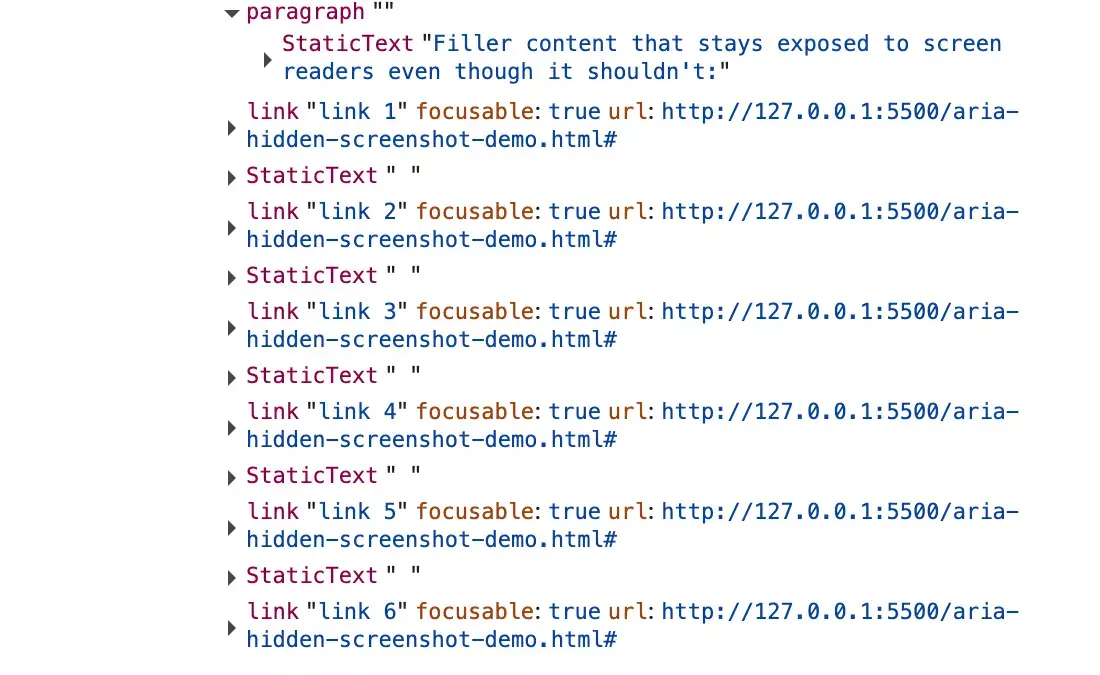
If you open a modal that triggers this warning and inspect the Elements panel, your aria-hidden="true" attribute is right there on the background wrapper, completely untouched. Nothing in the DOM inspector appears incorrect. Yet, if you switch to the Accessibility panel and look at the actual tree handed to assistive technologies, the subtree you attempted to hide is still fully exposed and readable.
Blink, the browser engine behind Chromium, reads your attribute, detects a focused node living inside that subtree, and walks back up the ancestor chain, ignoring the aria-hidden attribute entirely. The moment focus finally leaves, the pruning snaps back into place, hiding the region as requested. Consequently, the state you believe you shipped—where the background is invisible to assistive tech—does not exist anywhere outside your Elements panel and your imagination.
That gap between the two panels constitutes the core bug, driven by a paradox baked directly into aria-hidden. The attribute pulls content out of the accessibility tree, but it does not pull that content out of the keyboard focus order. Because these two systems operate independently without keeping in sync, an element can be fully focusable and completely imperceptible at the exact same time.
The instant a user presses the tab key and lands on such an element, ghost focus is created. The screen reader fires a focus event for a node it was previously told did not exist, looks it up, finds nothing permitted to describe, and falls completely silent. For the user on the other side of the screen, pressing a key yields zero acknowledgment from the machine, leaving them uncertain whether the application broke, their assistive technology crashed, or they made an error.

Chromium has been quietly patching these discrepancies for years. The open-time variant of the warning began appearing around Chrome 127 in the summer of 2024, clustering across major open-source repositories like Material UI, Ant Design, and Flowbite. The close-time variant arrived months later in late 2024 with Chrome 131, prompting bug reports across Bootstrap and Angular components. While Firefox and Safari do not surface comparable console warnings for this behavior, Chrome decided to make developers feel the friction directly, arguing that silent fixes allow broken code to ship indefinitely.
The Four Ways Developers Reach This State
Every variation of this issue converges on the same endpoint: focus sitting inside a region that has just turned hidden. However, these issues arrive from four distinct directions, and applying the wrong fix can either fail to silence the warning or worsen accessibility.
The first scenario is the close-time race, where a user clicks a close button and a CSS transition begins its fade out. During those few hundred milliseconds, focus remains parked on the close button, which sits inside the overlay the library just marked as hidden. Because the transition is ongoing and focus has not moved, Chrome logs a retained focus warning. This represents the vast majority of occurrences in major UI libraries.
The second scenario involves the open-time inversion, where an overlay opens and the library marks the background as aria-hidden="true". However, the trigger button the user just clicked resides in that background, holding focus for a vital beat before moving into the dialog. This creates a hidden region with a focused node inside, triggering the alternative warning wording about an element that just received focus.
The third scenario involves nested composition conflicts, often occurring when developers place a select element inside a modal dialog. When the user opens the select, picks an option, and closes it, two separate components believing they are the sole modal layer fight over who gets to hide the rest of the page. Under modern rendering updates in frameworks like React 19, this conflict graduates from an annoying console warning to a fatal accessibility freeze where keyboard navigation breaks entirely.
The final scenario happens when focus leaves the page entirely. If a user has a menu open and switches browser tabs or uses alt-tab, focus bookkeeping can strand an aria-hidden state on teardown with no live focus to reconcile against. This proves that even major browser and component maintainers struggle with the underlying architecture.
Why Quick Fixes Made the Problem Worse
Faced with a warning during a deployment crunch, many developers adopted the internet’s favorite one-liner: calling document.activeElement.blur() inside the modal’s hide handler. While this immediately silences the console warning and turns continuous integration builds green, it abandons the user entirely.
Calling blur() without specifying a destination forces the browser to drop focus onto the document body. For a mouse user, this is entirely invisible. For a keyboard or screen reader user, the reader falls silent or reads the page title, and the next tab press restarts navigation from the very top of the entire document. This represents a direct violation of web accessibility guidelines regarding predictable focus order.
Timing hacks utilizing timeouts or animation frames attempt to delay focus restoration until after the hide transition settles. While these approaches work on fast machines with warm caches, they fail under heavy CPU loads, cheaper mobile hardware, or concurrent rendering engines where schedulers slice work apart. When they fail, the broken hidden-with-focus state ships intermittently, becoming nearly impossible to reproduce locally.
Similarly, stripping the aria-hidden attribute entirely or utilizing non-modal escape hatches removes warnings by removing focus traps altogether. This allows users to tab out of active modals into background controls, breaking the basic modal contract and introducing severe accessibility failures.
The Teardown Contract and Proper Implementation
Solving this issue permanently requires adhering to a strict teardown contract: on close, focus must leave the closing region before that region becomes hidden or inert, and it must land somewhere valid—never on an inert node and never on the document body.
To achieve this safely in vanilla JavaScript or modern frameworks, developers must capture the active trigger element before moving focus into the dialog. Upon closing, the background container must be un-inerted first, focus must be returned synchronously to the trigger element, the closing shell must be made inert and non-interactive while its CSS transition runs, and finally, the element can be unmounted once the transition concludes.
Adopting this order of operations ensures that browsers remain satisfied, continuous integration pipelines stay green, and screen reader users experience seamless, predictable navigation. Ultimately, silencing the console was never the true goal; ensuring that applications remain fully usable for every visitor is what matters.
Leave a Reply