
For many developers working within the Drupal ecosystem, the omission of automated testing from standard development workflows often stems from a prevailing perception that tests introduce unnecessary complexity, financial overhead, and administrative friction without providing a commensurate return on investment. Yet, as web applications grow in scale, user expectations rise, and enterprise requirements demand absolute reliability, the necessity for robust automated testing becomes increasingly difficult to dismiss. Recent developments in open-source tooling have begun to shift this paradigm, offering modern solutions designed to streamline quality assurance without overwhelming development teams. Among these tools, Cypress has emerged as a prominent option, prized by front-end engineers and backend architects alike for its developer-friendly architecture and comprehensive feature set.
To understand how modern testing frameworks can be integrated into a standard web development lifecycle, it helps to examine the practical implementation of Cypress within a typical Drupal project. For the purposes of deployment and architectural consistency, many modern Drupal initiatives rely on a local development environment established through the drupal/recommended-project template, often complemented by containerized orchestration tools such as Lando. A project configured in this manner generally adheres to a standardized directory layout, featuring distinct vendor and web directories alongside essential configuration files like composer.json, composer.lock, and standard version control markers. Within this established structure, incorporating Cypress requires establishing a Node.js runtime environment and utilizing the Node Package Manager to handle package installation and dependency management.
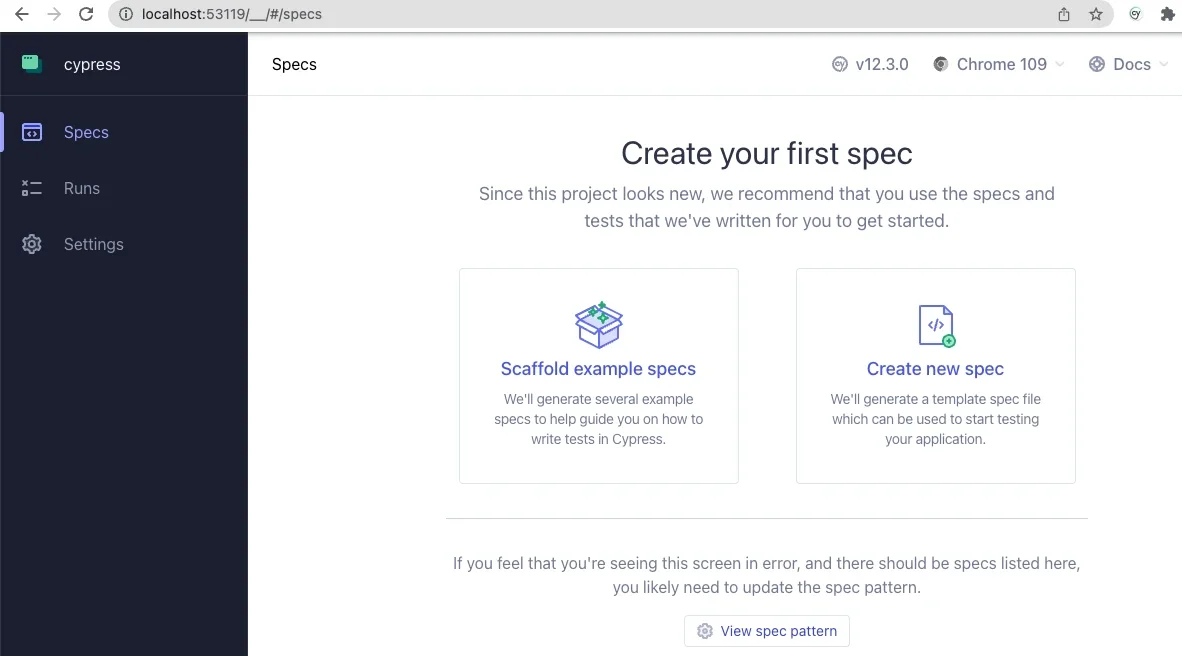
The installation procedure begins with initializing a Node package configuration within the root of the development directory, generating a baseline package.json file that establishes the project metadata and script execution hooks. From there, developers can install Cypress as a development dependency using npm, integrating the testing suite directly into the local repository architecture. Launching the application for the initial configuration prompts the Cypress graphical interface, which guides the user through setting up end-to-end testing protocols. By generating the initial configuration and scaffolding directories, the platform establishes a structured environment containing designated folders for integration tests, support files, fixtures, and video recordings, while automatically generating a primary configuration file in the project root.
Configuring this environment to communicate seamlessly with a local Drupal instance requires a few key adjustments to the primary configuration file, particularly updating the base URL to match the local development server address. These adjustments ensure that the testing engine can properly locate its resources, execute test specifications, and interact with the underlying Drupal installation. Once these foundational settings are established, developers can begin authoring and executing basic test scenarios to verify core application functionality, ranging from simple page load validations to complex user authentication workflows.

Write and Run Basic Tests Using Cypress
Constructing basic test specifications involves creating dedicated integration directories and authoring test scripts utilizing JavaScript-based syntax that proves remarkably intuitive for developers familiar with modern web standards. A typical test file can be structured to evaluate fundamental site behaviors, such as confirming that the front page loads successfully and that critical page elements, including main titles, exist within the Document Object Model. Furthermore, these scripts can simulate user interactions by navigating to specific paths, interacting with form fields, inputting credentials, and triggering submission events to evaluate authentication systems.
The execution of these tests within the Cypress application interface offers immediate visual feedback, rendering a split-screen view where one panel details each programmatic step of the active specification while a secondary simulated browser window displays the live user experience in real time. This interactive debugging environment often reveals subtle nuances in front-end rendering and interaction handling. For instance, testing form submissions can highlight scenarios where modern CSS styling or flexbox layouts temporarily impede an automation tool’s ability to recognize element visibility, demonstrating the tangible value of automated validation in uncovering edge cases that might otherwise bypass manual code reviews.
Beyond standard assertions and out-of-the-box interaction commands, the framework allows for extensive customization to accommodate the specific architectural patterns inherent to content management systems like Drupal. Developers can define custom commands within support files to encapsulate repetitive actions, streamlining test scripts and improving long-term maintainability. For example, standardizing administrative workflows often involves creating utility commands that handle user logout sequences and credential-based logins, ensuring that every test begins from a predictable, authenticated state without requiring redundant code across multiple test files.
Customize Cypress for Drupal
Expanding the capabilities of the testing suite to interface directly with backend utilities represents one of the most powerful aspects of modern front-end testing integration. By leveraging environment variables and system commands, developers can bridge the gap between user interface verification and backend administrative tooling. A prime example of this integration involves incorporating Drush commands directly into custom testing workflows, allowing automated scripts to interact with the Drupal application state at a fundamental level.
Through this approach, custom commands can be constructed to authenticate users via unique identifiers by executing command-line utilities behind the scenes and automatically directing the testing browser to the generated one-time login URL. This methodology offers profound security benefits, eliminating the need to hardcode, read, or store sensitive user passwords within testing repositories. The realization that a front-end testing framework can securely orchestrate backend administrative utilities challenges traditional boundaries between development tiers, offering a unified approach to quality assurance that spans the entire application stack.
As development teams continue to explore the boundaries of automated testing, the ecosystem surrounding these tools expands to include advanced concepts such as fixtures for managing test data, sophisticated routing strategies, and asynchronous form handling. Educational resources, community webinars, and public repositories provided by specialized agencies offer deeper dives into complex use cases, including the verification of Ajax-enabled forms and dynamic content components. By adopting these modern testing methodologies, Drupal developers can significantly reduce the perceived complexity of quality assurance, ensuring that web projects maintain high standards of reliability and performance throughout their lifecycle.