In an unexpected move that has caught the tech community by fete, Google has officially begun rolling out Android 17 QPR2 a full month ahead of schedule. Arriving right alongside the November Pixel Drop, this latest quarterly platform release is currently making its way to a wide variety of supported Google Pixel devices, ranging from the budget-conscious Pixel 6a all the way up to the company’s newest flagship hardware.
The rollout, which was initially highlighted by Google’s Mishaal Rahman on Reddit, follows a comprehensive and lengthy beta testing phase. While many of the most prominent features and visual tweaks are currently exclusive to Google’s own Pixel lineup, history suggests that several of these underlying improvements will eventually make their way to other major Android manufacturers as they adopt the newer codebase. Beyond the customary bug fixes and stability improvements that typically accompany mid-cycle updates, Android 17 QPR2 delivers a wealth of functional enhancements, particularly for users who prefer granular control over their smartphone’s interface, security, and hardware integrations.
Android gains more control over colors and wallpapers
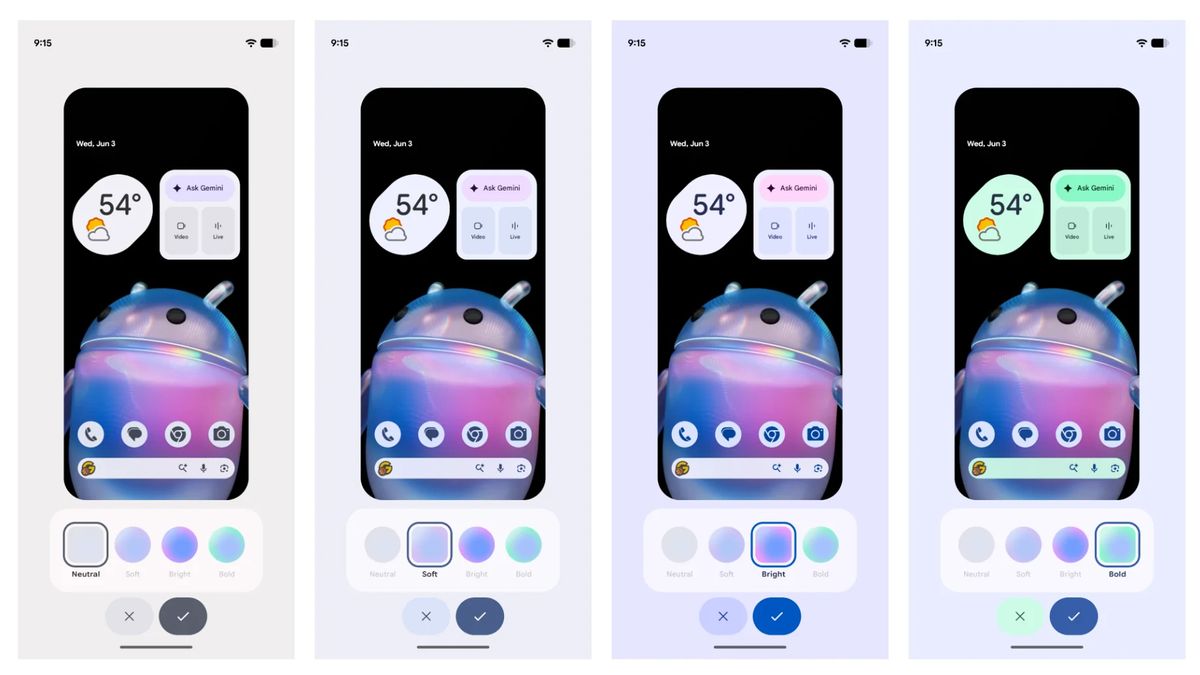
One of the most visually apparent changes introduced in Android 17 QPR2 is a significantly more robust color customization system. Historically, Android users have relied on preset color palettes generated automatically by the operating system to match their active wallpapers. With the new update, Google is breaking away from those rigid limitations by introducing a full rainbow hue slider, allowing users to dial in a completely custom system color of their choice.
To complement this newfound precision, the update includes four distinct intensity options: Neutral, Soft, Bright, and Bold. These settings give users the ability to fine-tune how aggressive or subtle the system-wide accent colors appear across supported applications, widgets, and quick settings menus. Furthermore, Google is expanding personalization options with the introduction of adaptive light and dark wallpaper support. Under this new framework, compatible wallpaper collections can seamlessly and automatically switch between designated light and dark variants depending on the system’s overarching theme, creating a more cohesive visual experience throughout the day.
Status bar and Quick Settings finally become more useful
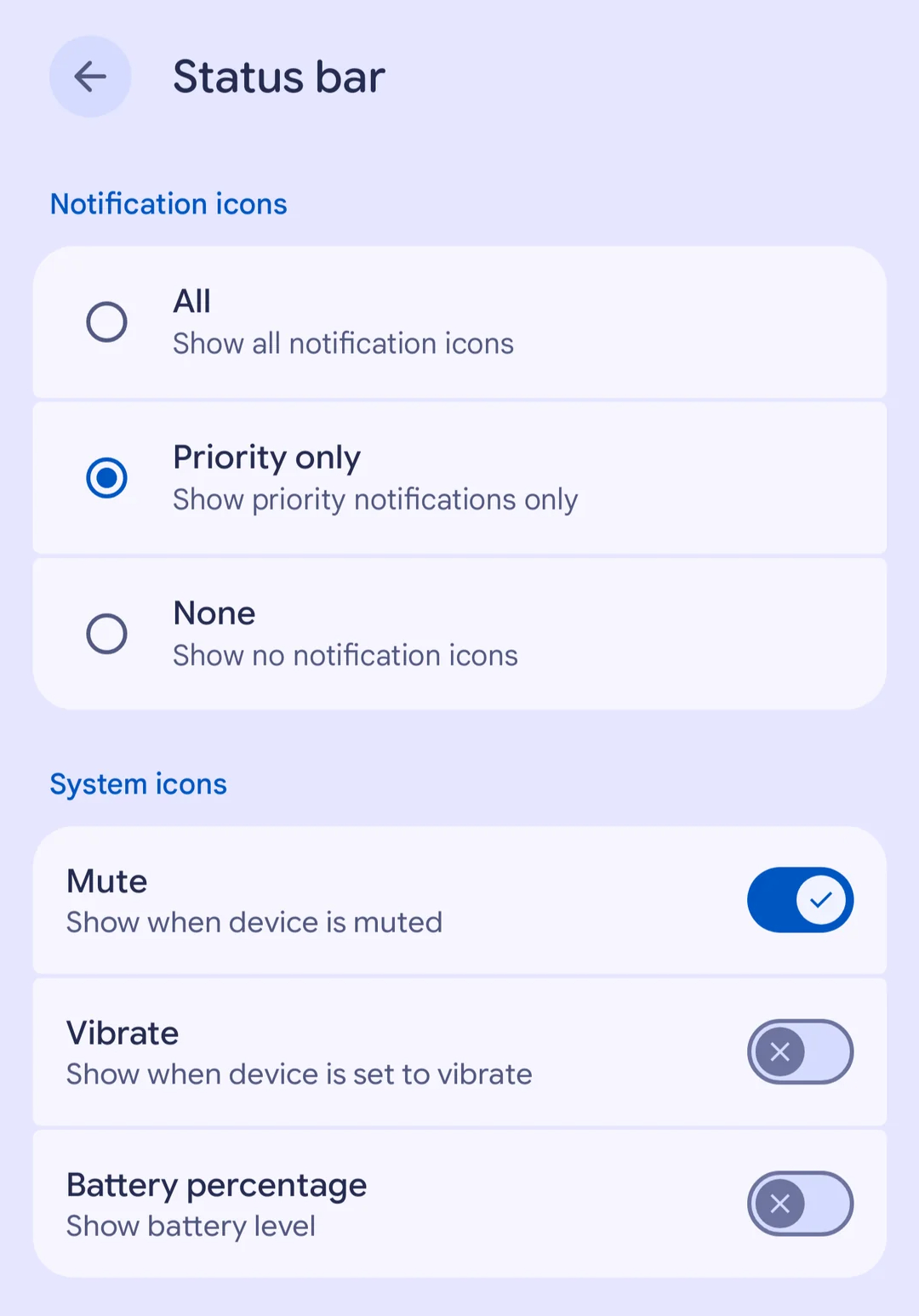
Beyond aesthetic adjustments, Google is also handing over greater management tools for the phone’s status bar and quick settings panels. A newly introduced settings page allows users to dictate precisely how notification icons are handled in the status bar, providing choices between displaying all notification icons, restricting the view to priority notifications only, or hiding them entirely.
In addition to managing notification icons, users can now toggle off individual system indicators that traditionally take up valuable screen real estate, including icons for battery percentage, mute states, and vibration modes. This level of customization ensures a cleaner, more minimalist status bar for those who prefer a clutter-free display.
Another practical adjustment embedded within the QPR2 release involves screen brightness controls. In previous iterations of the operating system, certain third-party applications possessed the ability to lock screen brightness at maximum levels, effectively overriding user inputs and preventing individuals from lowering the display brightness through the Quick Settings shade. Android 17 QPR2 removes this frustrating restriction, allowing users to manually adjust and dim their screen brightness even when an active application attempts to override the system setting.
Auracast gets smarter, foldables improve multitasking
Bluetooth LE Audio receives a major evolutionary step forward with the addition of a comprehensive Voice Broadcast feature. This capability enables users to broadcast their own voice directly using the smartphone’s built-in microphone or via a connected wired headset. Nearby listeners can then tune into the broadcast using compatible Auracast-enabled headphones, hearing aid devices, or other Android phones. For situations requiring privacy, users also have the option to secure their personal broadcasts with a password.
Google is simultaneously streamlining the Auracast discovery process by integrating QR codes, NFC tap-to-join functionality, and a dedicated Quick Settings tile. To make these broadcasts even more accessible, compatible receiving devices can leverage built-in features like Live Caption and Translation to follow along effortlessly.
For owners of foldable devices, Android 17 QPR2 introduces interface refinements designed to enhance multitasking efficiency. A new interactive handle is positioned neatly at the top of app windows, making the process of transitioning between full-screen applications, split-screen layouts, and floating bubbles much more intuitive and fluid.
Better privacy and a more convenient Linux Terminal
On the security front, Android 17 QPR2 implements a cleaner application installation dialog, granting users the ability to choose between temporary or permanent permission options when sideloading software. The update also introduces safeguards designed to block potentially risky actions during active phone calls from unknown contacts, such as restricting the ability to enable Developer options or requiring explicit confirmation before executing sensitive call-forwarding codes.
Privacy visibility is further bolstered by a new Private Compute Core logging option. This tool offers users greater transparency by allowing them to review specific data points shared with on-device artificial intelligence features, ensuring individuals maintain a clearer understanding of how their information is utilized locally.
For power users and developers, the built-in Linux Terminal application now supports guest-to-host file sharing. Through the standard Android file manager, users can seamlessly manage files residing within the Linux virtual machine, allowing them to browse, edit, and move documents without unnecessary friction.
Additional refinements arriving with the update include enhanced accessibility controls, customizable keyboard vibration patterns, improved management tools for hearing aids, and a helpful option to set a home time zone.
Users who participated in the beta testing phase and wish to transition to the stable over-the-air build without undergoing a complete storage wipe must ensure they manually opt out of the Android Beta Program first. Eligible Pixel owners can retrieve the latest over-the-air update directly through their device’s system settings menu, while users of non-Pixel hardware will need to await future software distributions tailored by their respective device manufacturers.