

For many developers working within the Drupal ecosystem, the integration of automated testing into daily workflows has long been viewed as an optional luxury—or worse, a burdensome complication that adds unnecessary expenses and technical complexity without guaranteeing a clear return on investment. Yet, the shifting landscape of modern web development demands higher standards of reliability, performance, and user experience. Enter Cypress, an open-source testing tool that is rapidly transforming how teams approach quality assurance. By bridging the gap between front-end user interactions and back-end execution, Cypress offers a compelling solution for developers looking to streamline their testing pipelines without sacrificing efficiency.
Adopting automated testing tools often feels daunting for teams accustomed to manual quality checks, particularly in content management systems like Drupal, where dynamic content, complex user permissions, and contributed modules create a vast matrix of potential failure points. However, industry adoption of tools like Cypress highlights a growing consensus that robust testing is essential for maintaining scalable, enterprise-grade digital platforms.
For developers eager to explore these capabilities within a standard Drupal environment, initiating the process begins with establishing a reliable local development setup. Assuming the use of a modern local orchestration environment and a standard project structure built via Composer, integrating Cypress is relatively straightforward. Developers working with standard directory layouts typically find that initialization through Node.js and the Node Package Manager provides a seamless pathway to incorporating end-to-end testing frameworks into existing version-controlled repositories.
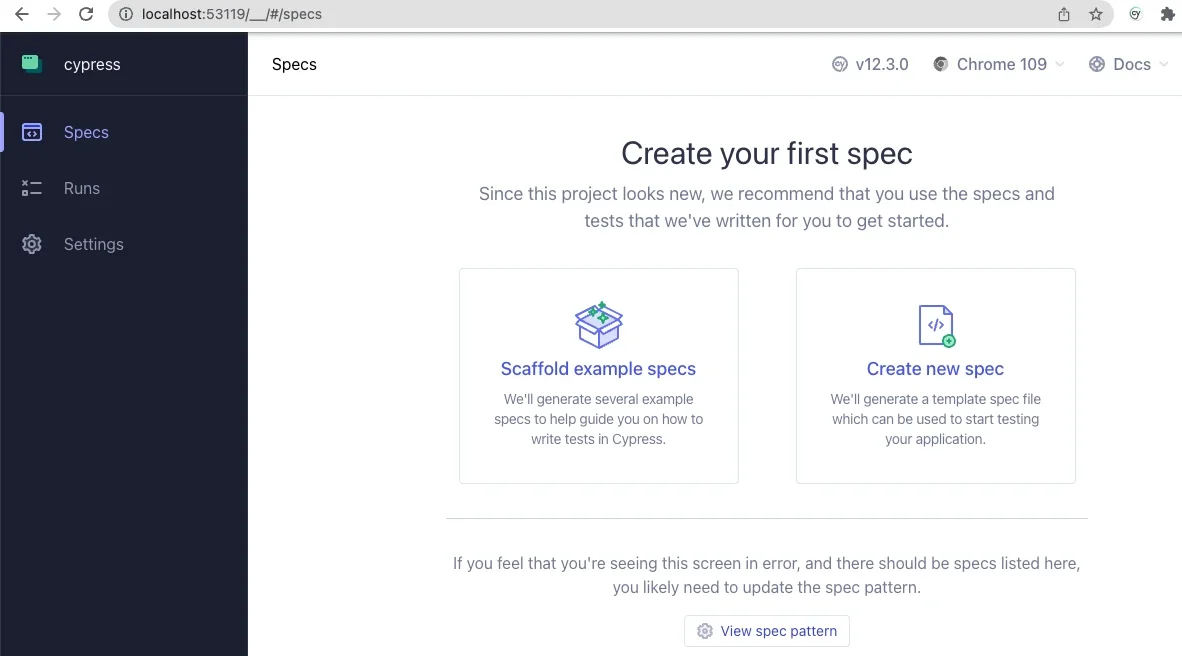
Once the foundational dependencies are established through standard package management commands, initializing the testing suite introduces developers to an interactive graphical interface. This interface serves as the command center for running and monitoring end-to-end test specifications. By configuring the testing environment to recognize local project URLs and specifying directories for assets, fixtures, and custom scripts, development teams can establish a direct line of sight between their local codebase and automated browser simulations.

Writing basic tests within this environment reveals the practical value of automated quality assurance almost immediately. Rather than relying on manual walkthroughs to verify that core functionality remains intact across updates, developers can author simple test specifications that simulate real user behaviors. These scripts can navigate to public landing pages, verify the presence of critical HTML elements, interact with input forms, and validate authentication workflows.
During the authoring process, teams often uncover subtle interface quirks that might otherwise slip past manual reviews. For instance, complex CSS styling, such as flexible box layouts on submit inputs, can occasionally interfere with automated interaction layers if elements are not properly validated or targeted. Automated testing catches these edge cases early, reinforcing the reliability of the front-end user experience and validating the core hypothesis that systematic testing genuinely prevents deployment-day surprises.
Beyond basic page loads and form submissions, the true power of Cypress in a Drupal context emerges through customization. Developers are not limited to generic testing commands; the framework allows for the creation of tailored commands designed specifically around common content management workflows. By leveraging support files and modular script organization, teams can write reusable functions that handle routine administrative tasks, such as clearing session states, terminating user sessions, or authenticating specific roles before executing critical test sequences.
This level of customization extends even further when integrating front-end testing environments with powerful back-end utilities like Drush. Through careful configuration and the use of environment variables, developers can execute command-line operations directly from their testing workflows. For example, rather than hardcoding credentials or exposing sensitive user passwords within test scripts, advanced testing configurations can programmatically generate one-time login links via Drush commands, instantly authenticating specific user IDs and routing them directly to designated application states.
This capability introduces profound security benefits to the testing lifecycle, allowing teams to verify administrative functions and role-based permissions without ever reading, transmitting, or storing raw user passwords within their test repositories. The ability of a front-end JavaScript testing framework to seamlessly interact with backend Drupal operations demonstrates the versatility of modern development tooling, blurring the traditional lines between client-side validation and server-side management.
As development teams continue to explore the boundaries of automated testing, resources from industry groups and open-source contributors provide valuable guidance on advanced use cases, including handling asynchronous operations, managing complex data fixtures, and testing dynamic Ajax-enabled forms. Publicly available code repositories and technical webinars offer ongoing support for teams looking to adopt these practices. Ultimately, incorporating tools like Cypress into Drupal workflows represents a significant step toward more resilient, maintainable, and secure web applications.



Leave a Reply