
When gamers purchase hardware or look to squeeze every drop of performance out of their systems, upscaling technologies have long been part of the conversation. Nvidia has long relied on its Deep Learning Super Sampling, known as DLSS, to render games at a lower resolution and reconstruct them intelligently. AMD offers its FidelityFX Super Resolution, or FSR, while Intel contributes its own XeSS solution to the mix. Yet, a lesser-known but increasingly powerful contender lives right inside the Windows operating system itself: Auto Super Resolution, a native feature that has been quietly making its way across a broader range of hardware architectures.
This week, Microsoft’s Auto Super Resolution is expanding its reach significantly, landing on laptops and desktops powered by Intel’s latest silicon. Specifically, the technology is coming to devices built on Panther Lake architecture, marking an important milestone for both high-end productivity laptops and portable gaming hardware.
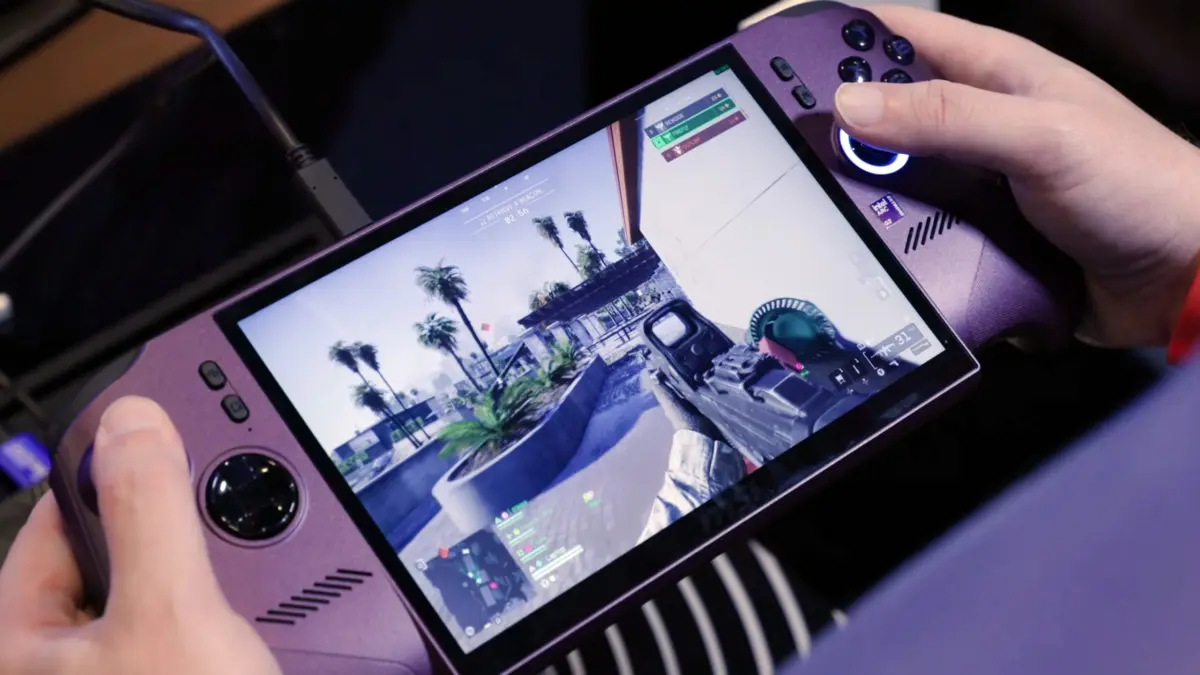
The expansion is particularly notable for systems utilizing Intel’s Core Ultra Series 3 processors—the high-performance chips finding their way into premium retail laptops—as well as the Arc G3 series. The Arc G3 series powers some of the most anticipated handheld gaming PCs on the market, such as the Predator Atlas 8. Because the vast majority of these gaming laptops and handheld devices operate on Windows, the arrival of a native, operating system-level upscaler offers an intriguing alternative to third-party or game-specific solutions like FSR and XeSS. Furthermore, this integration is bolstered by the presence of onboard Neural Processing Units, giving these dedicated AI engines a practical application beyond routine background tasks or generative utilities.
According to technical documentation and announcements from Microsoft, Auto Super Resolution is designed to be broadly compatible, capable of running with virtually any game utilizing DirectX 10 or later APIs. However, the system is engineered to deliver its most noticeable visual improvements in texture-heavy games running at higher resolutions and elevated graphical settings. Interestingly, Microsoft’s promotional materials for the feature encourage users to lean into higher visual settings and maintain a steady or slightly improved framerate, rather than prioritizing a pure performance leap that sacrifices image fidelity.

Promotional comparisons highlight this philosophy. In demonstration imagery for games like Assassin’s Creed Shadows, enabling Auto Super Resolution on an Ultra High graphics preset results in noticeably denser foliage and finer environmental details while keeping the overall framerate stable compared to native rendering without the feature engaged.
Despite its potential, Auto Super Resolution is still working through the growing pains typical of a developing operating system feature. The underlying AI models have been trained on very specific input and output performance targets, with optimization capped strictly around a 1080p baseline. When users attempt to run the feature outside of these anticipated parameters, the results can occasionally appear unpredictable or wonky.
Another technical limitation stems from how the feature processes the video output. Unlike game-specific solutions that often have access to rendering buffers and can apply upscaling while leaving user interface elements untouched, Windows Auto Super Resolution upscales the entire image indiscriminately. Consequently, even Microsoft acknowledges that text and fine line UI details can appear slightly fainter or softer after the process is applied. Because of these inherent trade-offs, Microsoft continues to recommend that users rely on developer-integrated upscalers like XeSS when a game explicitly supports them.
For users currently operating on compatible Panther Lake laptops or handheld gaming systems, the technology is now accessible. Microsoft has made the Auto Super Resolution package available for download through its application channels, allowing early adopters and enthusiasts to test the operating system’s upscaling capabilities firsthand across a wide catalog of DirectX-compatible titles.
Leave a Reply