
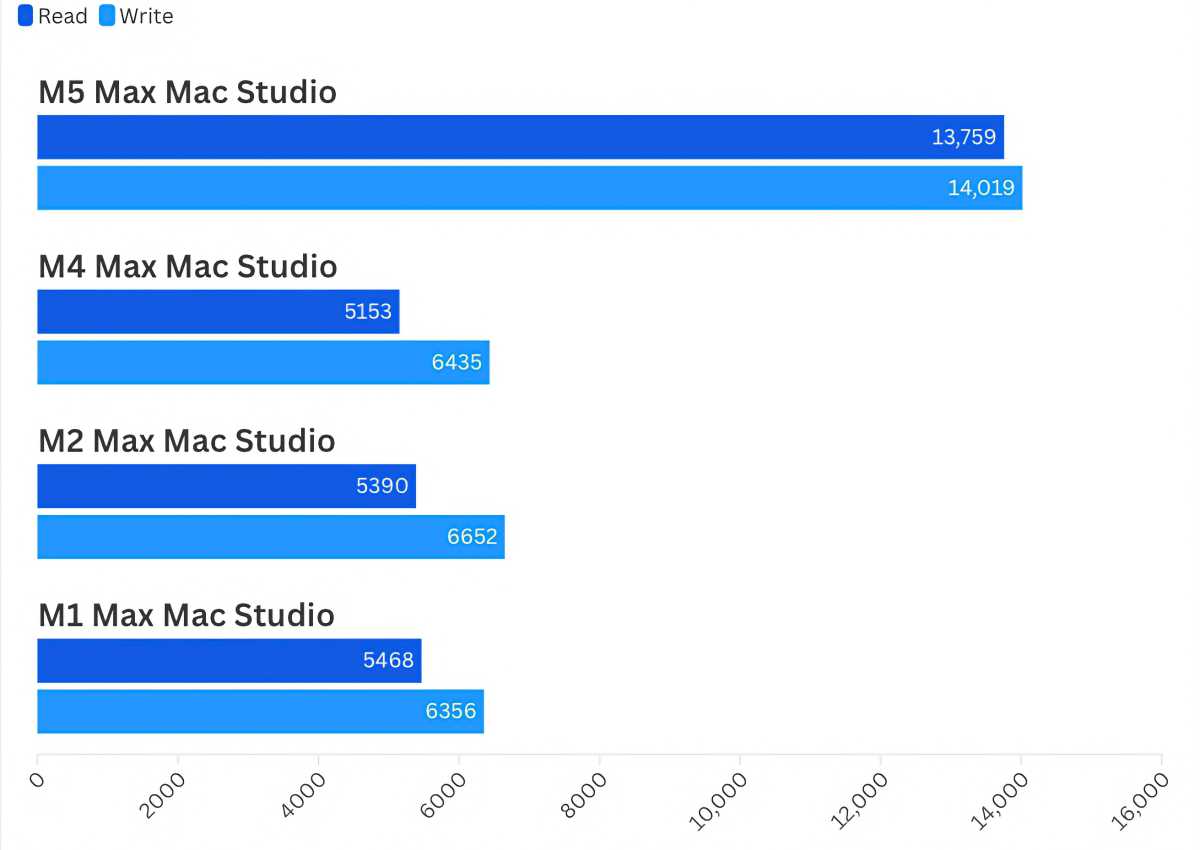
The latest iteration of Apple’s high-end desktop workstation has arrived, and it brings with it an internal hardware upgrade that is turning heads across the tech industry. According to recent expert evaluations, the SSD speed improvements on the 2026 Mac Studio are so dramatic that even professionals who invested in the previous M4 Max or M3 Ultra models earlier this year should seriously consider making the jump to the new M5 Max machine. Combined with expanded external display capabilities and faster graphics performance, the latest desktop release aims to solidify Apple’s dominance in high-end creative and technical production environments.

The new Mac Studio arrives with a mix of incremental processor updates and massive architectural leaps. While the CPU and graphics processing units offer a healthy, albeit expected, bump over previous generations, the true headline is the integration of the vastly superior solid-state drive technology first introduced with the M5 MacBook Pro. For heavy production environments where data transfer rates directly impact turnaround times, the financial investment in the current Mac Studio is being viewed by reviewers as money well spent, proving that time-saving hardware can quickly offset higher hardware costs.

M5 Max Mac Studio: Specifications and Configuration Options
Apple continues to offer the Mac Studio in two primary standard configurations, catering to a wide spectrum of creative professionals, developers, and power users. The entry-level model begins at $2,499, equipped with an M5 Max chip featuring an 18-core CPU—split into 6 super cores and 12 performance cores—alongside a 32-core GPU and 36GB of unified memory. At the higher end, a configuration featuring the M5 Ultra chip starts at $5,499 with 96GB of RAM. Beyond these baseline setups, customers can heavily customize their machines by adjusting core counts, expanding memory, and scaling up internal SSD storage to meet demanding workflow requirements.
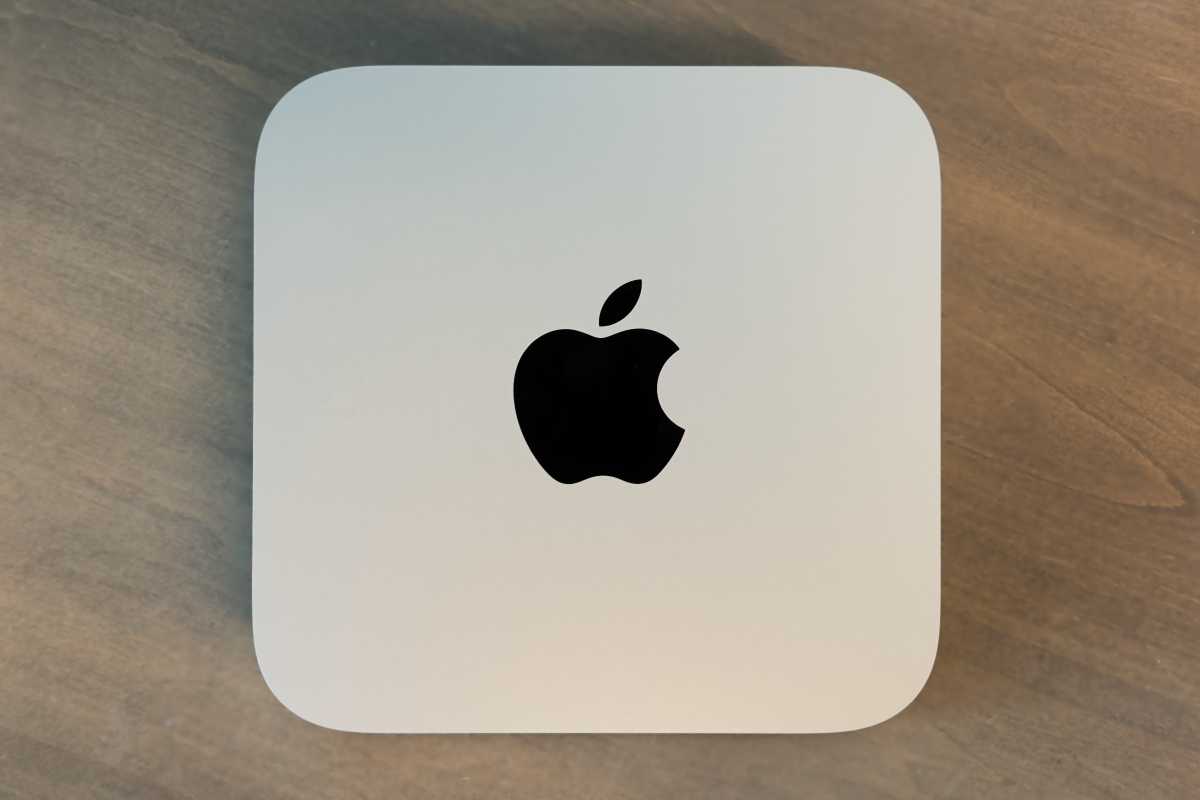
In-depth testing of upgraded units—such as configurations featuring the 18-core CPU, 40-core GPU, 128GB of RAM, and a massive 4TB SSD—reveals the true ceiling of Apple’s silicon performance. However, buyers must navigate Apple’s tiered pricing structures carefully. For instance, moving beyond the base 36GB of RAM requires stepping up to a higher GPU tier, which immediately adds hundreds of dollars to the final bill before factoring in memory and storage premiums. These customization costs push fully loaded configurations into substantial financial territory, making purchase decisions a careful calculation for independent professionals.
Performance Benchmarks: Shifting Into Overdrive
When evaluating overall system capabilities, benchmark suites like Geekbench 7, Geekbench 6, and Maxon’s Cinebench paint a clear picture of generational progress. While previous generations featured staggered releases—such as Apple skipping an Ultra chip generation before introducing the M3 Ultra—the M5 series establishes a unified generation encompassing both Max and Ultra variants.
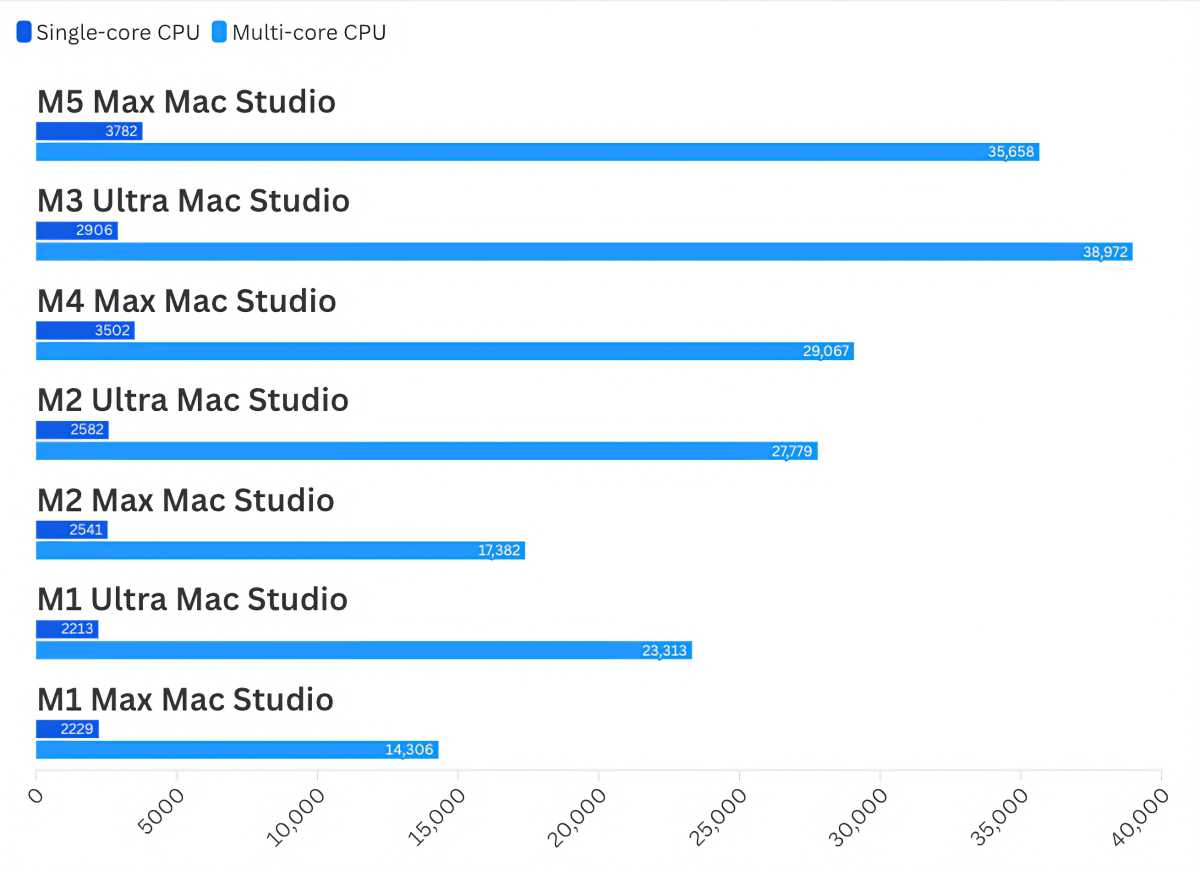
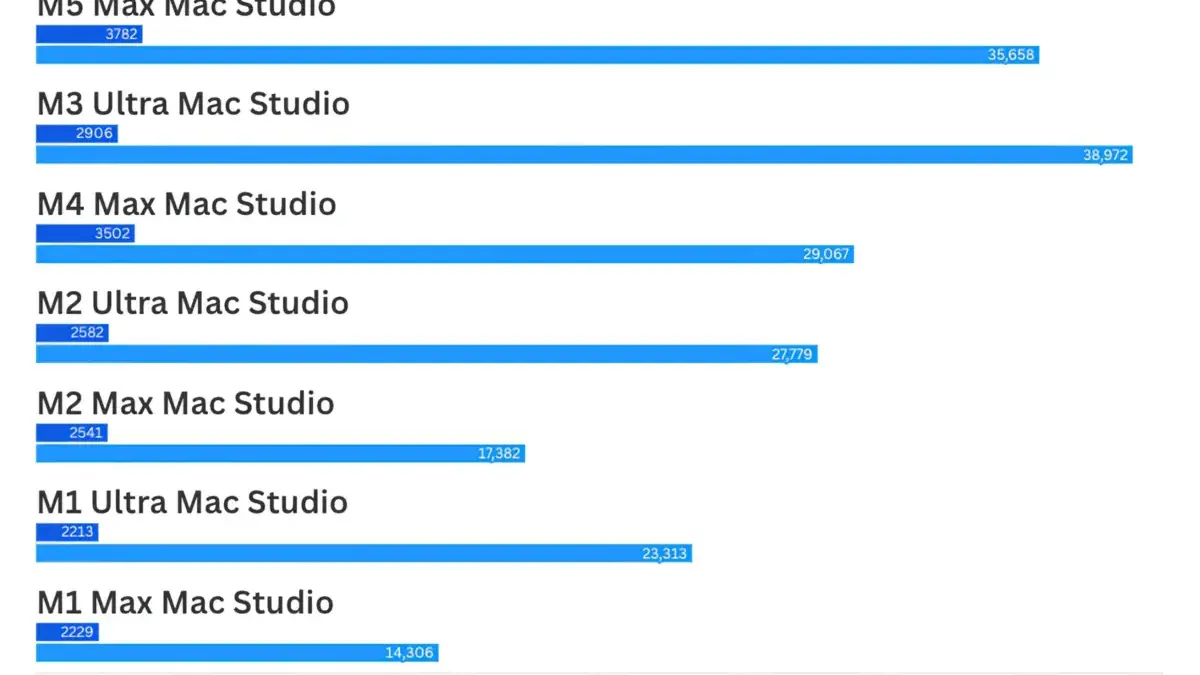
In multi-core CPU testing using Geekbench 7, the previous-generation M3 Ultra still holds an advantage due to its sheer volume of cores, beating the M5 Max by roughly 9 percent. However, when compared directly to its immediate predecessor, the M4 Max, the M5 Max delivers a substantial 22 percent performance boost in multi-core tasks. Single-core results show a consistent 8 to 10 percent generation-over-generation improvement.
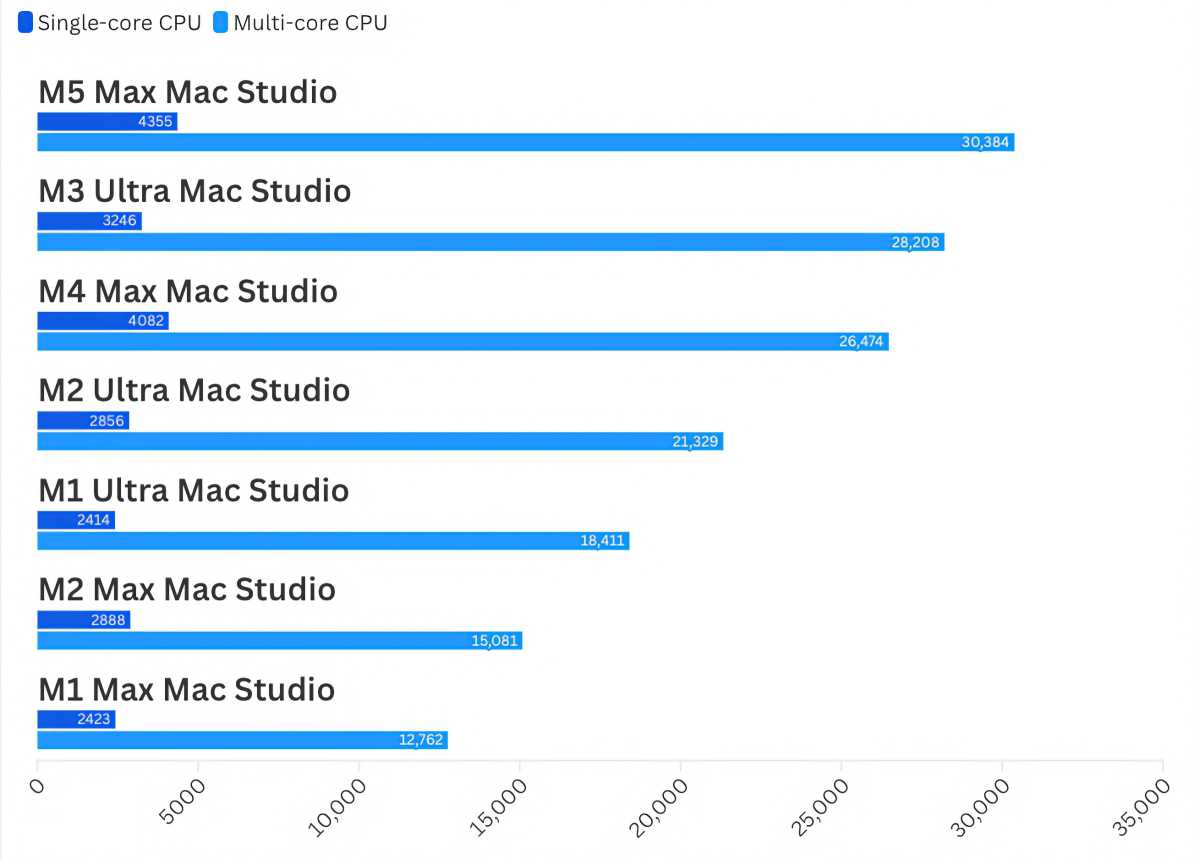
Yet, synthetic processor benchmarks do not tell the whole story. The standout performance metric belongs to disk read and write speeds. The SSD improvements brought over from the M5 MacBook Pro redefine what users can expect from internal storage on a desktop Mac. This monumental leap in storage throughput ensures that heavy file transfers, large project loading times, and virtual memory swapping occur almost instantaneously, providing a palpable, day-to-day workflow enhancement that raw CPU numbers fail to capture.
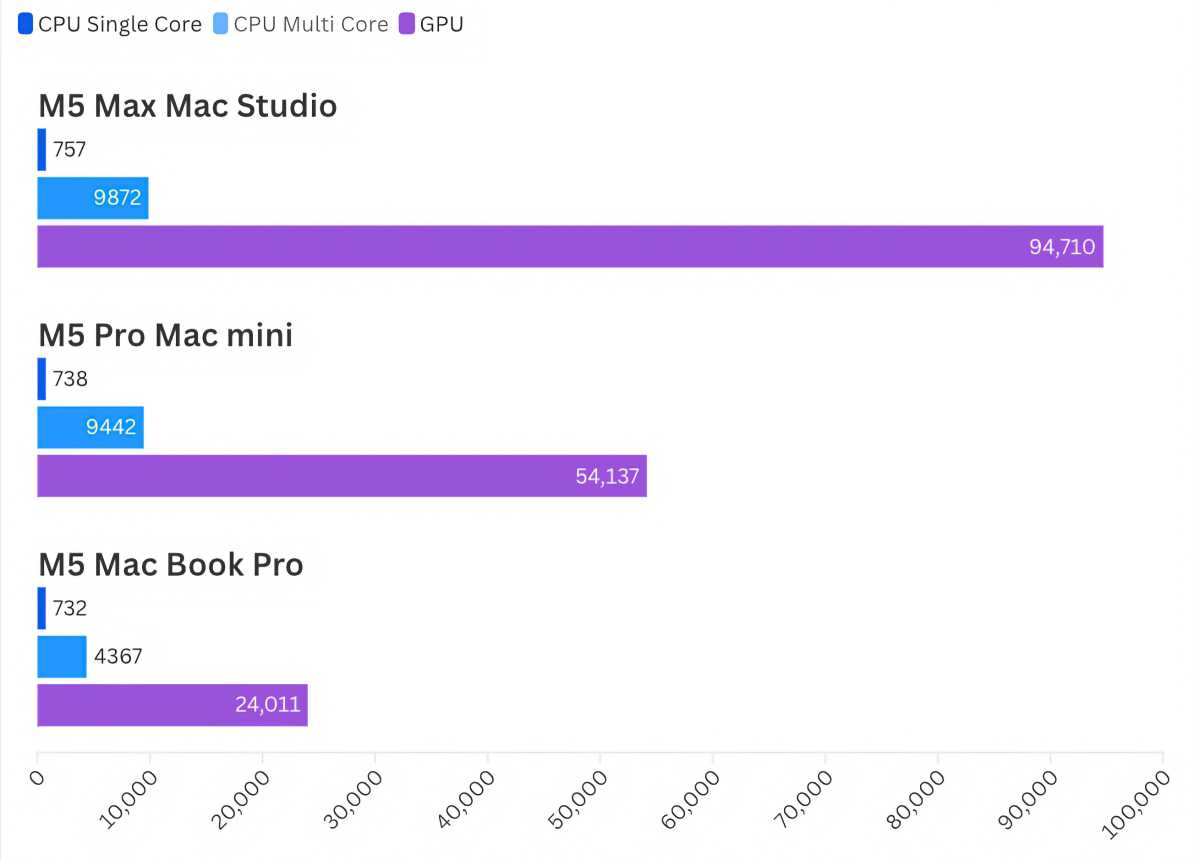
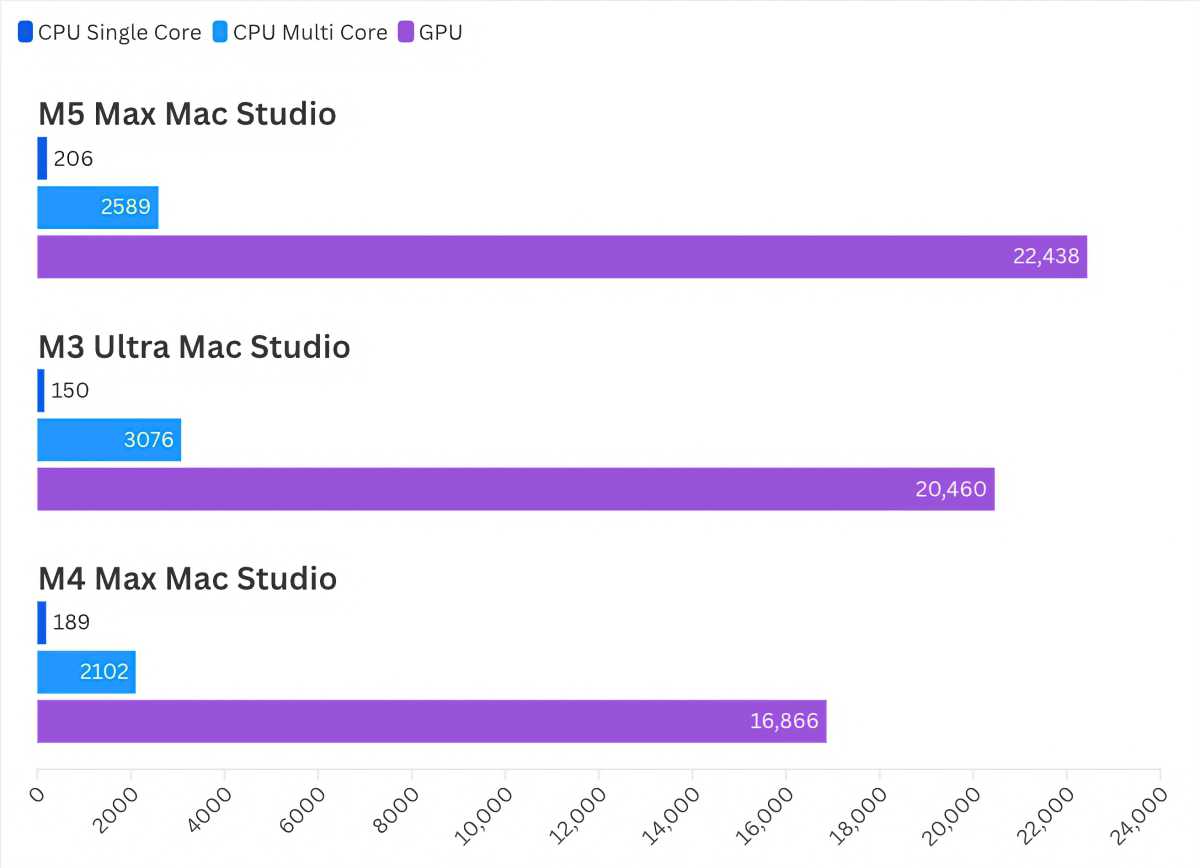
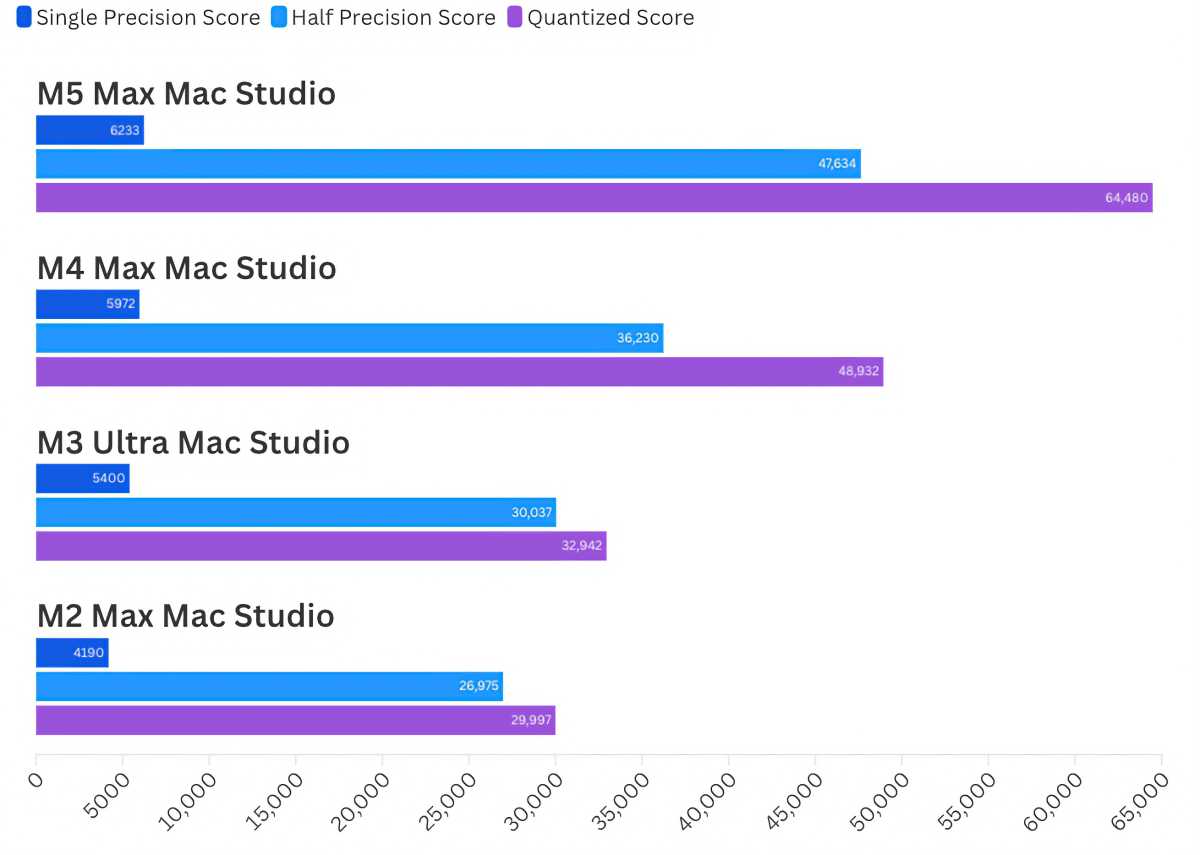
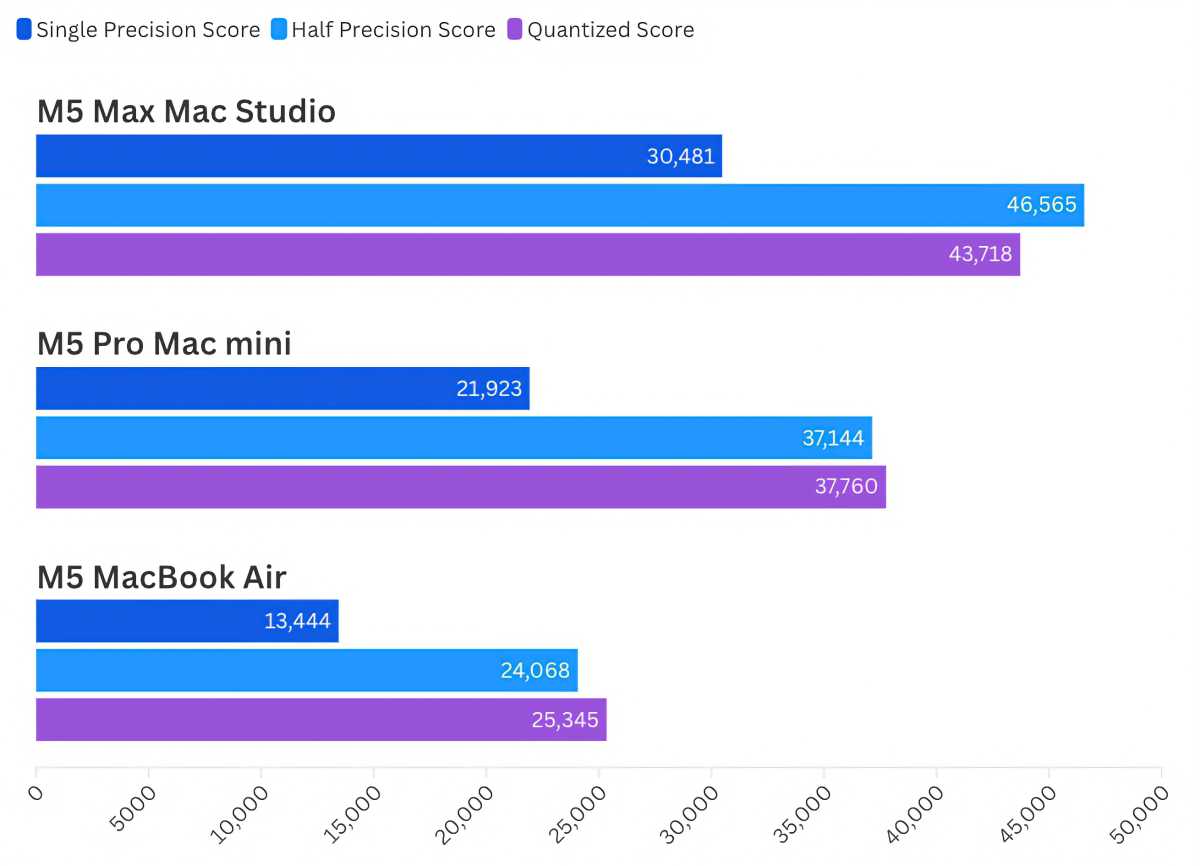
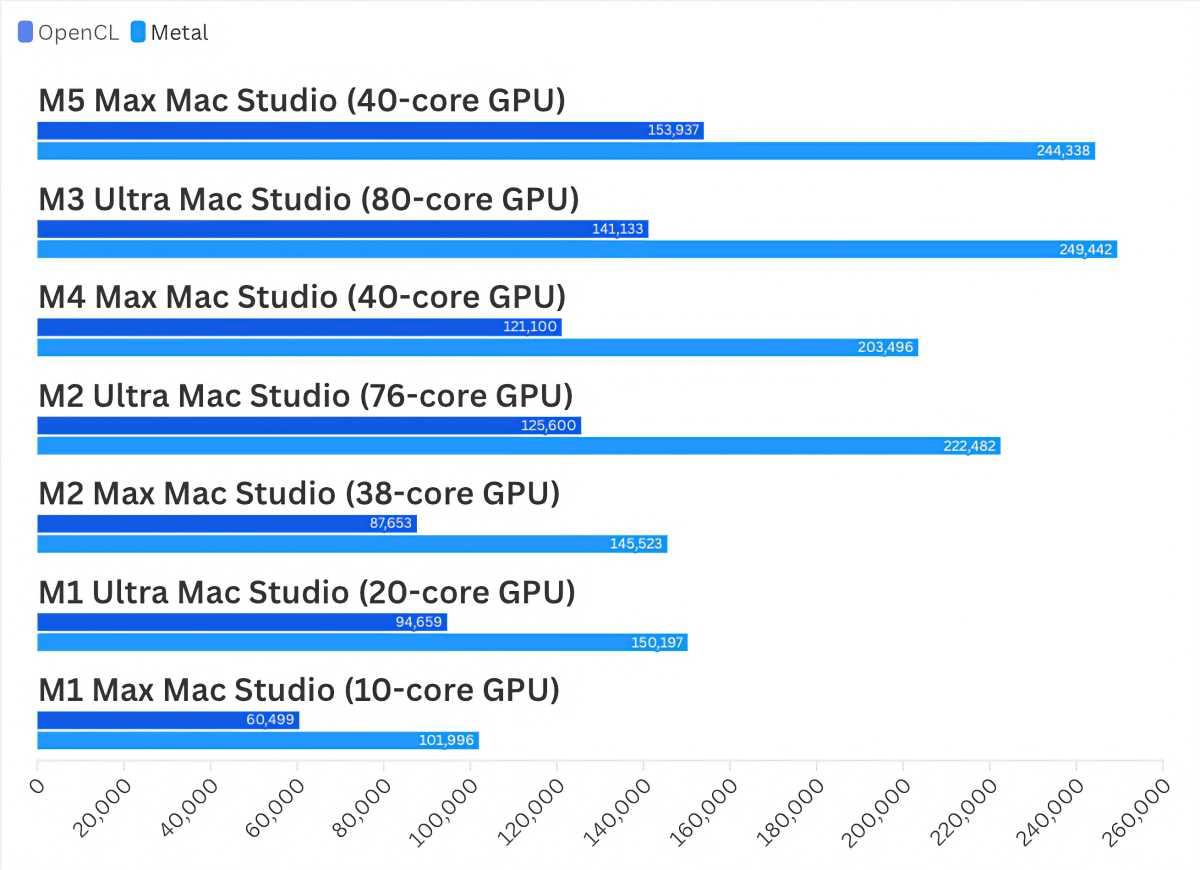
Furthermore, graphical and computational tests highlight impressive leaps. Cinebench testing indicates that the M5 Max delivers a 10 percent GPU boost over the M3 Ultra, and a striking 33 percent improvement over the M4 Max. In real-world gaming benchmarks, frame rate increases of 30 percent or more were recorded in titles like Total War: Warhammer III and Borderlands 3. Meanwhile, AI developers will find substantial value in the upgraded Neural Engine, which offers vast performance gains over previous chips, though users working heavily with artificial intelligence must carefully weigh their RAM requirements against Apple’s strict memory tiering.
Thunderbolt 5 Ports and Expanded Display Support
Connectivity on the 2026 Mac Studio builds upon the foundation laid by its predecessor, retaining the high-throughput Thunderbolt 5 ports. These ports deliver a baseline throughput of 80Gbps that can scale up to 120Gbps when paired with a compatible Thunderbolt 5 cable and supporting peripherals.
External display support has also received a notable upgrade. The M5 Max Mac Studio is now capable of driving up to five displays simultaneously. Users can connect four displays via Thunderbolt at resolutions up to 6K at 60Hz or 4K at 165Hz, alongside a fifth display connected through the HDMI port at 5K resolution and 60Hz. Alternatively, the machine can drive a setup consisting of two ultra-high-resolution displays at 8K/60Hz, 5K/120Hz, or 4K/240Hz, plus a third display via HDMI. This expanded display versatility gives video editors, financial analysts, and multi-monitor power users significantly more flexibility in configuring their workspaces.
Design Continuity and the Reality of Higher Pricing
Externally, the 2026 Mac Studio preserves the exact same physical chassis design that Apple introduced when the product line debuted in 2022. The compact, aluminum form factor remains unchanged, and given its thermal efficiency and desktop footprint, a redesign is unlikely in the near future. Port layouts remain identical, and peripherals such as keyboards, mice, and monitors continue to be sold separately. Apple’s standalone displays—including the standard Studio Display and the high-end Studio Display XDR—remain available for professionals seeking color-accurate, premium panel matching, though third-party alternatives are often sought by budget-conscious buyers.
The most contentious aspect of the 2026 Mac Studio release is not its hardware capability, but its cost. Following price adjustments made by Apple in previous product cycles, the base M5 Max model starts at $2,499—marking a $500 increase compared to the launch price of the M4 Max Mac Studio. The Ultra tier has seen even steeper increases, with the M5 Ultra starting at $5,499 following consecutive price hikes over prior generations.
These steep financial requirements force a reevaluation of personal and corporate upgrade cycles. While large production houses can easily offset the expense through immediate productivity gains, individual creators and freelancers may find the financial barrier formidable. Industry analysts suggest that these elevated hardware costs represent a permanent pricing shift rather than temporary supply chain fluctuations, meaning Mac buyers will need to adjust their expectations for future desktop investments.
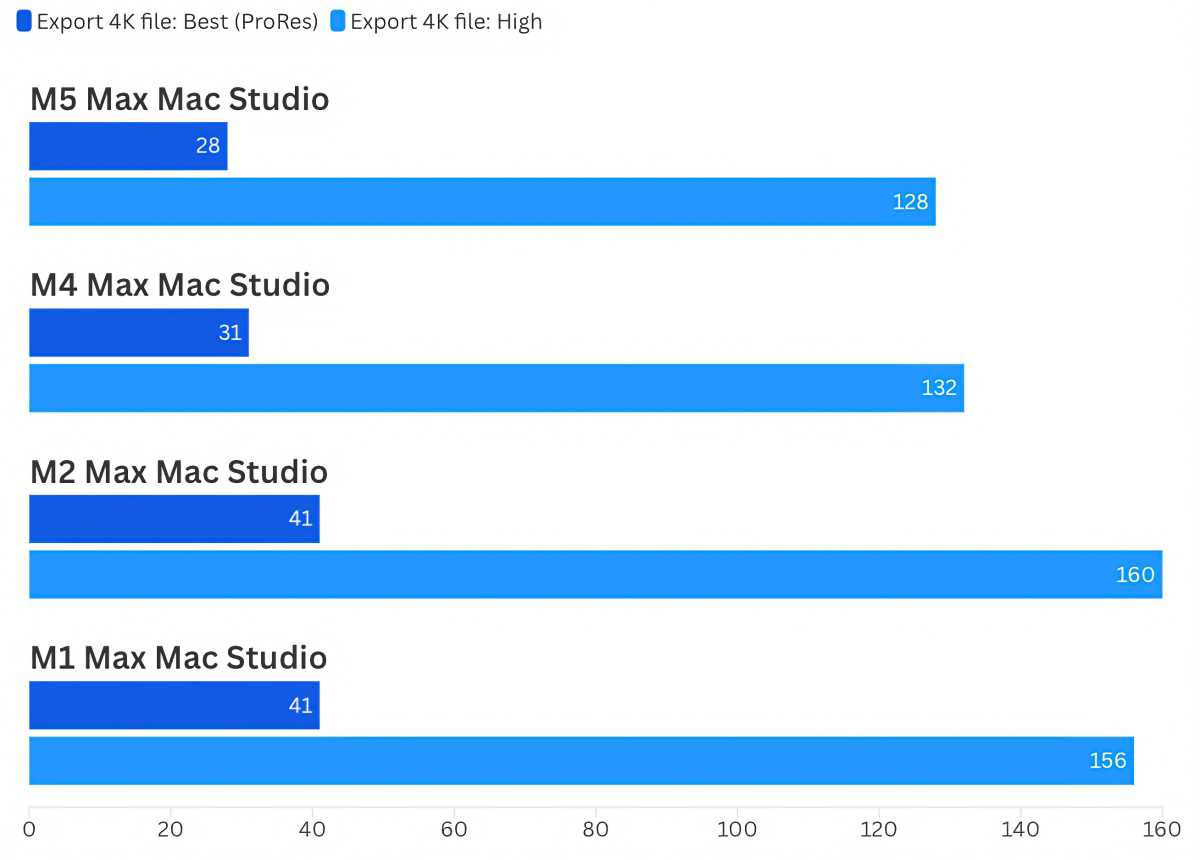
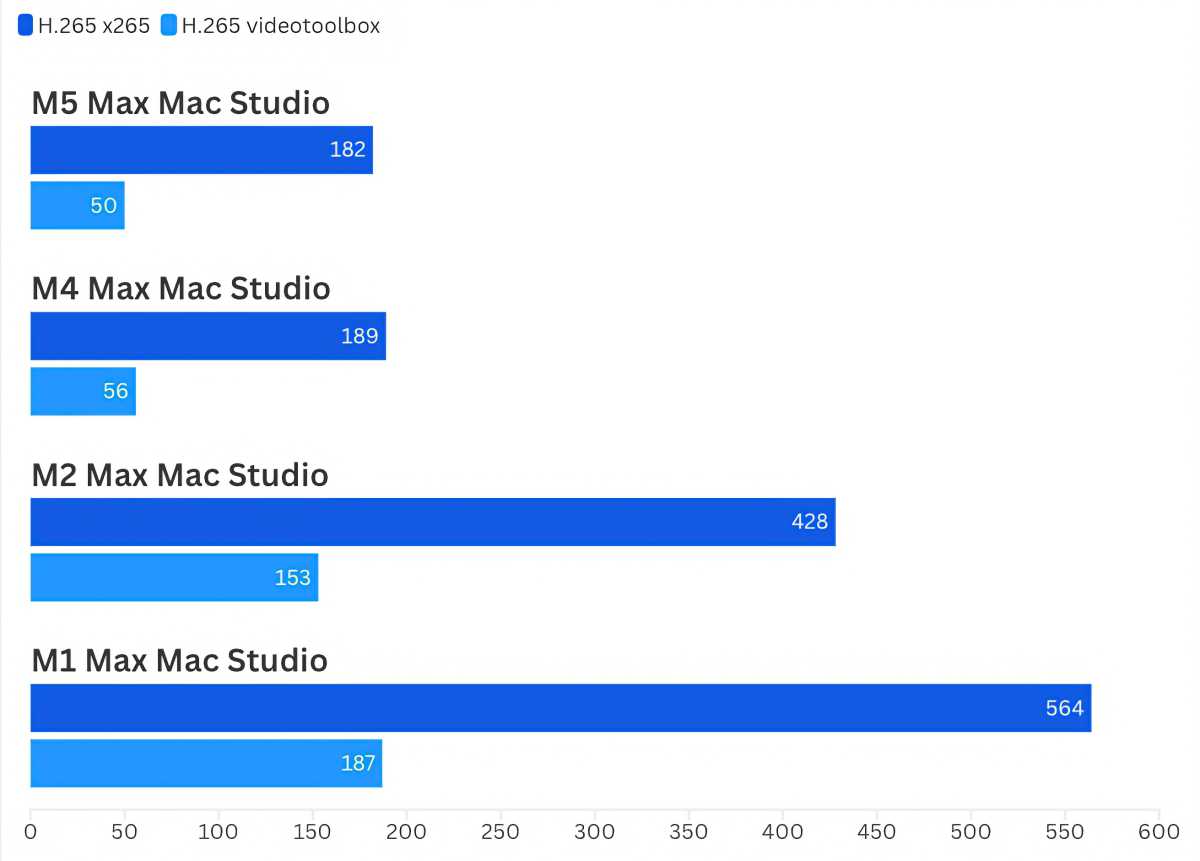
Ultimately, for professionals whose livelihoods depend on uncompromised processing power, data throughput, and rendering speeds, the 2026 Mac Studio delivers improvements that make it an compelling acquisition. The dramatic SSD performance boost alone justifies consideration for those currently operating on recent hardware, cementing the machine as a top-tier option for anyone seeking the absolute peak of Apple desktop performance.



Leave a Reply