For many developers working within the Drupal ecosystem, the decision to omit automated testing from a project’s development lifecycle often boils down to a familiar perception: that writing and maintaining tests introduces unnecessary complexity, additional expense, and administrative overhead without delivering tangible, day-to-day benefits. This skepticism is particularly common among teams working under tight deadlines or managing lean web operations. However, modern open-source testing solutions are steadily shifting this paradigm by offering robust, developer-friendly frameworks that streamline quality assurance. Among these tools, Cypress has emerged as a prominent choice for front-end and end-to-end testing, bringing a variety of architectural and operational advantages to web development workflows.
Examining how automated testing integrates with modern content management architectures reveals that tools like Cypress can significantly reduce regression bugs and verify user experience consistency. For teams managing complex Drupal implementations, incorporating a reliable testing framework ensures that core functionalities—ranging from user authentication flows to dynamic form submissions—operate smoothly across updates and deployments. To understand how this integration works in practice, developers typically examine three key phases of adoption: establishing the initial environment and installing the tool, writing and executing basic verification scripts, and customizing the framework to interact seamlessly with Drupal-specific mechanisms.
Installing Cypress within a Modern Local Development Environment
To begin implementing automated tests, developers generally assume a standard local development environment built around composer-based projects, such as the drupal/recommended-project template. While configuring a local setup using tools like Lando falls outside the immediate scope of basic testing guides, having a well-structured project layout is essential. A typical project structure includes core directories such as vendor and web, alongside standard configuration files like composer.json and composer.lock.
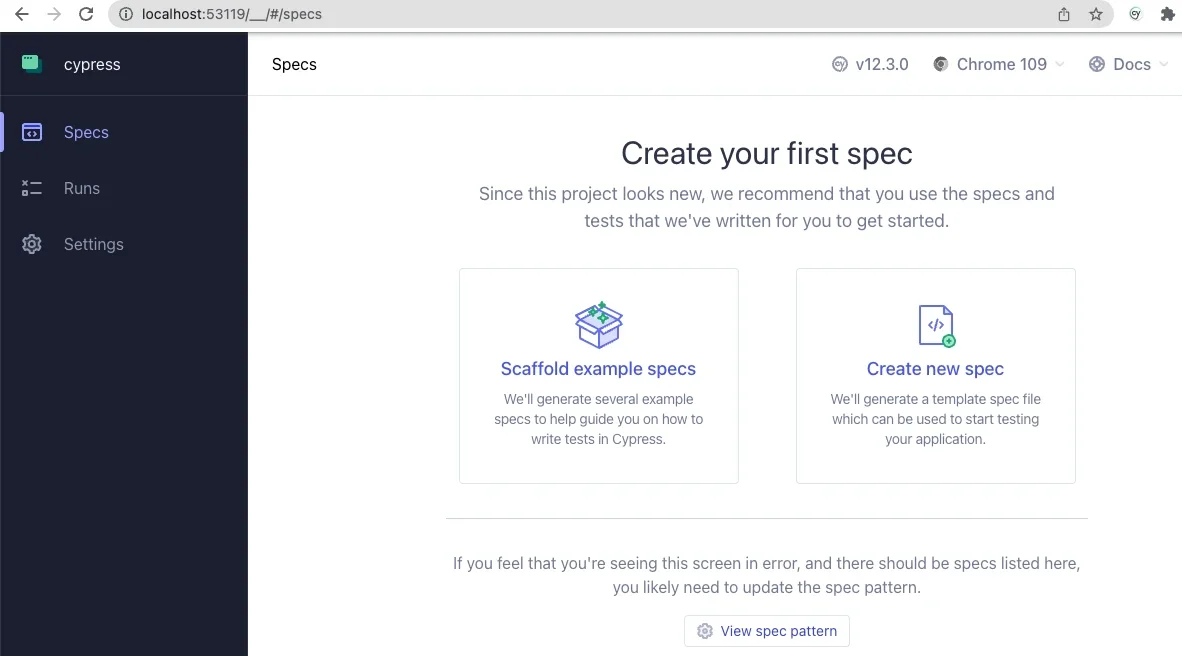
Cypress provides comprehensive installation documentation supporting a variety of operating environments and workflows. For many developers, installation is managed through npm, the Node.js package manager. Initializing a project via the command line establishes a base package configuration file, after which Cypress can be added as a development dependency. Launching the Cypress application for the first time opens an interactive graphical interface. Because a fresh installation lacks preexisting configuration files or custom test suites, the application prompts the user to configure the project for end-to-end testing. Selecting this option automatically generates the necessary directory structure and configuration files within the project root.

Following initial configuration, developers select their preferred browser for test execution, with Chromium-based browsers being a popular standard. Upon launching the testing environment, a secondary browser window opens to display a spec creation interface. This interface allows developers to load example specs provided by the framework, offering an accessible introduction to test syntax. The underlying language, built on JavaScript, is designed to be intuitive and readable for web developers. The application interface typically divides into two primary panels: a text-based step-by-step log on the left and a simulated browser window on the right, which visually demonstrates the user experience as the test executes.
To ensure the testing framework correctly locates project resources and test specifications, developers modify the primary configuration file located in the project root. Adjusting parameters such as the base URL ensures that the test runner points directly to the local development environment. These configuration updates allow Cypress to map its internal resources accurately against the local Drupal site architecture.
Writing and Executing Basic Tests for Drupal Applications
Once the environment is properly configured, developers can begin authoring custom test specifications within a designated integration directory. A basic test file can evaluate fundamental site behaviors, such as verifying that the front page loads correctly and that critical elements, like the main page title, exist in the Document Object Model. Furthermore, tests can simulate user interactions with complex site features, such as authentication forms.
For instance, a standard authentication test might navigate to the user login path, input specific credentials into the appropriate form fields, and trigger the submission action to verify that the system correctly rejects invalid login attempts. Through this process, developers often gain valuable insights into front-end behavior. During practical implementation, engineers have discovered that certain form elements—such as submit buttons styled with CSS flexbox properties—require explicit assertions confirming they contain specific text before the test runner can successfully interact with them. This empirical validation demonstrates the practical value of automated testing in uncovering subtle front-end rendering quirks that might otherwise go unnoticed until deployment.
When a test script is executed within the application interface, developers can observe the test runner methodically stepping through each defined action. The visual feedback provided by the side-by-side execution panels allows teams to track navigation, monitor element selection, input simulation, and form submission in real time.
Customizing the Framework for Drupal-Specific Workflows
Beyond standard web interactions, the testing framework can be extended through custom commands tailored specifically to content management workflows. The framework’s support file configuration points to dedicated script modules where custom commands are defined and imported automatically without requiring explicit file extensions.
Developers can construct custom commands to handle routine administrative or user-state tasks across multiple test scripts. For example, a custom logout command can be established to ensure that any active user session is terminated before initiating subsequent test sequences. Building upon this, a comprehensive login command can be structured to clear existing sessions, navigate to the authentication path, populate the username and password fields, and submit the form. To enhance security during testing, sensitive parameters such as password inputs can be configured to remain hidden within execution logs.
Advanced integrations can also leverage environment variables to bridge front-end testing tools with back-end administration utilities like Drush. By integrating command-line operations into test definitions, developers can programmatically execute administrative tasks directly from their testing suites. For example, a custom command can utilize user identification numbers to generate one-time login links via Drush, allowing test scripts to authenticate specific user accounts instantly without manually handling or storing plaintext passwords. This capability highlights an intersection between front-end validation tools and server-side management utilities, offering significant security and efficiency advantages for Drupal maintenance teams.
As organizations continue to refine their quality assurance practices, adopting flexible testing frameworks provides a structured approach to maintaining web application stability. Additional resources, including community-maintained repositories and webinars focused on Drupal testing methodologies, offer further guidance for development teams looking to expand their automated testing capabilities.