
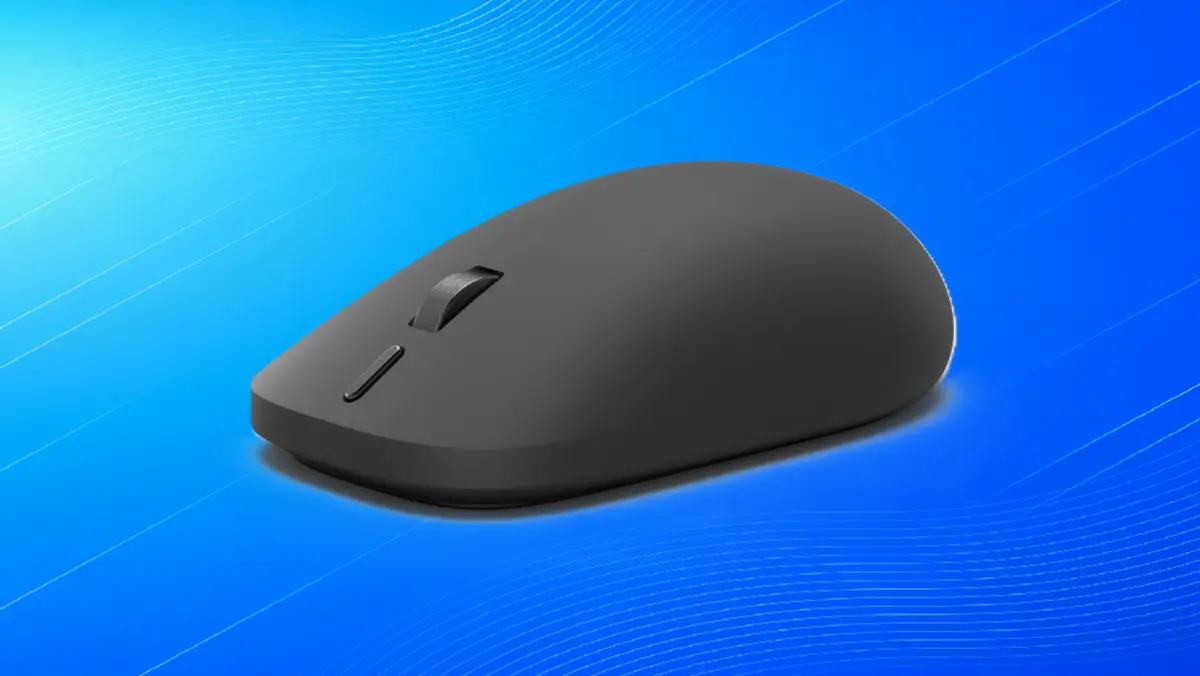
When Microsoft unveiled its latest hardware lineup alongside a new wave of devices powered by Qualcomm’s Snapdragon X2 Plus chips, the tech giant introduced several predictable refreshes alongside a few intriguing surprises. Among the new 13-inch Surface Laptop priced at $1,199 and the 12-inch Surface Pro priced at $1,149, it was a much smaller peripheral that arguably captured the most technical intrigue. Microsoft announced a new version of the Surface Mouse, a $79.99 ambidextrous peripheral designed specifically with new Windows features in mind.
The primary technological hook of this new mouse is its support for Windows’ latest interface feature: haptic feedback. By bringing tactile responses to a traditional desktop mouse, Microsoft is joining hardware manufacturers like Logitech in pushing the boundaries of how users physically interact with their operating systems. However, while these advancements represent a concerted effort to modernize the classic PC-mouse interface, they ultimately raise a fundamental question about modern hardware design: are haptic desktop mice answering a genuine productivity need, or are they merely solving a problem that never truly existed?
To understand the evolution of this technology, it helps to look at how haptic feedback has already transformed other computing hardware. For years, manufacturers have successfully integrated haptic trackpads into premium portables, such as the Surface Laptop Studio 2. Unlike traditional mechanical trackpads that rely on physical hinges and require users to depress a mechanical switch—a mechanism whose actual clickability often extends only over a limited portion of the surface—haptic trackpads use localized vibrations to simulate the sensation of a click anywhere on the glass pad.
These trackpad implementations have proven to be exceptionally useful. Because the entire surface registers tactile feedback uniformly, users do not need to aim their fingers at a specific mechanical zone to execute a command. The transition from mechanical clicking to solid-state, haptically simulated clicking eliminated physical wear-and-tear while expanding the functional footprint of the input device.

However, translating that same philosophy from a laptop trackpad to a standalone desktop mouse introduces a entirely different dynamic. In April, a preview of these new haptics inside Windows 11 Insider Build 26300.8155 showcased how force feedback could be integrated into the desktop environment using prototype hardware. Now, that capability is moving into consumer products. The new Surface Mouse and Logitech’s MX Master 4 for PC and Mac—widely regarded as a premier productivity mouse—both support these advanced haptic functions.
When connected to a compatible system, these mice utilize vibrations and subtle pushes against the user’s fingers to communicate desktop actions. Aligning objects in Microsoft PowerPoint, window snapping, resizing windows, or hovering over the Close button all trigger physical feedback on the mouse, mirroring the behaviors built into modern operating system trackpads. Additional capabilities, such as the tactile notification accompanying drag-and-drop file operations, are slated to roll out over time. Logitech’s hardware takes the concept even further, providing users with the option to turn on additional haptic features through its Actions Ring and Smart Actions software, or generating physical pulses when the mouse is searching for a Bluetooth host or establishing a connection.
The physical implementation of these features varies by design. Logitech’s haptics, for instance, are designed to trigger as part of the thumb rest, providing a localized cue to the hand. While the exact internal configuration of Microsoft’s new Surface Mouse remains subtle, both companies are leaning heavily into the idea that physical touch should accompany visual cues on the desktop screen.
Appreciating the engineering behind these products does not automatically translate to a belief in their absolute utility. While haptic trackpads easily justify their existence by maximizing usable surface area and removing mechanical failure points, haptics inside a desktop mouse tell a different story.

Using a haptic-enabled desktop mouse often feels less like an indispensable productivity booster and more like a high-tech convenience. Drawing an analogy to the automotive world, a car’s primary purpose is straightforward: to transport you efficiently from point A to point B. In that context, desktop mouse haptics can feel somewhat akin to an extra rear-window wiper. Is it functional? Yes. Is it strictly necessary for the core task of driving? Not necessarily.
During demonstrations of the technology, representatives often position these features as adjustments that users quickly adapt to, claiming they would genuinely miss the tactile responses if the feature were suddenly removed. There is a degree of truth to that observation. Human muscle memory and sensory adaptation mean that users can grow accustomed to almost any subtle feedback loop. Yet, it remains difficult to escape the feeling that the feature is a luxury addition rather than a vital workflow enhancement. After all, the human eye can easily perceive when a window expands on a high-resolution display, and a user can effortlessly click a window closed without requiring tactile confirmation from the palm of their hand.
The breadth of these integrations also introduces potential pitfalls regarding sensory overload. During testing sessions where hardware like the Logitech MX Master 4 was made available for hands-on evaluation, the sheer volume of potential actions tied to haptic feedback became apparent. As a left-handed user who typically avoids dedicated right-handed mice, the thoughtful ambidextrous consideration behind Microsoft’s design choices is certainly welcome. However, when haptic feedback triggers for too many routine actions, the distinct signals begin to blur together. When every minor movement or interface boundary crossing results in a buzz, it becomes increasingly difficult to keep track of what each specific vibration is actually trying to communicate.
Ultimately, these developments highlight a nuanced reality in hardware design. The pursuit of more immersive, responsive computing interfaces is a worthy endeavor, and nobody actively turns down thoughtful engineering improvements designed to streamline daily PC interaction. Yet, after evaluating how these systems operate in practice, it is difficult to shake the impression that haptic desktop mice are offering physical confirmations for information that the user’s eyes and existing workflows already provide natively. Innovation for its own sake is fascinating to witness, but when it comes to the classic desktop mouse, the added complexity may ultimately solve a problem that never truly existed.
Leave a Reply