
Seven and a half years after the block editor made its debut in WordPress Core, developers have been given a long-awaited alternative to the traditional JavaScript-heavy block development workflow. With the release of WordPress 7.0, developers can now build and register custom blocks using exclusively PHP, eliminating the traditional requirement to learn React, configure complex build pipelines, or manage intricate NPM packages.
While the feature marks a significant evolution in how WordPress handles code, it arrives with a clear division among developers regarding its capabilities and practical applications. For years, building a custom WordPress block required dual registration: once in PHP and once in JavaScript. Developers who wanted to introduce custom blocks or migrate existing features into the block-based editing environment had to master a modern JavaScript stack, setting up Webpack or similar bundling tools alongside dependency managers.

WordPress 7.0 changes this dynamic by introducing a streamlined registration approach that relies strictly on PHP. By implementing a specific autoRegister flag within the block supports section, WordPress can now automatically generate the necessary client-side registration and editor previews based entirely on the PHP block configuration.
This simplification extends to block attributes, which historically required developers to construct matching user interface controls within the JavaScript editor architecture. Under the new PHP-only approach, defining attributes during block registration prompts WordPress to automatically generate the corresponding input controls within the block’s settings sidebar. For many developers accustomed to classic WordPress theme development, the shift feels reminiscent of a simpler era of programming, stripping away layers of configuration overhead that have accumulated around the Gutenberg ecosystem.

However, the arrival of PHP-only blocks has sparked immediate technical discussions regarding their architectural limitations. Because the editor displays HTML returned directly by the block’s PHP render callback, blocks registered this way operate outside the single-page JavaScript application that powers the broader editor experience. When a user interacts with block controls, the editor requests a fresh PHP render via a REST API endpoint, a mechanism that introduces distinct constraints for content interaction and data handling.
These constraints become apparent when attempting to build interactive components. Developers cannot add custom controls directly within the block preview area, confining interface options entirely to the auto-generated sidebar settings. Furthermore, features such as image uploads or multiline text editing are currently unsupported within this framework. Dynamic JavaScript interactions that rely on finding and manipulating DOM elements—such as transforming a raw list of posts into an interactive slider—also fail to function reliably, because the editor markup is fetched asynchronously and replaced on every re-render, disconnecting any attached event listeners.

Additional architectural challenges involve data synchronization and post context. PHP-only blocks query the database directly during rendering, bypassing the client-side data store managed by JavaScript. As a result, if a user modifies a post title or other dynamic content within the editor, a PHP-rendered block will continue displaying stale data from the database until the post is explicitly saved and the page is reloaded. Furthermore, because REST APIs are stateless and do not rely on traditional global variables like the WordPress Loop, render callbacks lack automatic access to the current post context when generating editor previews, requiring developers to implement workarounds to retrieve post IDs from URL query parameters.
Despite these limitations, industry observers and theme developers have identified a powerful, highly specific use case where these architectural constraints fade into the background: migrating legacy PHP code into modern block themes.

The broader adoption of block themes has faced a stubborn barrier across the WordPress ecosystem. While block themes offer proven performance advantages and maintainability benefits, countless developers have remained tied to classic themes simply because migrating complex, legacy PHP features required an intimidating transition to JavaScript block development and modern build workflows.
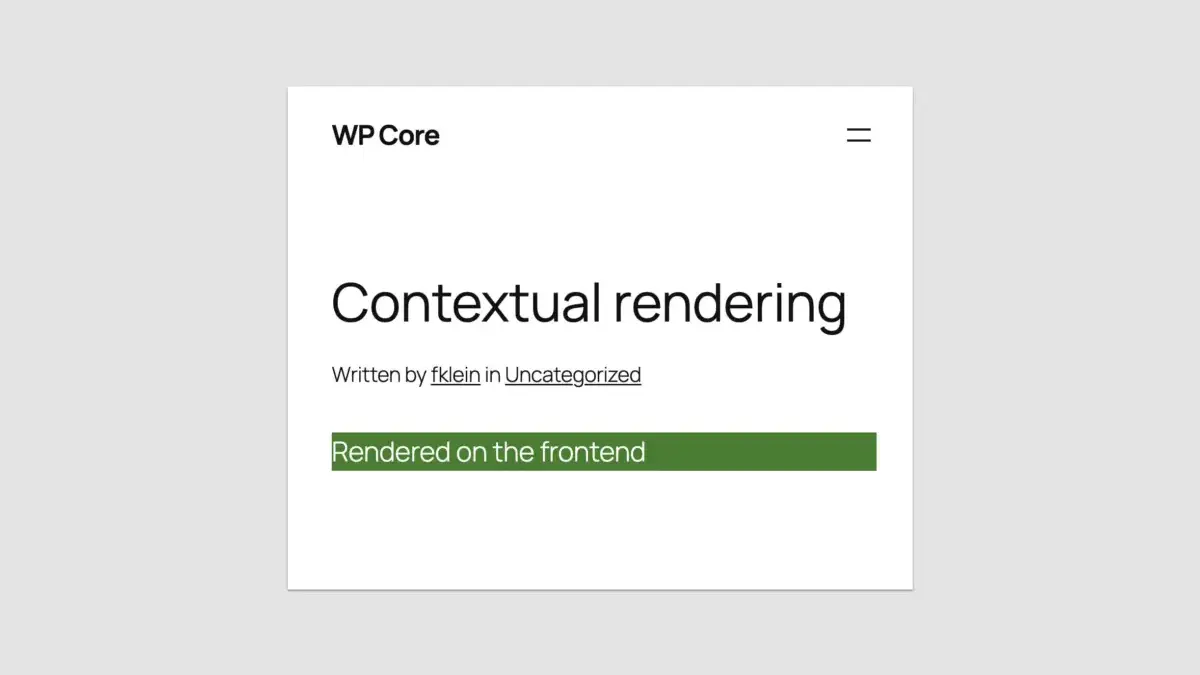
PHP-only registered blocks effectively dismantle these barriers. Developers can now take existing shortcodes, widgets, and custom template components and wrap them into server-side rendered blocks using their existing PHP skills. Although the resulting block previews in the editor may lack advanced interactivity or native editing capabilities, they render accurately on the front end of the website. For developers looking to transition legacy sites to block themes without dedicating days or weeks to rewriting custom features in JavaScript, this migration path cuts down implementation time significantly.

Practical implementation of the feature requires careful navigation of its boundaries. Developers managing context-sensitive output can utilize REST endpoint detection functions to distinguish between front-end rendering and editor previews, applying conditional styling or messaging where necessary. Similarly, handling stylesheets and front-end scripts remains straightforward, as WordPress allows developers to register and enqueue assets conditionally based on whether a specific block is present on the page.
Furthermore, PHP-only blocks can leverage the broader Block Supports API, allowing developers to opt into core features like color customization, alignment controls, or insertion limits via simple configuration flags. By hiding specific blocks from the inserter or restricting them to a single instance per post, developers can seamlessly integrate migrated legacy features into structured block themes without exposing them as general-purpose content blocks to everyday site editors.

Ultimately, the introduction of PHP-only block registration in WordPress 7.0 is not intended to replace JavaScript-powered blocks for building rich, highly interactive content editing experiences. For complex, native-feeling components that require real-time data binding and deep editor integration, JavaScript remains essential.
Instead, the feature serves as a pragmatic bridge. By lowering the technical threshold for migrating legacy code, WordPress has addressed one of the most persistent obstacles holding developers back from fully embracing modern block-based themes. For thousands of websites carrying years of accumulated PHP functionality, WordPress 7.0 provides a clear, accessible route into the future of the platform without requiring a complete rewrite of foundational code.


Leave a Reply